Actions
An action is what a decision turns into. Allow, reject, change an author's status or define your own, and act on the webhook each run sends.
An action is what a decision becomes: allow, reject, a change of an author's status, or an operation you define, such as asking a seller to edit a listing. A reviewer runs one from an item of the review queue. Your backend runs one through the API.
Infrared changes nothing in your product. Running an action applies its effect inside Infrared (the queue item, the author's status), writes a log entry and sends the action.executed webhook event. Your backend acts on that event.
Here a custom action, request_edits, runs on a listing that is waiting in the queue:
curl https://api.useinfrared.com/v1/actions/request_edits/execute \
  -H "Authorization: Bearer $INFRARED_KEY" \
  -H "Content-Type: application/json" \
  -d '{
    "moderation_id": "mod_6IYSa2qBKpMi4Xnxm1jkOB",
    "value": {
      "reason": "off_platform_link",
      "message": "Remove the link from the description."
    },
    "note": "Second listing from this seller with an outside link."
  }'
const response = await fetch("https://api.useinfrared.com/v1/actions/request_edits/execute", {
method: "POST",
headers: {
Authorization: `Bearer ${process.env.INFRARED_KEY}`,
"Content-Type": "application/json",
},
body: JSON.stringify({
moderation_id: "mod_6IYSa2qBKpMi4Xnxm1jkOB",
value: {
reason: "off_platform_link",
message: "Remove the link from the description.",
},
note: "Second listing from this seller with an outside link.",
}),
});
const log = await response.json();import os
import requests
response = requests.post(
"https://api.useinfrared.com/v1/actions/request_edits/execute",
headers={"Authorization": f"Bearer {os.environ['INFRARED_KEY']}"},
json={
"moderation_id": "mod_6IYSa2qBKpMi4Xnxm1jkOB",
"value": {
"reason": "off_platform_link",
"message": "Remove the link from the description.",
},
"note": "Second listing from this seller with an outside link.",
},
)
log = response.json(){
"object": "action_log",
"id": "al_2vl5zS0SnY5XqWDjRROnpk",
"action_id": "act_2BdP4rjezzQ5PTND66nyLi",
"action": "request_edits",
"target_type": "moderation",
"moderation_id": "mod_6IYSa2qBKpMi4Xnxm1jkOB",
"author_id": null,
"queue_item_id": "qi_0eietVVV87wOZub5qkiPfU",
"actor_user_id": null,
"source": "api",
"value": {
"reason": "off_platform_link",
"message": "Remove the link from the description."
},
"note": "Second listing from this seller with an outside link.",
"created_at": "2026-10-08T08:48:22.177Z"
}POST /v1/actions/request_edits/executeOr a reviewer picks Request edits on a queue item.Checks
Enabled, has its target, value allowed.Else 409
action_disabledor 422, and nothing below runs.Passed:OKBuilt-in effect
Only
block_author,suspend_authorandenable_authorhave one.Nothing to apply:None for a custom actionQueue behaviourResolve
Item
qi_0eietVVV87wOZub5qkiPfUbecomesresolved.resolution: "action:request_edits"queue_item.actionedLog entry
One entry a run.
al_2vl5zS0SnY5XqWDjRROnpksource: "api"Webhook
action.executedsent to your endpointYour backendAsks the seller to editlisting_20932.
Sample data
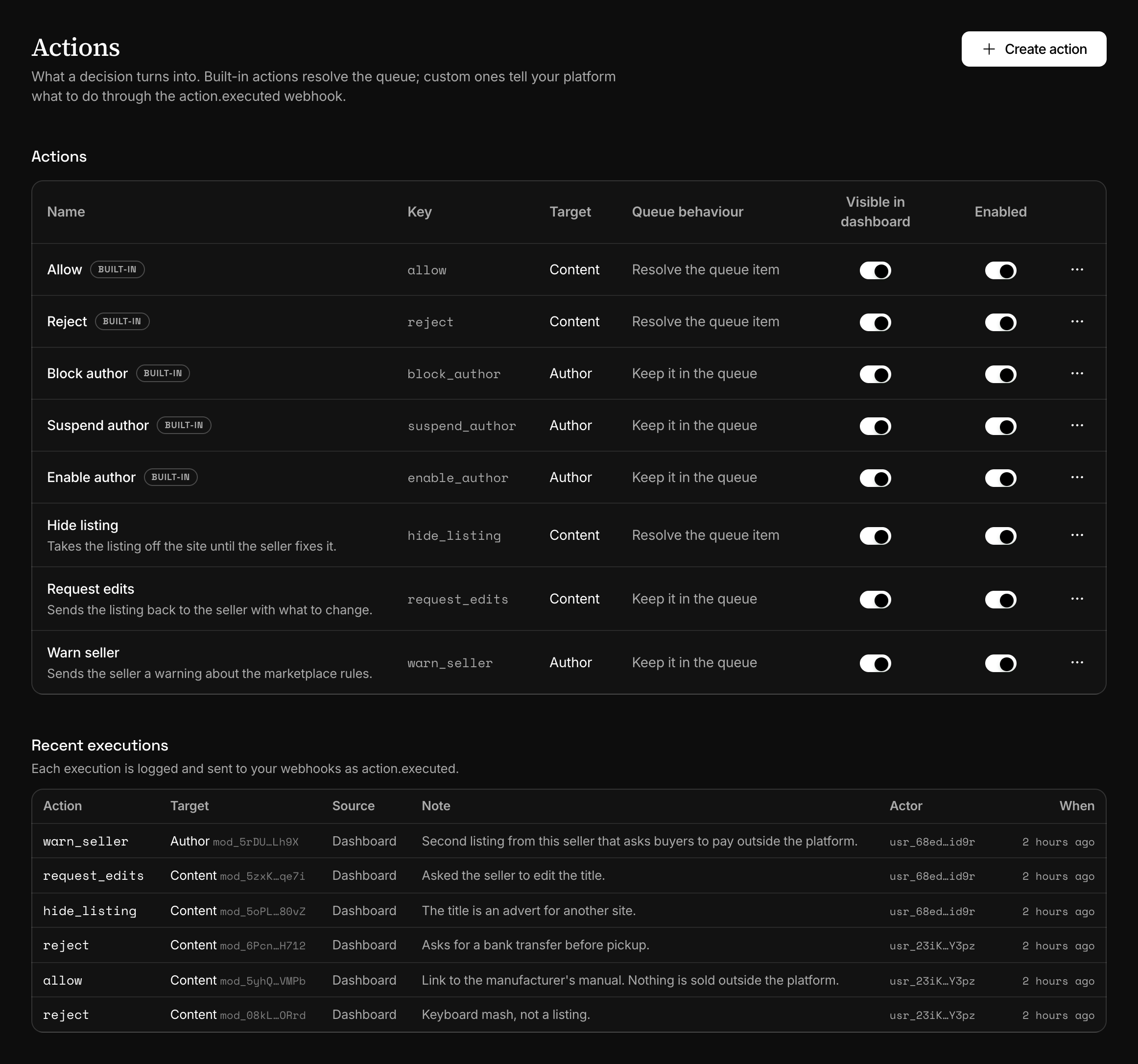
Built-in actions
Every project starts with five.
| Key | Runs on | Queue item | What Infrared does |
|---|---|---|---|
allow | Content | Resolved | Resolves the item as allowed. |
reject | Content | Resolved | Resolves the item as rejected. |
block_author | Author | Kept | Sets the author's status to blocked. |
suspend_author | Author | Kept | Sets the status to suspended. |
enable_author | Author | Kept | Sets the status back to enabled. |
block_author and suspend_author accept a value: a string is the reason, an object is { "reason": "...", "until": "2026-10-13T00:00:00Z" }. Only suspend_author reads until.
A built-in can be renamed, hidden from the dashboard or disabled, never deleted. Disabling allow or reject makes the Allow and Reject buttons of the queue, and resolution in the API, answer 409 action_disabled.
Custom actions
A custom action names something your product does: request edits, hide a listing, warn a seller. Create it in the dashboard under Actions, with Create action. The API runs actions and does not create or edit them.
| Setting | What it decides |
|---|---|
| Name | What reviewers see in the queue. |
| Key | How the API and the webhook name the action: lowercase letters, digits and underscores, 2 to 64 characters, starting with a letter. It cannot change later. |
| Target | Content runs on a moderation. Author runs on an author. |
| Queue behaviour | What happens to the moderation's queue item, below. |
| Visible in dashboard | Whether reviewers find it under More actions on a queue item. A hidden action still runs through the API. |
| Accepts a value | Whether a run may carry a value: a reason, a date, a message. |
| Queue behaviour | Effect on the item |
|---|---|
| Resolve the queue item | An open item becomes resolved, with action: and the key as its resolution. |
| Keep it in the queue | The item stays as it is. A note sent with the run is attached to it. |
| Reopen a resolved item | A resolved item becomes reopened. |
Infrared does not check a value: whatever JSON a run carries goes to the log and the webhook as it is. Validate it in your handler. The value_schema field of an action object is not used today.
Run an action
In the dashboard, actions run from a queue item: Allow and Reject are buttons, the rest are under More actions. The Actions page itself has no run button.
Through the API, name the action in the path and say what it runs on.
moderation_idstringThe moderation to act on. Required for an action whose target is content.
author_idstringThe author to act on, as your own id. Required for an action whose target is an author, unless
moderation_idnames a moderation that has one. An id Infrared has not seen creates the author.valueanyAllowed only when the action accepts a value.
notestringUp to 4,000 characters, kept with the log entry.
GET /v1/actions lists the project's enabled actions, hidden ones included.
| Status | Code | When |
|---|---|---|
| 404 | not_found | No action has that key, or the moderation is not in this project. |
| 409 | action_disabled | The action is disabled. |
| 422 | validation_error | A content action without moderation_id, an author action without an author, or a value sent to an action that takes none. |
Execute ignores the Idempotency-Key header, so a retried request runs the action again and sends the event again. Make your handler safe to run twice.
What your backend receives
The run above sent this event:
{
  "id": "evt_4m24Cq6qE5xjatO20hxDK6",
  "type": "action.executed",
  "created_at": "2026-10-08T08:48:22.365Z",
  "api_version": "2026-09-01",
  "data": {
    "value": {
      "reason": "off_platform_link",
      "message": "Remove the link from the description."
    },
    "action": {
      "id": "act_2BdP4rjezzQ5PTND66nyLi",
      "key": "request_edits",
      "name": "Request edits",
      "target": "content",
      "built_in": false,
      "accepts_value": true,
      "queue_behavior": "resolve"
    },
    "source": "api",
    "author_id": null,
    "content_id": "listing_20932",
    "executed_at": "2026-10-08T08:48:22.177Z",
    "moderation_id": "mod_6IYSa2qBKpMi4Xnxm1jkOB",
    "queue_item_id": "qi_0eietVVV87wOZub5qkiPfU"
  }
}
data.action is the whole action object, shortened here, and content_id is the id you sent with the moderation. source is api or dashboard.
author_id is Infrared's id of the author, starting with aut_, not the id you use. The API looks authors up by your id only, so keep both ids from the moderation response, or send yours in value.
Other events can come first. An action that resolves a queue item sends queue_item.allowed, queue_item.rejected or queue_item.actioned before it: this run sent queue_item.actioned, with the resolution action:request_edits. A built-in author action sends author.blocked, author.suspended or author.enabled before it.
A status change made on an author's page or with the author endpoints is not an action. It sends its author.* event only, so follow status through those events, not through action.executed.
The action log
Every run adds one entry, and entries never change. Recent executions on the Actions page lists them with the action, the target, the source, the note and who ran it. An author's page lists the runs on that author.
The API returns the entry as the answer to execute and has no endpoint that lists the log. GET /v1/webhooks/events?type=action.executed lists the same runs as events for 30 days, whether or not a webhook endpoint exists.
Who can do what
In the dashboard, creating, editing, disabling and deleting an action needs the Developer role or one above it. Any member can run an action from a queue item. An API key needs the read scope to list actions and the write scope to execute one.
Next
- Review queueContent your rules send to review waits in the queue until a person, or your own code, allows it, rejects it or runs another action on it.
- Event typesThe twelve events Infrared sends, when each one fires and what its data holds, with a real payload for moderations, queue items, authors and actions.
- Authors and trustInfrared keeps a status, a trust level and a history for each of your users, and content rules read them. Block, suspend or trust an author.
- Verify signaturesEvery delivery is signed with the endpoint's secret. Check the signature and its timestamp before you trust the body, with code you can copy.
Something missing or unclear on this page? Write to support@useinfrared.com.