Verify signatures
Every delivery is signed with the endpoint's secret. Check the signature and its timestamp before you trust the body, with code you can copy.
Your endpoint has a public address, so anyone who learns it can post to it. Every delivery therefore carries a signature made with the endpoint's signing secret, which only you and Infrared hold.
Verify it on every request, before you read the body. A delivery that passes came from Infrared, was not changed on the way and was sent within the last five minutes.
POST /webhooks/infrared HTTP/1.1Host: hooks.example.comContent-Type: application/jsonUser-Agent: Infrared-Webhooks/1.0Infrared-Signature: t=1791450000,v1=c3b75e43e6b7544517ebc76e5469c140144e6de915abf13e6496525d3112975fInfrared-Event: queue_item.rejectedInfrared-Delivery: whd_2KDTyulQT1D2GOekNPXjPrInfrared-Api-Version: 2026-09-01 {"id":"evt_1o0oZO1NFcij58RkwoB2hK","type":"queue_item.rejected","created_at":"2026-10-08T09:00:00.000Z","api_version":"2026-09-01","data":{"moderation_id":"mod_3McWZ0Cmeone5i4ZG8eFCN"}}The body above is cut short so that it fits on a line. The signature is the real one for these bytes: check your code against it.
- The timestamp
1791450000t, when it was sent - then
- A dot
. - then
- The raw body
{"id":"evt_1o0oZO1NFcij58RkwoB2hK",Byte for byte"type":"queue_item.rejected",…}
v1, 64 hex characters.whsec_Zk3p…tK6qThe endpoint's signing secret, prefix includedInfrared-Signature: t=1791450000,v1=c3b75e43…3112975fYour endpoint computes the same value, compares in constant time and refuses a t more than 5 minutes from its clock.Sample data
How the signature is made
The header is Infrared-Signature: t=1791450000,v1=c3b7…, two values separated by a comma.
tis the time the request was sent, in seconds since the Unix epoch.v1is an HMAC-SHA256, written as 64 lowercase hex characters. The message ist, a dot and the raw body. The key is the signing secret.
The secret is used exactly as it was shown to you, with its whsec_ prefix. Do not decode it.
Each attempt is signed when it is sent. A retry an hour later carries a new t and a new v1, so it passes the five-minute check like the first attempt did.
Verify a delivery
- Read the raw body, the bytes as they arrived. JSON that was parsed and written out again has other spacing and another key order, and its signature no longer matches.
- Take
tandv1from the header. - Refuse the request when
tis more than 300 seconds from your clock, in either direction. - Compute the HMAC of
t, a dot and the raw body with the endpoint's secret. - Compare it with
v1in constant time. Compare the lengths first: most constant-time functions fail on values of different length. - Parse the JSON only now.
// infrared-webhooks.js
import crypto from "node:crypto";

export class SignatureError extends Error {}

// rawBody: the request body as received, a Buffer or a string, before any JSON parsing
// header:  the value of the Infrared-Signature header
// secret:  the endpoint's signing secret, or an array of two while you replace an endpoint
export function constructEvent(rawBody, header, secret, toleranceSeconds = 300) {
  const parts = {};
  for (const item of String(header ?? "").split(",")) {
    const at = item.indexOf("=");
    if (at > 0) parts[item.slice(0, at).trim()] = item.slice(at + 1).trim();
  }
  if (!/^[0-9]{1,15}$/.test(parts.t ?? "") || !parts.v1) throw new SignatureError("malformed signature header");

  const age = Math.abs(Math.floor(Date.now() / 1000) - Number(parts.t));
  if (age > toleranceSeconds) throw new SignatureError("timestamp outside the tolerance");

  const body = Buffer.isBuffer(rawBody) ? rawBody : Buffer.from(String(rawBody), "utf8");
  const received = Buffer.from(parts.v1, "utf8");
  let valid = false;
  for (const candidate of [secret].flat()) {
    const expected = Buffer.from(crypto.createHmac("sha256", candidate).update(`${parts.t}.`).update(body).digest("hex"), "utf8");
    // timingSafeEqual throws when the lengths differ, so compare them first.
    if (received.length === expected.length && crypto.timingSafeEqual(received, expected)) valid = true;
  }
  if (!valid) throw new SignatureError("signature mismatch");

  return JSON.parse(body.toString("utf8"));
}
# infrared_webhooks.py
import hashlib
import hmac
import json
import re
import time
class SignatureError(Exception):
pass
def construct_event(raw_body, header, secret, tolerance_seconds=300):
"""raw_body: the request body as received, in bytes, before any JSON parsing.
header: the value of the Infrared-Signature header.
secret: the endpoint's signing secret, or a list of two while you replace an endpoint.
"""
if isinstance(raw_body, str):
raw_body = raw_body.encode("utf-8")
parts = {}
for item in (header or "").split(","):
name, found, value = item.partition("=")
if found:
parts[name.strip()] = value.strip()
timestamp, received = parts.get("t", ""), parts.get("v1", "")
if not re.fullmatch(r"[0-9]{1,15}", timestamp) or not received:
raise SignatureError("malformed signature header")
if abs(int(time.time()) - int(timestamp)) > tolerance_seconds:
raise SignatureError("timestamp outside the tolerance")
message = timestamp.encode("ascii") + b"." + raw_body
valid = False
for candidate in [secret] if isinstance(secret, str) else secret:
expected = hmac.new(candidate.encode("utf-8"), message, hashlib.sha256).hexdigest()
# compare_digest runs in constant time. Bytes on both sides, so an odd header cannot raise.
if hmac.compare_digest(expected.encode("ascii"), received.encode("utf-8")):
valid = True
if not valid:
raise SignatureError("signature mismatch")
return json.loads(raw_body)Both functions return the parsed event, or raise when the delivery should be refused. The receiver on the Webhooks page shows them inside a handler.
The dashboard prints the scheme on every endpoint, under Signature, with the API version its payloads follow.
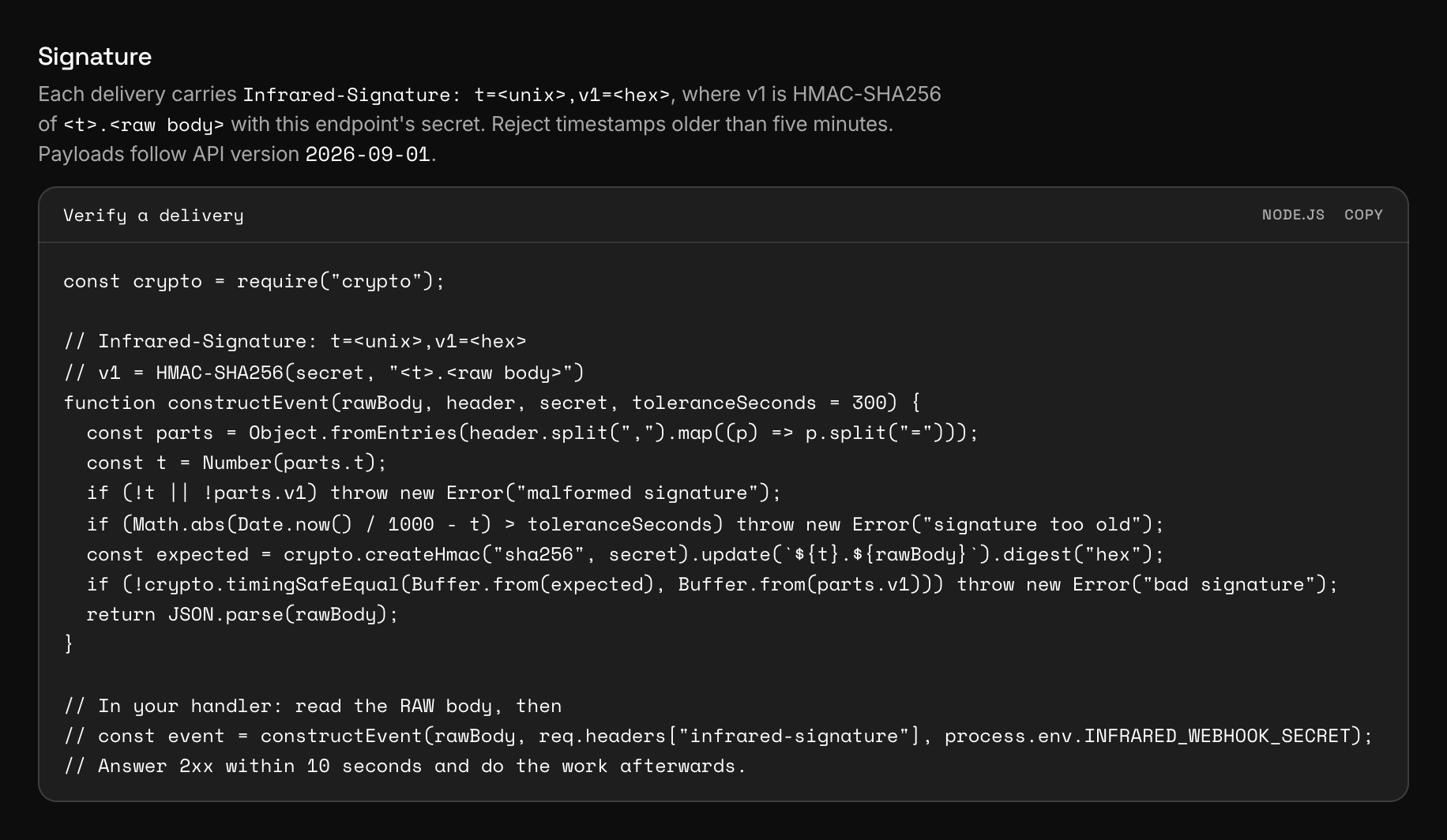
The snippet printed there is a shorter form of the function above. A missing header or a v1 of the wrong length makes it throw a TypeError or a RangeError, so treat every error it throws as a refusal.
The headers of a delivery
| Header | Value |
|---|---|
Infrared-Signature | t and v1, as above. |
Infrared-Event | The event type, for example queue_item.rejected. |
Infrared-Delivery | The id of the delivery, starting with whd_. It is the same on every automatic retry of that delivery. |
Infrared-Api-Version | The version the payload follows: 2026-09-01. |
Content-Type | application/json. The body is compact JSON in UTF-8. |
User-Agent | Infrared-Webhooks/1.0 |
Only t and the body are signed. Take the event's type and id from the body you verified, not from the headers.
Check your code against a known delivery
Sign these values in your own language and compare. The body is the one of the delivery at the top of the page: a single line of 185 bytes, with no line break after the final brace.
{"id":"evt_1o0oZO1NFcij58RkwoB2hK","type":"queue_item.rejected","created_at":"2026-10-08T09:00:00.000Z","api_version":"2026-09-01","data":{"moderation_id":"mod_3McWZ0Cmeone5i4ZG8eFCN"}}- Secret:
whsec_Zk3pQ8vT1mX6cR9bW2nH5yJ7dL0sF4gA8uE3tK6q t:1791450000- Expected
v1:c3b75e43e6b7544517ebc76e5469c140144e6de915abf13e6496525d3112975f
The timestamp is in the past, so pass a tolerance that lets it through while you test: Infinity in Node.js, float("inf") in Python. The secret was made up for this page and belongs to no endpoint.
Rotate the secret
Rotate the secret with a request, or with Rotate secret in the endpoint's menu. Either way the secret is replaced and the new one is shown once.
curl -X POST https://api.useinfrared.com/v1/webhooks/whe_0dFoExHEccOjnJ7ZHHwXsq/rotate_secret \
  -H "Authorization: Bearer $INFRARED_KEY"
const response = await fetch("https://api.useinfrared.com/v1/webhooks/whe_0dFoExHEccOjnJ7ZHHwXsq/rotate_secret", {
method: "POST",
headers: { Authorization: `Bearer ${process.env.INFRARED_KEY}` },
});
const endpoint = await response.json();import os
import requests
response = requests.post(
"https://api.useinfrared.com/v1/webhooks/whe_0dFoExHEccOjnJ7ZHHwXsq/rotate_secret",
headers={"Authorization": f"Bearer {os.environ['INFRARED_KEY']}"},
)
endpoint = response.json()The old secret stops at that moment. Infrared never signs with two secrets, so there is no window in which both verify. Every attempt sent after the rotation is signed with the new secret, including retries of deliveries that were created before it.
Deliveries that reach your receiver before it has the new secret fail your check. Deploy the new secret right away, then replay the deliveries that failed in between.
To change secrets without that gap, replace the endpoint instead of rotating it:
- Add a second endpoint with the same URL. It gets its own secret, and both endpoints now deliver every event.
- Pass both secrets to the verifier, as a list. Your handler already ignores an event id it has seen.
- Delete the old endpoint and drop its secret.
This needs a free endpoint on your plan.
When verification fails
- A body parser ran first. A JSON middleware mounted before your route replaces the bytes with an object. Read the raw body on this route.
- The clock is off. A server more than five minutes from the real time refuses every delivery.
- The secret belongs to another endpoint. Each endpoint has its own.
- The secret was rotated, and the receiver still holds the old one.
Whatever the cause, think about what your endpoint answers. A 4xx other than 408 and 429 ends the delivery at once, with no retry. A 5xx is retried on the usual schedule. Deliveries, retries and replay has both paths.
Next
- Deliveries, retries and replayA delivery is one event sent to one endpoint. What counts as delivered, how a failure is retried for about an hour, and how to send a delivery again.
- Event typesThe twelve events Infrared sends, when each one fires and what its data holds, with a real payload for moderations, queue items, authors and actions.
- WebhooksInfrared posts a signed event to your endpoint when a moderation finishes, a queue item is decided or an author changes. Add an endpoint and receive it.
Something missing or unclear on this page? Write to support@useinfrared.com.