Templates
A template is the configuration for one kind of content. It holds the fields, the policies and the rules, and requests name it by its slug.
A listing, a review and a chat message are not judged alike. A phone number is expected in one and a violation in another, and only a listing has a price to check against its description. A template holds those choices for one kind of content, and each request names the template it is judged by: "template": "listing".
You create and edit templates in the dashboard, under Templates. The API reads them and tests them. No endpoint creates or changes one.
Read a template to see what its requests are held to.
curl https://api.useinfrared.com/v1/templates/listing \
  -H "Authorization: Bearer $INFRARED_KEY"
const response = await fetch("https://api.useinfrared.com/v1/templates/listing", {
headers: { Authorization: `Bearer ${process.env.INFRARED_KEY}` },
});
const template = await response.json();import os
import requests
response = requests.get(
"https://api.useinfrared.com/v1/templates/listing",
headers={"Authorization": f"Bearer {os.environ['INFRARED_KEY']}"},
)
template = response.json(){
"object": "template",
"id": "tpl_64mYq4nD3NXNfu0gcdaMZa",
"slug": "listing",
"name": "Listing",
"description": null,
"status": "active",
"built_in": false,
"version": 2,
"context": "A public listing on a marketplace: an item, a service, a property or a vehicle for sale or rent, with a price and photos of what is offered. Buyers contact the seller through the platform.",
"fields": [
{
"key": "title",
"name": "Title",
"type": "text",
"required": true,
"triggers": [
{ "effect": "flag", "policy": "hate_speech" },
{ "effect": "flag", "policy": "links_contact" }
],
"validation": { "max_length": 120, "min_length": 5 },
"description": "Short headline naming what is offered."
} // description, price and photos follow
],
"policies": [
{ "key": "toxicity", "mode": "trigger" },
{ "key": "links_contact", "mode": "trigger", "options": { "off_platform_phrases": true } },
{ "key": "gibberish", "mode": "trigger", "effect": "review" },
{ "key": "made_with_ai", "mode": "trigger", "effect": "review", "threshold": 0.9 },
{ "key": "guideline/no-off-site-deals", "mode": "trigger" } // 14 more
],
"triggers": [
{ "effect": "flag", "policy": "hate_speech" },
{ "effect": "review", "policy": "duplicate" } // 5 more
],
"rules": [
{
"id": "r6",
"name": "Links from new accounts",
"action": "review",
"enabled": true,
"conditions": [
{ "op": "at_most", "type": "author_trust", "value": "new" },
{ "type": "policy_flagged", "value": true, "policy": "links_contact" }
]
} // r1 to r5 come first
],
"severity": { "reject": 0.8, "review": 0.4 },
"ai_instructions": "Check that the title, description, price and photos describe the same offer, ...", // trimmed
"settings": {},
"created_at": "2026-10-08T08:44:31.624Z",
"updated_at": "2026-10-08T09:28:01.454Z"
}The response is the published version of the template. Each part of it is a tab of the editor in the dashboard.
Listinglistingv2The published version
Fieldschecked first, with no model
titleText, required5 to 120 charactersTriggers:hate_speechlinks_contactdescriptionText, requiredup to 5,000 charactersTriggers:profanitytoxicitypriceNumber, optionalat least 0validated onlyphotosImage, optionalup to 10 filesTrigger:made_with_aiat 0.90, review
Policiesscore the content19 on
toxicityTrigger0.70flaglinks_contactTriggerany matchflaggibberishTrigger0.70reviewmade_with_aiTrigger0.90reviewguideline/no-off-site-dealsTrigger0.70flag- 14 more
AI instructionsjudged once, across all fields
Check that the title, description, price and photos describe the same offer …
instructionsflags from 0.70
Content rulesthe first match decides
- Block banned authorsReject
- Zero tolerance for hateReject
- Illicit goodsReject
- No sexual contentReject
- Allow established authorsAllow
- Links from new accountsReview
Severity triagewhen no rule matches
0.400.80AllowReviewRejectSample data
What a template holds
| In the response | Tab in the editor | What it sets |
|---|---|---|
fields | Fields | The parts of a submission, each with a type, a rule, validation and its own triggers. See Fields and validation. |
policies | Policies | Which policies score the content, and each one's mode, threshold, effect, weight and options. |
triggers | Policies | What a score sets off for the whole template. See Triggers. |
rules, severity | Rules | Content rules, where the first match decides, and the two thresholds of severity triage. |
context, ai_instructions | Instructions | What this content is, and plain-language AI instructions judged across all fields. |
settings | Instructions | The run settings: a review deadline, a language hint, storage and cache. |
version | History | The number of the published version. See Versions, testing and diff. |
The Test tab holds no configuration. It runs a sample through the template and shows the verdict and the JSON your integration would receive.
Create a template
Name it
Open Templates and choose New. Give the template the name of the content it moderates: Listings, Reviews, Messages. The slug your requests use is generated from that name.
Pick a starting point
Under Start from, choose one of the eight presets or Blank template. A preset fills in fields, policies, triggers and rules for that kind of content. Listing is selected until you choose another. Then choose Create template.
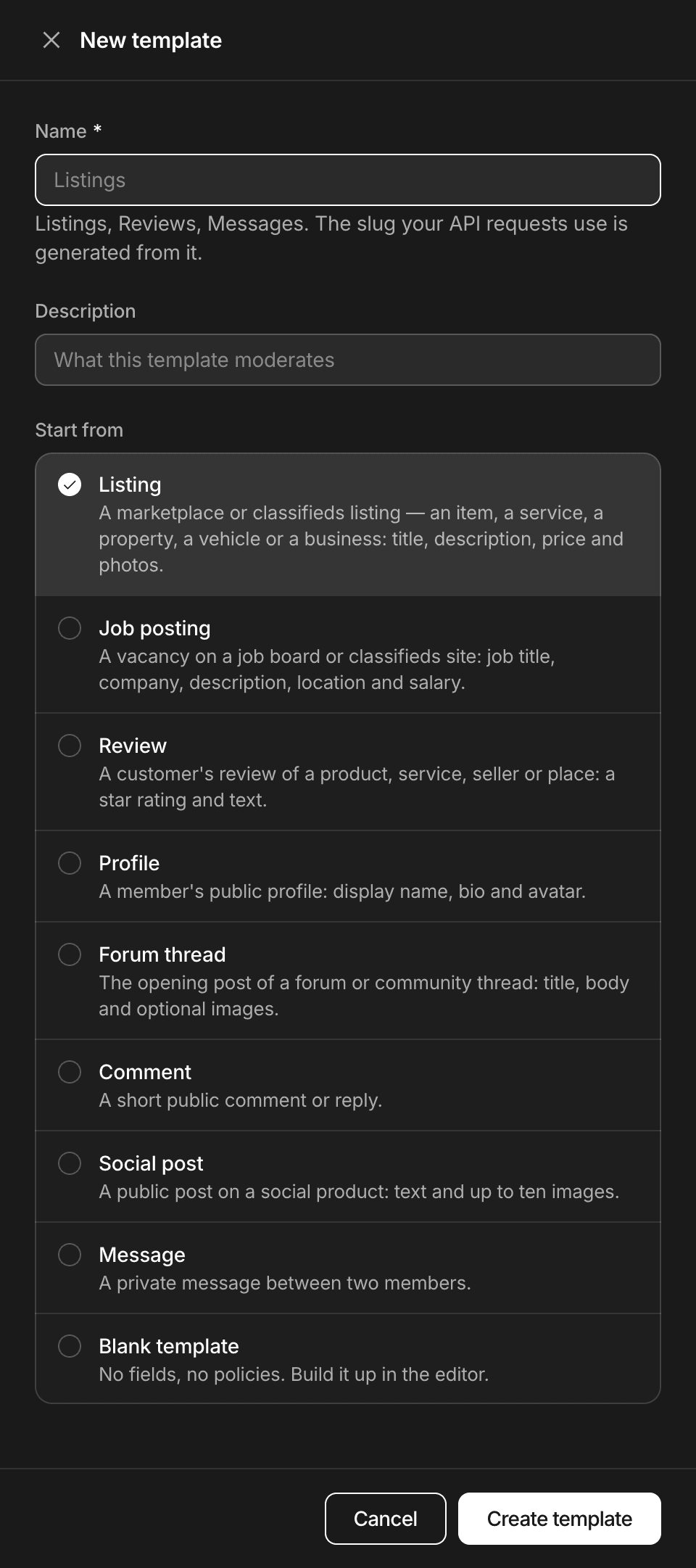
Dashboard, TemplatesA new template starts from a preset or from nothing. Shape it, test it, publish it
The editor opens on a draft, and nothing runs yet: a request that names the template answers 409
template_not_published. Adjust the tabs, try a sample in Test, then choose Publish version. From then on every edit goes to a new draft and waits for the next publication, as Versions, testing and diff describes.
The slug
- It is generated from the name when the template is created: lowercase letters, digits and hyphens, 2 to 80 characters. "Job postings" becomes
job-postings. - It is unique in the project. A slug that is taken gets a number:
listing-2. An archived template keeps its slug, andbasicbelongs to the basic check. - It never changes. Rename, in the More menu beside the editor's buttons, changes the name and the description only, so requests keep working.
- You cannot type or edit a slug. Create the template under the name that gives the slug you want, then rename it.
Draft, active, archived
| Status | Means | A request that names it |
|---|---|---|
| Draft | Created, never published. | Answers 409 template_not_published. |
| Active | Has a published version. | Runs the published version. |
| Archived | Taken out of use. Nothing is deleted. | Answers 404 template_not_found. |
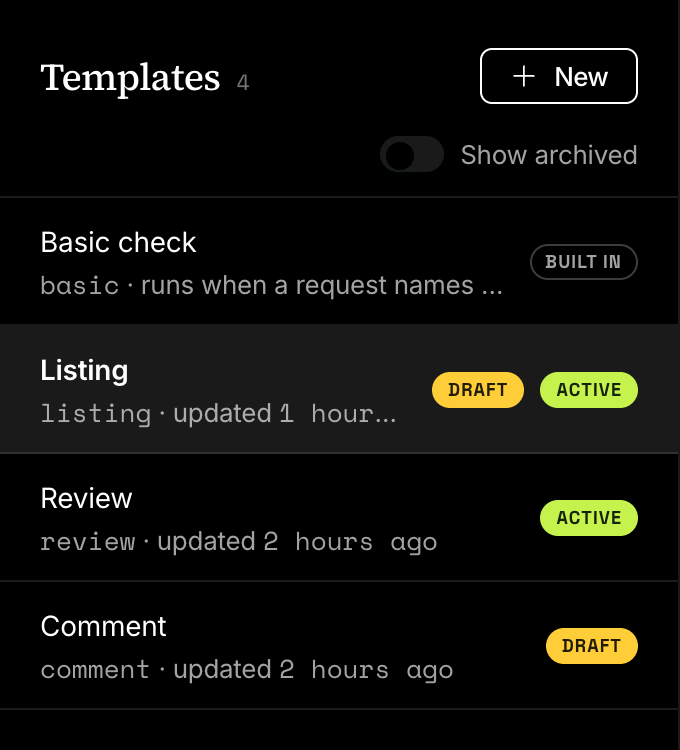
Editing an active template does not change its status. The edits wait in a draft, marked with a second Draft badge in the list, and requests keep running the published version.
A template cannot be deleted. Archive template, in the More menu, takes it out of use and keeps every version. Switch on Show archived above the list to see it again, and choose Restore template to put it back to work.
Which template a request runs
- The template the request names.
- With no
template, the project's default template. - With no default, the basic check.
The default is set in Settings, Project, under Default template. The list there also offers templates that were never published: with one of those as the default, every request that names no template answers 409 template_not_published. A default that is archived later is skipped without an error, and those requests run the basic check.
A named template is never swapped for another one. When it cannot run, the request fails.
| Status | code | When |
|---|---|---|
| 404 | template_not_found | No template of the project has this slug, or it is archived. |
| 409 | template_not_published | The template exists and has no published version. |
| 403 | plan_limit | The plan does not include templates. Every name except basic answers this, whether or not the template exists. |
A request that names listings in a project whose template is listing:
{
  "error": {
    "code": "template_not_found",
    "message": "Template listings not found",
    "details": [],
    "request_id": "req_cc04a628577f4e5a92c4f8b683c73b6b"
  }
}
Every moderation says which template and version judged it, in template: { "slug": "listing", "version": 2 }.
Templates over the API
| Endpoint | Key scope | Returns |
|---|---|---|
GET /v1/templates | read | Every template of the project: the basic check first, then yours from oldest to newest. |
GET /v1/templates/{slug} | read | One template with its published configuration. |
POST /v1/templates/{slug}/test | moderate | The moderation of a sample, with nothing stored or charged. |
Three things to know when you read templates:
- The list is not paginated.
limitandcursorare accepted, and every template still comes back in one response. Archived templates are left out unless you ask withstatus=archived. GET /v1/templates/{slug}returns an archived template too, with"status": "archived".- A template that was never published comes back with
"version": nulland none of the configuration keys. The API never returns a draft.
Plans and roles
| Limit | Free | Starter | Growth | Business |
|---|---|---|---|---|
| Templates, per project | Not included | 5 | 20 | 100 |
The limit counts the templates of one project that are not archived. The basic check is not counted.
Owners, Admins, Project admins and Developers can create, edit, publish and archive templates. A Moderator can open them and sees Read only. Choosing the default template takes an Owner, an Admin or a Project admin. Members and roles has the full table.
Next
- Fields and validationA template's fields say what a submission must contain. Validation runs first, costs nothing and answers with one error per problem, named by field.
- TriggersA trigger says what a policy's score sets off, a flag or a review, for the whole template or for one field. One of your own replaces the default.
- PresetsEight starting points for a template, one per broad kind of content. Each fills in fields, policies, triggers and rules that you then make your own.
- Versions, testing and diffEdits go to a draft, a test runs it and keeps nothing, and publishing makes it the version every request runs. Earlier versions stay comparable.
Something missing or unclear on this page? Write to support@useinfrared.com.