Triggers
A trigger says what a policy's score sets off, a flag or a review, for the whole template or for one field. One of your own replaces the default.
Every policy a template enables returns a score from 0 to 1. A trigger says what that score sets off once it reaches a threshold: mark the content FLAGGED, or ask for a person to look at it. You set triggers per policy, for the whole template or for one field, so the same words can flag in a description and not in a title.
The listing template below has one trigger for profanity: on the description field, with the flag effect. Test a sentence against that field.
curl https://api.useinfrared.com/v1/templates/listing/test \
  -H "Authorization: Bearer $INFRARED_KEY" \
  -H "Content-Type: application/json" \
  -d '{
    "type": "text",
    "field": "description",
    "input": "Honest sale, no bullshit: the frame is solid and it rides great."
  }'
const response = await fetch("https://api.useinfrared.com/v1/templates/listing/test", {
method: "POST",
headers: {
Authorization: `Bearer ${process.env.INFRARED_KEY}`,
"Content-Type": "application/json",
},
body: JSON.stringify({
type: "text",
field: "description",
input: "Honest sale, no bullshit: the frame is solid and it rides great.",
}),
});
const moderation = await response.json();import os
import requests
response = requests.post(
"https://api.useinfrared.com/v1/templates/listing/test",
headers={"Authorization": f"Bearer {os.environ['INFRARED_KEY']}"},
json={
"type": "text",
"field": "description",
"input": "Honest sale, no bullshit: the frame is solid and it rides great.",
},
)
moderation = response.json(){
"object": "moderation",
"id": null,
"template": { "slug": "listing", "version": 1 },
"type": "text",
"field": "description",
"status": "completed",
"flagged": true,
"recommendation": "review",
"severity": "medium",
"policies": {
"profanity": 0.83,
"toxicity": 0 // the other policies of the template are trimmed
},
"triggered": ["profanity"],
"rule": null,
"reasons": ["trigger:profanity@description:flag", "triage:review"],
"test": true
}The same sentence, sent three ways, scores 0.83 for profanity each time. Only what the score sets off differs.
| Sent as | flagged | recommendation | reasons |
|---|---|---|---|
"field": "description" | true | review | trigger:profanity@description:flag, triage:review |
"field": "title" | false | review | triage:review |
No field | true | review | trigger:profanity:flag, triage:review |
In title the policy has no trigger, so nothing flags. The score still counts for severity, which is why the text goes to review all the same. Without field the text could be any field, so the trigger of description applies to it.
policiestriggeredflagged to trueOne policy, two triggerstoxicity
In the listing template it has a trigger for the whole template and one for description. Both flag from 0.70.
toxicity scores 0.94triggersCompares the highest score across the submission.fields[].triggersCompares the score in description.descriptiontrigger:toxicity:flagtrigger:toxicity@titletrigger:toxicity:flagA policy with only a field trigger fires in that field and nowhere else.
Mode and effect
Two settings of a policy decide whether it can set anything off. Both are on the policy's row in the Policies tab, and Policy options and instructions covers them with the other settings.
| Mode | Effect | When the score reaches the threshold |
|---|---|---|
| Trigger | Flag | flagged becomes true: the content is FLAGGED. |
| Trigger | Review | flagged is left alone. If severity triage would allow the content, the recommendation becomes review. |
| Observe | none | Nothing. The policy is scored and returned under policies, fires no trigger and does not count for severity. |
A trigger that fires adds its policy to triggered, whatever its effect. A review effect never overrides a content rule and never softens a reject.
Observe keeps a policy out of triggers and severity, not out of your content rules: a rule can still test the score of a policy you only observe.
A trigger of your own
A trigger names a policy and an effect, and may carry its own threshold. This is how GET /v1/templates/{slug} returns one:
{ "effect": "review", "policy": "made_with_ai", "threshold": 0.9 }policyis a policy the template enables, a guideline or a wordlist included.effectisflagorreview.thresholdis optional. Without it the trigger uses the policy's threshold in this template, and without that the catalog's: 0.70 for most policies. The trigger fires when the score is at or above it.
Policies that match a pattern have no use for a threshold. links_contact, personal_data, lookalike_characters, duplicate and every wordlist fire on any match and never without one. The editor shows a Threshold input for them all the same, and it changes nothing.
For the template or for one field
| Template-level | Field-level | |
|---|---|---|
| In the response | triggers | fields[].triggers |
| Compares | The policy's highest score across the whole submission. | The policy's score on that field. |
In reasons | trigger:toxicity:flag | trigger:toxicity@description:flag |
A policy can have both, and field triggers on several fields. Each one is checked on its own, so both can appear in reasons for one submission.
In a whole form, the result of each field under fields is decided with that field's triggers and the template-level ones.
The default trigger and what replaces it
A policy in Trigger mode that has no trigger of its own anywhere gets one for the whole template, from its own Effect and Threshold. That is why turning a policy on is enough for it to flag. The AI instructions get the same default: they flag from 0.70.
A trigger that names a policy in Observe mode is accepted and never fires.
An object sent without a field
A single object that does not say which field it is could be any of them. Every field trigger of the template then applies to it as if it were template-level: the last row of the table at the top. When a policy has a template trigger at 0.70 and a field trigger at 0.80, such an object is held to both, so 0.70 decides.
Name the field and the object is held to that field's triggers and the template-level ones only. Moderate text shows what else naming the field changes.
Flagged and recommendation are separate answers
Triggers with the flag effect set flagged, and nothing else does. The recommendation comes from your content rules and, when none matches, from severity triage, which reads every score whether or not a trigger fired. So content can be SAFE and sent to review, or FLAGGED and allowed.
Each row below is the listing template of the example, with one score in the description field unless the row says otherwise.
| What happened | flagged | recommendation | reasons |
|---|---|---|---|
| No score reaches a threshold | false | allow | triage:allow |
toxicity 0.55, under its trigger | false | review | triage:review |
profanity 0.83 in title, where it has no trigger | false | review | triage:review |
profanity 0.83 in description | true | review | trigger:profanity@description:flag, triage:review |
toxicity 0.94 | true | reject | trigger:toxicity:flag, trigger:toxicity@description:flag, triage:reject |
gibberish 0.75, a review effect on a policy with a low weight | false | review | trigger:gibberish:review, triage:allow, review_trigger |
toxicity 0.75 from an author at trust level regular | true | allow | trigger:toxicity:flag, trigger:toxicity@description:flag, rule:r5 |
In the last row a content rule of the template, Allow established authors, decided before triage. The flag stays: a rule changes the recommendation, not the verdict. How a decision is made follows the whole order.
Set triggers in the editor
Open a template in Templates. Triggers are set in two tabs.
Policies, for the whole template. Open a policy's row. Under its settings a small switch reads "Fires on the whole submission (implicit) unless a field trigger names it". Switch it on to give the policy a template-level trigger. The switch then reads "Fires on the whole submission with its own threshold and effect", with both to set beside it.
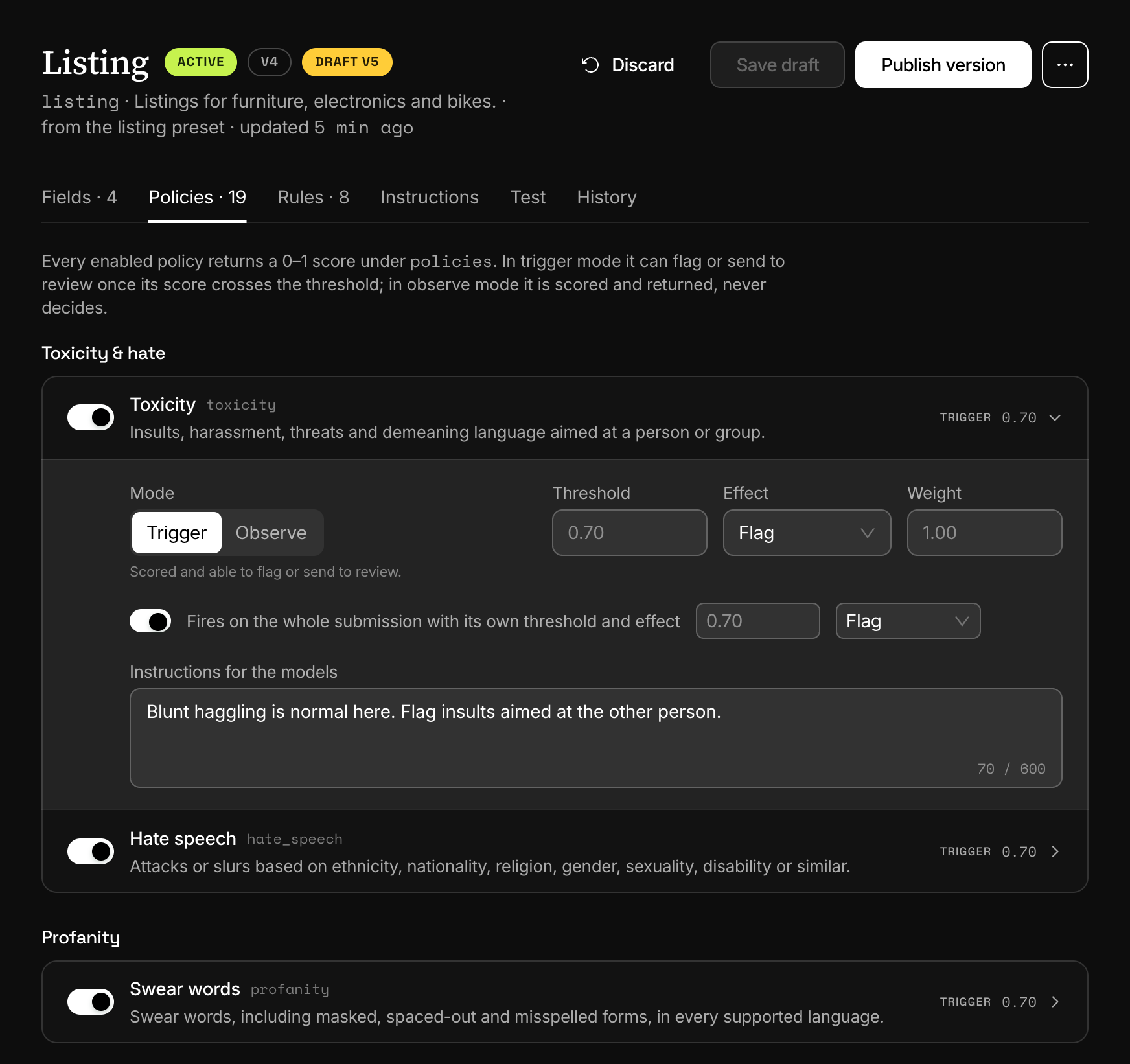
The switch is not offered for guidelines and wordlists. Once one of them has a field trigger, it fires through field triggers only.
Fields, for one field. The Triggers column shows one badge per field trigger, and a text or image field with none reads "Template triggers". In the field's form, Add trigger adds a row: a policy, a threshold (leave it empty for the default) and an effect, Flag or Review.
A field trigger on the AI instructions or on a guideline fires only when the finding names that field, which is not always the case. Leave those two without field triggers.
Changes apply once you choose Save draft and then Publish version. The Test tab runs a sample against the draft first: see Versions, testing and diff.
Next
- How a decision is madeTriggers set the verdict, severity ranks the content, your content rules decide first and triage decides the rest. reasons records the path taken.
- Content rulesOrdered rules on a template turn scores, author trust and field values into allow, review or reject. Severity triage decides when no rule matches.
- Policy options and instructionsDecide how each policy behaves on a template: mode, threshold, effect and weight, guidance for the models, and the options four policies take.
- Versions, testing and diffEdits go to a draft, a test runs it and keeps nothing, and publishing makes it the version every request runs. Earlier versions stay comparable.
Something missing or unclear on this page? Write to support@useinfrared.com.