Organisations and projects
An organisation holds the plan and the people. A project holds what a request touches: templates, keys, the review queue and its own settings.
Everything you configure in Infrared lives in a project, and every project belongs to an organisation. Use more than one project when kinds of content need different rules, keys or reviewers: listings in one, messages in another, reviews in a third.
An API key belongs to one project, so the key you send decides where a request lands. No request names a project.
- Plan and subscription
- Monthly checks and extra checks
- Owners and Admins
- Invitations
- Audit log
monthly_checksprojectsmembers
- ListingsProjectCounted here
templatesguidelineswordlistsapi_keyswebhooks
- The key belongs to Listings
POST /v1/ moderations Authorization: Bearer ir_live_ … Your backend - MessagesProject
- ReviewsProject
A request names no project. The key decides.
Sample data
What belongs to which
| The organisation holds | Each project holds |
|---|---|
| The plan and the subscription | Templates, with the built-in basic check |
| The monthly checks and the extra checks, shared by all its projects | Guidelines and wordlists |
| Its Owners and Admins | API keys |
| Invitations | Webhook endpoints and their deliveries |
| The audit log | The review queue, authors and actions |
| Moderations, stored media and usage by day | |
| Its own settings |
The policy catalog is the same in every project. Limits follow the same split: Plans and limits says which are counted per organisation and which per project.
What you start with
Signing up creates an organisation and one project called "Default", and makes you the organisation's Owner. The project already holds the built-in basic check, which runs when a request names no template, and five built-in actions: allow, reject, block author, suspend author and enable author.
If you signed up from an invitation, you join the organisation that invited you and none is created for you.
Create a project
Open the project switcher at the top of the rail and choose Create project, or use the same button in Settings, Organisation. Give the project a name. Its slug is generated from the name and cannot be changed later. A description and the project context are optional, and both can be edited afterwards.
Owners and Admins can create projects. How many an organisation can have depends on its plan:
| Limit | Free | Starter | Growth | Business |
|---|---|---|---|---|
| Projects | 1 | 2 | 5 | 20 |
A new project starts with the basic check, the built-in actions and no API key. Create a key for it before you send it traffic.
Project settings
Settings, Project holds what the models are told about your platform, what is kept and how decisions are enforced. Owners, Admins and Project admins can change it; everyone else sees it read-only.
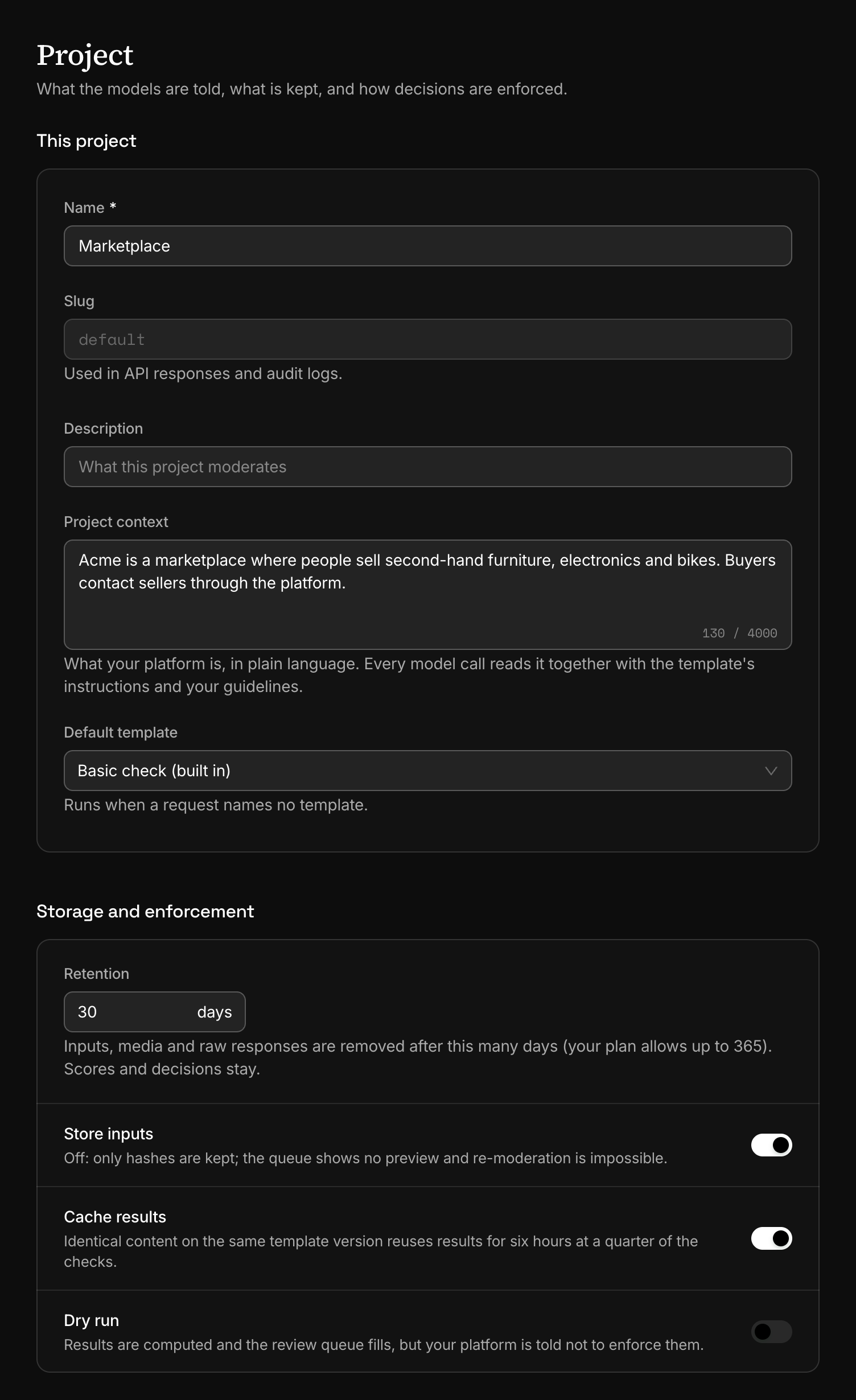
| Setting | What it does |
|---|---|
| Project context | Your platform in plain language, up to 4,000 characters. Every model call reads it, together with the template's instructions and your guidelines. |
| Default template | The template that runs when a request names none. Left on "Basic check (built in)", such a request runs the basic check. On Starter and up. |
| Retention | How many days a moderation's content is kept, up to your plan's limit. Data retention and privacy has the details. |
| Store inputs | Off: the input and the media of every moderation in the project are not stored. |
| Cache results | On: identical content on the same template version reuses its earlier scores for six hours, at a quarter of the checks. |
| Dry run | On: every moderation of the project is marked dry_run: true. See Dry run. |
| Allowed domains | Your own hosts. A link to one of them is not reported as an off-platform link. A host is matched exactly: example.com does not cover www.example.com. Policy options has the rest. |
| Trust rules | The thresholds at which an author moves up a trust level. Leave a field empty to keep its default. |
Three details of these settings are worth knowing before you rely on them:
- A default template has to be published. While it has no published version, a request without
templateanswers 409template_not_published. - On a plan without templates the default template is ignored. A request without
templateruns the basic check, and no error says so. - A request can turn dry run on for itself with
dry_run: true. It cannot turn a project's dry run off.
Changing Project context applies from the next request. Cached results made under the old context are no longer reused.
Switch project or organisation
The switcher at the top of the rail shows the organisation's name and, under it, the current project. It lists the projects of the current organisation, then Switch organisation when you belong to more than one. The dashboard remembers your choice in the browser.
The dashboard works on the current project: its templates, its queue, its keys. Checks and billing belong to the organisation, so the Billing page and the checks figures read the same in every project.
Add another organisation
An organisation is a separate billing boundary, with its own plan, members and projects. An agency running moderation for several clients gives each client one. Choose Create organisation in Settings, Organisation: you become its Owner, and it starts on the Free plan with one project.
The Free plan limits how many organisations on it one person can own. At that limit the button is disabled and says why. Upgrading the organisation you own lets you create another, because organisations on a paid plan do not count.
Archive a project
Archive project, at the foot of Settings, Project, removes a project from the switcher and revokes every one of its API keys at once. From then on the project answers as not found: its moderations can no longer be opened in the dashboard or read over the API. Content it stored is still removed on schedule.
There is no undo, and no way to delete a project outright. The last project of an organisation cannot be archived. An archived project no longer counts toward the plan's project limit.
Next
- Members and rolesInvite people to the whole organisation or to one project, and choose what each of them can do. Five roles, from Owner to Moderator.
- API keysA key signs every request and decides which project it lands in. Create one for each place that calls Infrared, with only the scopes it needs.
- Plans and limitsWhat each plan includes, what is counted per organisation and what per project, and what happens to your setup when the plan changes.
- Data retention and privacyWhat Infrared keeps of a moderation, for how long, and what the nightly purge removes. Set it for a project, a template or a single request.
Something missing or unclear on this page? Write to support@useinfrared.com.