Guidelines
Write a rule of your platform in plain language. Infrared scores every submission against it and returns the score as a policy of its own.
A guideline is a rule of your platform, written the way you would explain it to a new moderator: "Sellers must not ask buyers to pay outside the platform." Infrared reads it together with your project context, scores every submission of a template that turns it on, and returns the score as its own policy, guideline/<slug>.
Use a guideline when no pre-built policy covers the rule and a wordlist cannot express it, because the rule depends on meaning and not on particular words.
Create a guideline
curl https://api.useinfrared.com/v1/guidelines \
  -H "Authorization: Bearer $INFRARED_KEY" \
  -H "Content-Type: application/json" \
  -d '{
    "title": "No off-site deals",
    "instructions": "Sellers must not ask buyers to pay or to arrange the deal outside the platform: bank transfers, payment links, crypto, or a move to email, phone or a messaging app. Flag any attempt.",
    "examples": {
      "violating": [
        "Pay me by bank transfer and I will knock 10% off.",
        "Message me on my number, it is easier than the chat here."
      ],
      "compliant": [
        "Collection in person or tracked delivery, payment through the site."
      ]
    }
  }'
const response = await fetch("https://api.useinfrared.com/v1/guidelines", {
method: "POST",
headers: {
Authorization: `Bearer ${process.env.INFRARED_KEY}`,
"Content-Type": "application/json",
},
body: JSON.stringify({
title: "No off-site deals",
instructions: "Sellers must not ask buyers to pay or to arrange the deal outside the platform: bank transfers, payment links, crypto, or a move to email, phone or a messaging app. Flag any attempt.",
examples: {
violating: [
"Pay me by bank transfer and I will knock 10% off.",
"Message me on my number, it is easier than the chat here.",
],
compliant: [
"Collection in person or tracked delivery, payment through the site.",
],
},
}),
});
const guideline = await response.json();import os
import requests
response = requests.post(
"https://api.useinfrared.com/v1/guidelines",
headers={"Authorization": f"Bearer {os.environ['INFRARED_KEY']}"},
json={
"title": "No off-site deals",
"instructions": "Sellers must not ask buyers to pay or to arrange the deal outside the platform: bank transfers, payment links, crypto, or a move to email, phone or a messaging app. Flag any attempt.",
"examples": {
"violating": [
"Pay me by bank transfer and I will knock 10% off.",
"Message me on my number, it is easier than the chat here.",
],
"compliant": [
"Collection in person or tracked delivery, payment through the site.",
],
},
},
)
guideline = response.json(){"object": "guideline","id": "gl_4R8CeEbylEzY7fCtrNNQPR","project_id": "prj_0TBAgHGtdMketrbltGFHuk","slug": "no-off-site-deals","policy": "guideline/no-off-site-deals","title": "No off-site deals","instructions": "Sellers must not ask buyers to pay or to arrange the deal outside the platform: bank transfers, payment links, crypto, or a move to email, phone or a messaging app. Flag any attempt.","examples": {"compliant": ["Collection in person or tracked delivery, payment through the site."],"violating": ["Pay me by bank transfer and I will knock 10% off.","Message me on my number, it is easier than the chat here."]},"enabled": true,"position": 0,"created_at": "2026-10-08T08:44:27.742Z","updated_at": "2026-10-08T08:44:27.742Z"}titlestringRequiredA name for the rule, 200 characters at most. The models read it with the instructions.
instructionsstringRequiredThe rule itself in plain language, 4,000 characters at most. Say what is not allowed and what is fine.
slugstringThe end of the policy key: 2 to 80 lowercase letters, digits and single hyphens. Default: made from the title. It cannot be changed later.
examplesobjectviolatingandcompliant: two lists of sample texts that sharpen the score.enabledbooleanDefaulttruefalsecreates the guideline switched off.
The key needs the write scope. This endpoint does not read Idempotency-Key: send slug yourself, and a repeated request answers 409 slug_taken instead of creating a second guideline.
In the dashboard, open Policies, Guidelines and choose New guideline. The drawer asks for the same things: Title, Slug, Instructions, Violating examples, Compliant examples and Enabled.
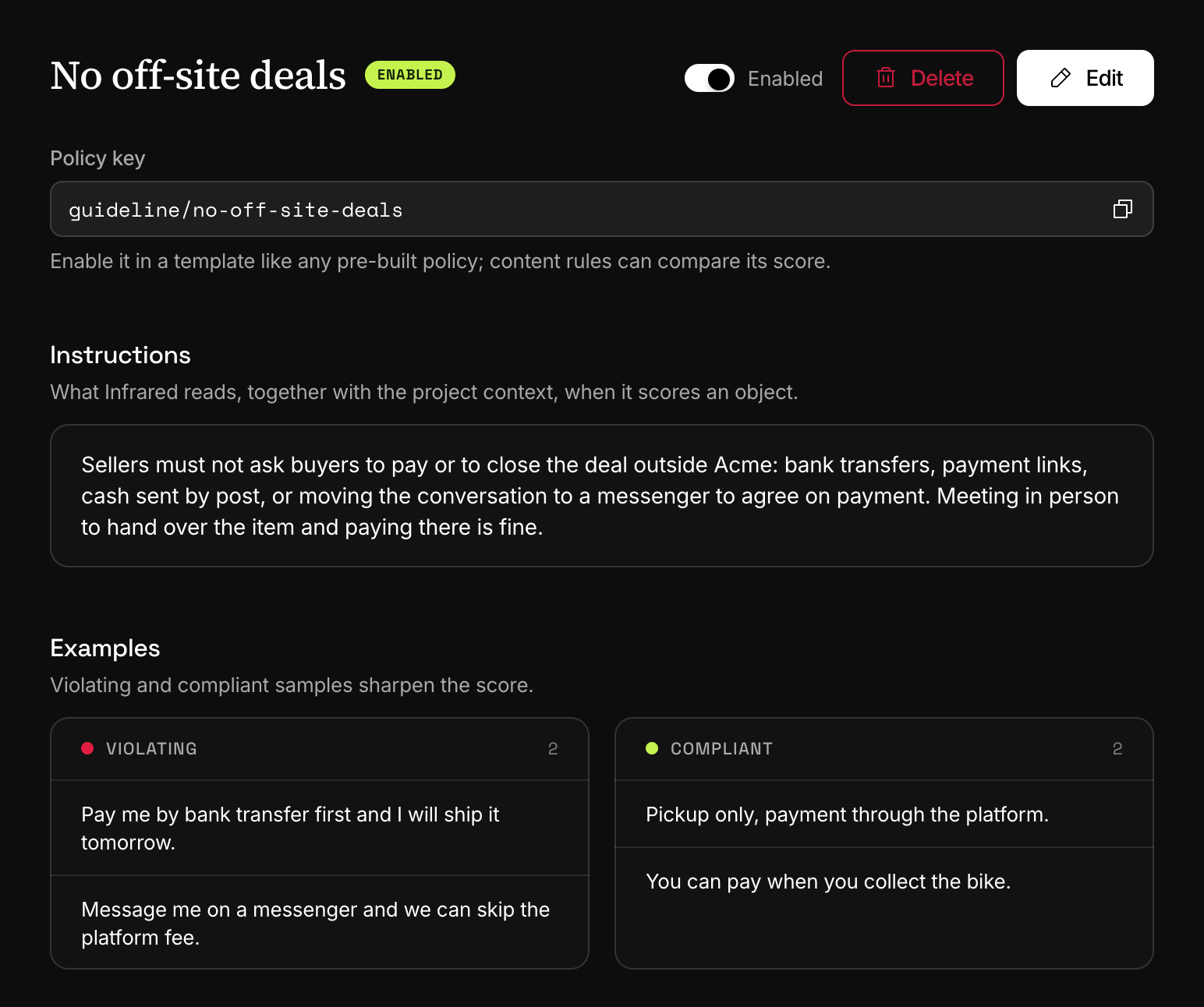
Turn it on in a template
A guideline scores nothing until a template lists its policy. In the template editor, open Policies, find the guideline under Your guidelines and wordlists and turn it on. Then choose Save draft and Publish version. The published version holds:
{ "key": "guideline/no-off-site-deals", "mode": "trigger" }With nothing else set, a score of 0.70 or more flags the submission, and the score counts in full for severity. A guideline takes mode, threshold, effect and weight like any policy: see Policy options and instructions.
How a guideline is scored
One evaluation per submission reads all the fields together, with:
- the project context and the template's own context;
- the template's AI instructions;
- every enabled guideline the template lists: its title, its instructions and its examples.
For each guideline it returns a score from 0 (compliant) to 1 (a clear violation), how confident it is, the field responsible when the finding belongs to one field, a short quote and a sentence of explanation. An image contributes the text read from it, or a one-line description.
Two limits shape what you write. The first five violating and the first five compliant examples are read, so put the most telling ones first. The project context is read up to its first 1,500 characters.
Read the result
curl https://api.useinfrared.com/v1/moderations \
  -H "Authorization: Bearer $INFRARED_KEY" \
  -H "Content-Type: application/json" \
  -d '{
    "template": "listing",
    "type": "text",
    "input": "Solid oak desk, barely used. Send the deposit to my bank account and I will hold it for you."
  }'
const response = await fetch("https://api.useinfrared.com/v1/moderations", {
method: "POST",
headers: {
Authorization: `Bearer ${process.env.INFRARED_KEY}`,
"Content-Type": "application/json",
},
body: JSON.stringify({
template: "listing",
type: "text",
input: "Solid oak desk, barely used. Send the deposit to my bank account and I will hold it for you.",
}),
});
const moderation = await response.json();import os
import requests
response = requests.post(
"https://api.useinfrared.com/v1/moderations",
headers={"Authorization": f"Bearer {os.environ['INFRARED_KEY']}"},
json={
"template": "listing",
"type": "text",
"input": "Solid oak desk, barely used. Send the deposit to my bank account and I will hold it for you.",
},
)
moderation = response.json(){"object": "moderation","id": "mod_2wCRB1Sodc8XV83zmnJ6x6","flagged": true,"policies": {"links_contact": 0.7,"guideline/no-off-site-deals": 1},"triggered": ["links_contact", "guideline/no-off-site-deals"],"details": {"guideline/no-off-site-deals": {"labels": ["confidence:100"],"matches": [{"label": "evidence","value": "Send the deposit to my bank account and I will hold it for you.","field": null}],"explanation": "The seller explicitly requests a deposit to their bank account, which is a clear attempt to move the transaction off-platform."}}}policies holds the score, and details says why:
labelscarries the confidence, fromconfidence:0toconfidence:100.matchesquotes the passage. Itsfieldnames the field the quote comes from, or isnull.explanationis one or two sentences for a moderator.fieldis added to the entry when the finding belongs to one field.
links_contact triggered too, because this template counts steering off the platform as a contact.
In a whole form, guideline results are on the parent moderation, not on the per-field ones. If the evaluation fails, the moderation ends partial: the guideline is missing from policies, details carries an error for it, and a result that would have been allow becomes review. Statuses and errors covers partial results.
Use it in triggers and rules
A guideline's key works wherever a policy key does. A trigger can give it its own threshold and effect, and a content rule can test its flag or its score:
{ "type": "policy_score", "policy": "guideline/no-off-site-deals", "op": "gte", "value": 0.9 }A trigger placed on one field fires for a guideline only when the finding names that field.
Change, disable or delete
PATCH /v1/guidelines/{id} changes the title, the instructions, the examples, enabled and position. A slug in the body is accepted and ignored.
- Disabled. The guideline stays in its templates, scores 0 and never triggers. Enable it again and nothing else has to change.
- Deleted. It is gone for good. Turn the guideline off in every template first: a template that still lists it keeps returning the key with a score of 0, the editor has no row left to turn it off, and that template's draft is refused until a guideline with the same slug exists again.
Results are cached for six hours per identical submission. A change to the instructions applies at once, and so does enabling or disabling. A change to the title or the examples alone reaches content that was already screened only when its cached result expires.
Limits
| Limit | Free | Starter | Growth | Business |
|---|---|---|---|---|
| Guidelines, per project | Not included | 5 | 20 | 100 |
The count is per project and includes disabled guidelines. Each list of examples holds 20 entries of 500 characters.
Creating, changing and deleting take a key with the write scope, or the Owner, Admin, Project admin or Developer role in the dashboard.
Next
- WordlistsMatch your own terms, such as competitor names or banned phrases. A list's mode says whether a match is a violation, required or only reported.
- AI instructionsPlain-language instructions on a template, judged once per submission across all its fields. The result comes back as a policy called instructions.
- Content rulesOrdered rules on a template turn scores, author trust and field values into allow, review or reject. Severity triage decides when no rule matches.
Something missing or unclear on this page? Write to support@useinfrared.com.