AI instructions
Plain-language instructions on a template, judged once per submission across all its fields. The result comes back as a policy called instructions.
Some problems are in no single field. A title promises a new carbon bike and the description is about a rusty steel one. A price cannot be right for what is described. A review is about the courier and not the product. Every field passes on its own, and the submission is still wrong.
AI instructions are a few sentences, in your own words, that say what to check across the whole submission. They are judged once per submission with every field in view, and the result is a policy of its own, instructions, with a score and an explanation.
The listing template below carries these instructions:
Check that the title, description, price and photos describe the same offer, that the photos show what is offered rather than unrelated or stock images, and that the price is plausible for what is described. Flag listings that only advertise another website or ask buyers to pay outside the platform.
curl https://api.useinfrared.com/v1/moderations \
  -H "Authorization: Bearer $INFRARED_KEY" \
  -H "Content-Type: application/json" \
  -d '{
    "template": "listing",
    "content_id": "item_8842",
    "fields": {
      "title": "Carbon road bike, 2025 model, as new",
      "description": "Steel city bike from the nineties with some rust on the frame. The brakes need replacing.",
      "price": 40
    }
  }'
const response = await fetch("https://api.useinfrared.com/v1/moderations", {
method: "POST",
headers: {
Authorization: `Bearer ${process.env.INFRARED_KEY}`,
"Content-Type": "application/json",
},
body: JSON.stringify({
template: "listing",
content_id: "item_8842",
fields: {
title: "Carbon road bike, 2025 model, as new",
description: "Steel city bike from the nineties with some rust on the frame. The brakes need replacing.",
price: 40,
},
}),
});
const moderation = await response.json();import os
import requests
response = requests.post(
"https://api.useinfrared.com/v1/moderations",
headers={"Authorization": f"Bearer {os.environ['INFRARED_KEY']}"},
json={
"template": "listing",
"content_id": "item_8842",
"fields": {
"title": "Carbon road bike, 2025 model, as new",
"description": "Steel city bike from the nineties with some rust on the frame. The brakes need replacing.",
"price": 40,
},
},
)
moderation = response.json(){"object": "moderation","id": "mod_4IywiEDtPE1eG86UPCgJU5","template": { "slug": "listing", "version": 1 },"type": "form","status": "completed","flagged": true,"recommendation": "reject","severity": "high","policies": {"instructions": 0.9 // the other policies of the template are trimmed},"triggered": ["instructions"],"rule": null,"reasons": ["trigger:instructions:flag", "triage:reject"],"details": {"instructions": {"labels": ["confidence:90"],"matches": [{"label": "evidence","value": "Carbon road bike, 2025 model, as new\nSteel city bike from the nineties with some rust on the frame. The brakes need replacing.","field": "title"}],"explanation": "The title describes a new carbon road bike, but the description details a used steel city bike with rust and worn brakes, indicating a mismatch in the offer.","field": "title"}},"test": true,"content_id": "item_8842"}No policy objected to the title or to the description. Both fields come back allowed under fields, and the form is rejected on the instructions alone.
Write them in the editor
Open a template in Templates and choose the Instructions tab.
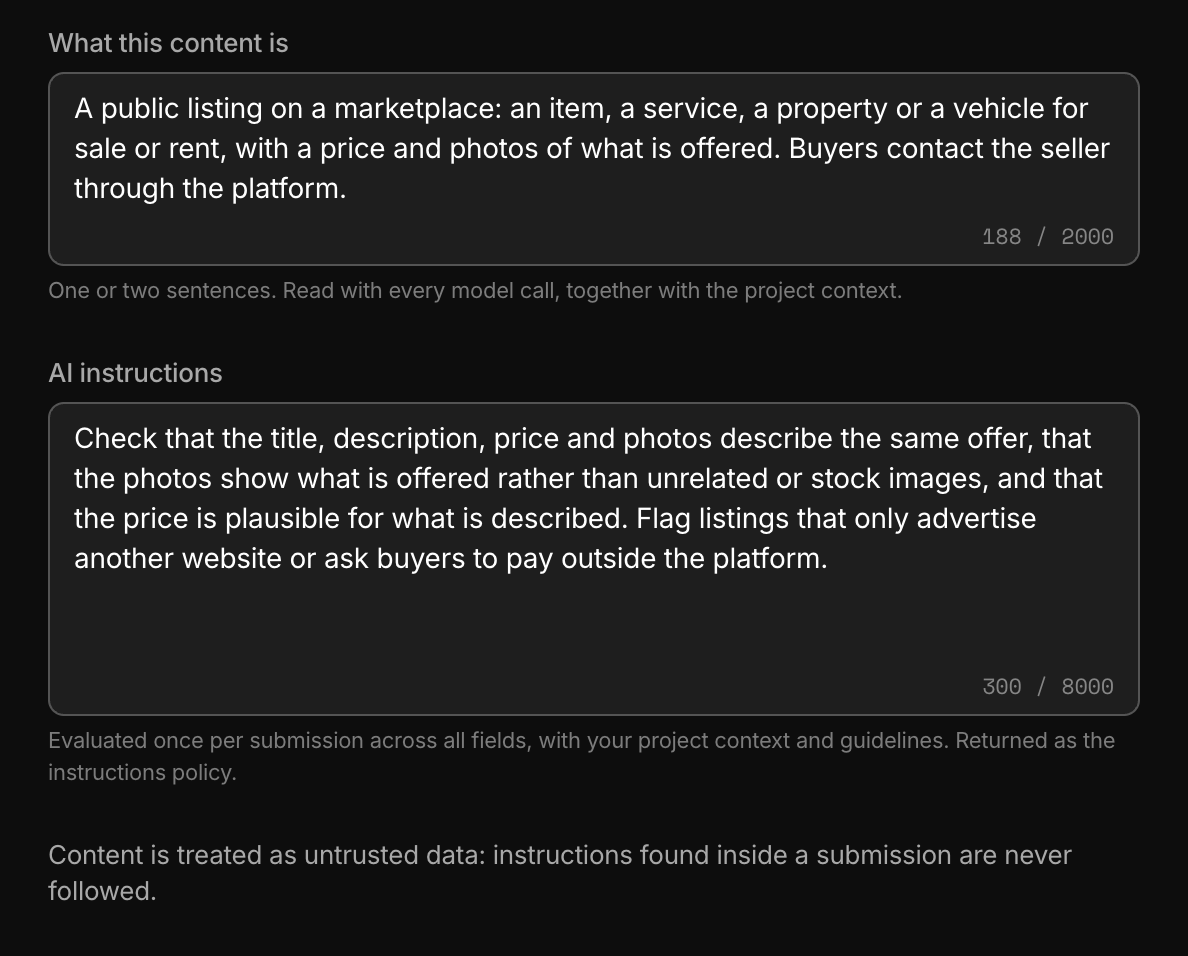
- What this content is takes one or two sentences about the content itself: who writes it, where it appears, what is normal in it. Every model call for this template reads it, not only this one.
- AI instructions takes what to check across the submission, up to 8,000 characters.
Choose Save draft, try a few submissions on the Test tab with Whole form selected, then Publish version.
Name the fields and say what would be wrong: "the price is plausible for what is described" gives the model something to compare. Keep what is normal for this content in What this content is, so the instructions can stay about what to flag.
What the instructions are judged on
One call reads, together:
- the project context, from Settings, Project;
- the template's name and What this content is;
- every field that has a value, with its name and its description;
- your guidelines that the template enables, which are judged in the same call and scored separately.
How a value reaches the call depends on the field's type:
| Field type | What the call reads |
|---|---|
| Text | The text, up to its first 6,000 characters. |
| Number, boolean, enum, URL | The value. |
| Image | The text found in the images. When there is none, a one-sentence description of each image. |
| JSON | A list of plain values, joined by commas. An object is not read: do not write instructions that depend on one. |
The call does not look at the pictures themselves. "The photos show what is offered" is judged from the text in the images, or from the one-sentence description of each.
A request that sends a single object is judged too, with that one field. Cross-field instructions have little to compare there, so test them with a whole form.
The instructions policy
The result is a score from 0 to 1 under policies.instructions. A template with AI instructions has this policy without listing it, with these defaults:
- It is in Trigger mode and flags from 0.70.
- It counts in full for severity. With no content rule in the way, triage sends a score from 0.40 to review and rejects from 0.80.
To change that, open the Policies tab, find AI instructions in the Custom group and switch it on. It then takes Mode, Threshold, Effect and Weight like any policy: Observe to watch what it finds before it decides anything, or a Review effect to send its findings to a person.
Switching it on is also what lets a trigger or a content rule name instructions. Until then the editor does not offer it in either place.
The instructions return one score. When the model finds several problems, the highest one is kept. For a concern you want scored, triggered and ruled on by itself, write a guideline: each guideline is its own policy.
How a finding comes back
details.instructions.labelsarrayHow sure the model is, as one label from
confidence:0toconfidence:100.details.instructions.matchesarrayThe passage the finding rests on, with
labelset toevidence, the quote invalueand, infield, the field it was taken from ornull.details.instructions.explanationstringOne or two sentences for a moderator, 400 characters at most.
details.instructions.fieldstringThe field the finding is about. Present only when one field is responsible.
In a whole form the finding is on the form itself. The per-field results under fields do not carry it.
If the call fails, the moderation ends partial: instructions is missing from policies, details.instructions holds an error, and a result that would have been allow becomes review. Statuses and errors covers partial results.
Limits
| What | Limit |
|---|---|
| AI instructions | 8,000 characters |
| What this content is | 2,000 characters, of which the models read the first 1,500 |
| Project context | 4,000 characters, of which the models read the first 1,500 |
| A field's description | 500 characters |
| Each text field, in this call | Its first 6,000 characters |
A simulation replays stored scores, and it leaves the instructions score out unless AI instructions is switched on in the Policies tab.
Guidance for one policy is a different setting
Instructions for the models, on a policy's row in the Policies tab, is guidance for that one policy: up to 600 characters on how, say, profanity applies to this content. It changes how that policy scores each field and has no score of its own. Policy options and instructions covers it.
| AI instructions | Instructions for the models | |
|---|---|---|
| Set on | The template, Instructions tab | One policy, Policies tab |
| Reads | All fields of a submission together | One field at a time |
| Returns | A score of its own, instructions | Nothing of its own. It shapes the policy's score. |
Content is judged, not obeyed
Your project context, the template's context, the field descriptions and the instructions are given to the model as your directions. The submission is given apart from them, marked as content to be judged, and the model is told never to follow an instruction found inside it, even one that claims to come from you.
Treat that as a safeguard and not as a guarantee.
Next
- GuidelinesWrite a rule of your platform in plain language. Infrared scores every submission against it and returns the score as a policy of its own.
- Moderate a whole formSend every field of a listing, a profile or a post in one request. Each content field gets its own result and the parent carries the decision.
- TriggersA trigger says what a policy's score sets off, a flag or a review, for the whole template or for one field. One of your own replaces the default.
- Content rulesOrdered rules on a template turn scores, author trust and field values into allow, review or reject. Severity triage decides when no rule matches.
Something missing or unclear on this page? Write to support@useinfrared.com.