Webhooks
Infrared posts a signed event to your endpoint when a moderation finishes, a queue item is decided or an author changes. Add an endpoint and receive it.
A webhook tells your backend that something happened, so your backend does not have to ask. An image finished screening. A moderator rejected a listing in the review queue. An author was suspended. Each of these is an event, and Infrared sends it as a signed JSON POST to every endpoint of the project that asked for it.
You need one as soon as an answer arrives after the request. Images are screened in the background, and a decision in the review queue can come hours later. Infrared never publishes or removes anything in your product, so the webhook is how a decision reaches the code that does.
moderation.completedevt_2uhhIo2wErQojIHSPaTfHEPOST https://hooks.example.com/infraredInfrared-Signature: t=…,v1=…Infrared-Event: moderation.completedInfrared-Delivery: whd_0oBGD4cLwRR1dYwd5ow6oW- Verify the signature
- Answer 2xx within 10 seconds
- Handle the event once, by its id
2xxDelivered:
succeeded5xx408429a redirect, a timeout or a network errorRetried8 attempts over about an hour- Any other
4xxNot delivered:
failedNo retry
Sample data
Add an endpoint
An endpoint is a URL of yours, the events it wants and a signing secret. Add one with a request, using a key that has the write scope:
curl https://api.useinfrared.com/v1/webhooks \
  -H "Authorization: Bearer $INFRARED_KEY" \
  -H "Content-Type: application/json" \
  -d '{
    "url": "https://hooks.example.com/infrared",
    "description": "Syncs verdicts to the CMS",
    "event_types": [
      "moderation.completed",
      "queue_item.allowed",
      "queue_item.rejected"
    ]
  }'
const response = await fetch("https://api.useinfrared.com/v1/webhooks", {
method: "POST",
headers: {
Authorization: `Bearer ${process.env.INFRARED_KEY}`,
"Content-Type": "application/json",
},
body: JSON.stringify({
url: "https://hooks.example.com/infrared",
description: "Syncs verdicts to the CMS",
event_types: [
"moderation.completed",
"queue_item.allowed",
"queue_item.rejected",
],
}),
});
const endpoint = await response.json();import os
import requests
response = requests.post(
"https://api.useinfrared.com/v1/webhooks",
headers={"Authorization": f"Bearer {os.environ['INFRARED_KEY']}"},
json={
"url": "https://hooks.example.com/infrared",
"description": "Syncs verdicts to the CMS",
"event_types": [
"moderation.completed",
"queue_item.allowed",
"queue_item.rejected",
],
},
)
endpoint = response.json(){
"object": "webhook_endpoint",
"id": "whe_0dFoExHEccOjnJ7ZHHwXsq",
"project_id": "prj_0TBAgHGtdMketrbltGFHuk",
"url": "https://hooks.example.com/infrared",
"description": "Syncs verdicts to the CMS",
"event_types": ["moderation.completed", "queue_item.allowed", "queue_item.rejected"],
"status": "active",
"api_version": "2026-09-01",
"consecutive_failures": 0,
"disabled_at": null,
"disabled_reason": null,
"last_delivery_at": null,
"last_success_at": null,
"created_at": "2026-10-08T08:53:38.326Z",
"updated_at": "2026-10-08T08:53:38.326Z",
"secret": "whsec_Zk3pQ8vT1mX6cR9bW2nH5yJ7dL0sF4gA8uE3tK6q" // only in this response
}urlstringRequiredWhere the events go. Up to 2,048 characters. The rules are under The endpoint URL.
descriptionstringA note for your team, up to 500 characters.
event_typesstring[]Default[]The event types to deliver. An empty list means every event, including types added later.
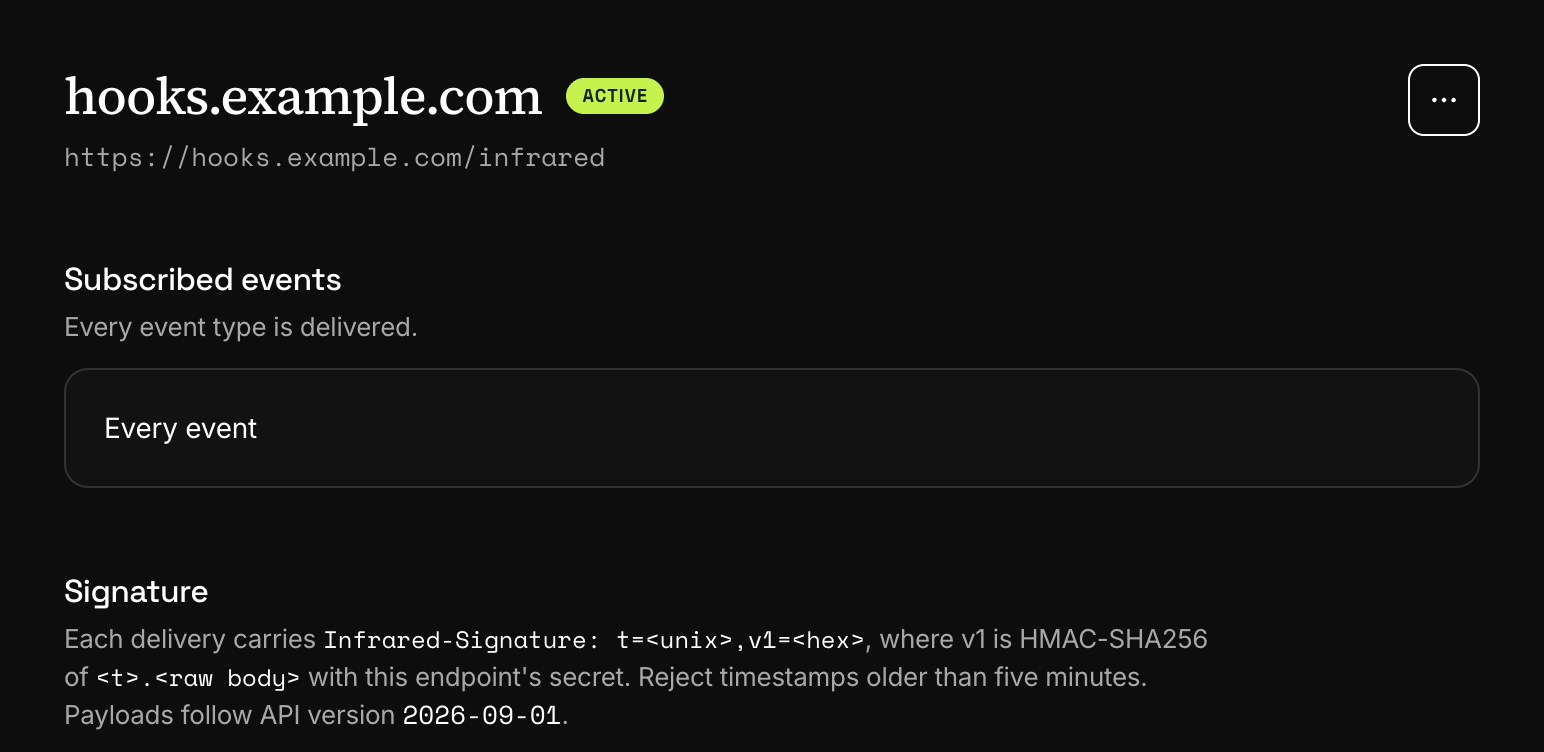
secret is the signing secret, the key your endpoint verifies each delivery with. Infrared stores it encrypted and returns it in this response only. Keep it where you keep other secrets.
This call ignores the Idempotency-Key header. Sent twice, it creates two endpoints, and each one delivers every event.
In the dashboard
Open Webhooks
Open Webhooks in the project and choose Add endpoint.
Enter the URL and pick the events
Fill in Endpoint URL, and a Description if it helps your team. Under Events, tick the events this endpoint wants, or leave every box unchecked to receive every event.
Copy the signing secret
Choose Add endpoint. The Signing secret appears once. Copy it, store it, then choose Done.
The endpoint URL
- It uses
https. - It is public.
localhost, a name ending in.internaland any address in a private or reserved range are refused when you save the endpoint. The check runs again on every delivery, against the addresses the name resolves to at that moment. - Redirects are not followed. A 3xx answer is a failed attempt.
- A name that does not resolve yet is accepted. Its deliveries fail until it does.
{"error": {"code": "validation_error","message": "url: Target resolves to a private address (localhost)","details": [{ "field": "url", "message": "Target resolves to a private address (localhost)" }],"request_id": "req_06bb4ebfad604972be886073091ee44e"}}To receive events on your own machine, give the port a public https address with a tunnel and add that address as the endpoint.
A minimal receiver
A receiver does four things: it reads the raw body, verifies the signature, answers 2xx, and acts on an event once. constructEvent and construct_event are the functions from Verify signatures.
// receiver.js
import express from "express";
import { constructEvent, SignatureError } from "./infrared-webhooks.js";

const app = express();
const seen = new Set(); // in production, a store that outlives the process

// express.raw keeps the body as bytes. Put it on this route, before any express.json().
app.post("/webhooks/infrared", express.raw({ type: "application/json" }), (req, res) => {
  let event;
  try {
    event = constructEvent(req.body, req.get("Infrared-Signature"), process.env.INFRARED_WEBHOOK_SECRET);
  } catch (error) {
    if (error instanceof SignatureError) return res.status(400).json({ error: error.message });
    throw error;
  }

  // Answer first: a delivery times out after 10 seconds.
  res.json({ received: true });

  // The event id is the same on every retry and on a replay.
  if (seen.has(event.id)) return;
  seen.add(event.id);
  handle(event);
});

function handle(event) {
  if (event.type === "moderation.completed") {
    const { id, recommendation } = event.data.moderation;
    console.log(id, recommendation); // publish, hold or reject the content here
  }
}

app.listen(process.env.PORT ?? 3000);
# receiver.py, run with: flask --app receiver run
import os
from flask import Flask, request
from infrared_webhooks import SignatureError, construct_event
app = Flask(__name__)
seen = set() # in production, a store that outlives the process
@app.post("/webhooks/infrared")
def infrared_webhook():
try:
# request.get_data() is the raw body. Verify it before anything parses it.
event = construct_event(request.get_data(), request.headers.get("Infrared-Signature"), os.environ["INFRARED_WEBHOOK_SECRET"])
except SignatureError as error:
return {"error": str(error)}, 400
# The event id is the same on every retry and on a replay.
if event["id"] not in seen:
seen.add(event["id"])
handle(event)
return {"received": True}
def handle(event):
# Keep this short, or hand the event to a queue: a delivery times out after 10 seconds.
if event["type"] == "moderation.completed":
moderation = event["data"]["moderation"]
print(moderation["id"], moderation["recommendation"]) # publish, hold or reject the content hereOnly a 2xx answer counts as delivered. A 5xx, a network error or no answer within 10 seconds is retried for about an hour. A 4xx other than 408 and 429 ends the delivery at once, which is why the receiver answers 400 only to a request it does not trust. Deliveries, retries and replay has the schedule.
No button sends a test event. To try a receiver, send a moderation with a test key: it uses no checks and produces a real moderation.completed.
Disable, enable and delete
Change an endpoint with PATCH /v1/webhooks/{id}, or from the menu on its page in the dashboard: Edit endpoint, Rotate secret, Disable endpoint, Delete endpoint. The request can change the url, the description, the event_types and the status, as Update an endpoint lists.
curl -X PATCH https://api.useinfrared.com/v1/webhooks/whe_0dFoExHEccOjnJ7ZHHwXsq \
  -H "Authorization: Bearer $INFRARED_KEY" \
  -H "Content-Type: application/json" \
  -d '{
    "status": "disabled"
  }'
const response = await fetch("https://api.useinfrared.com/v1/webhooks/whe_0dFoExHEccOjnJ7ZHHwXsq", {
method: "PATCH",
headers: {
Authorization: `Bearer ${process.env.INFRARED_KEY}`,
"Content-Type": "application/json",
},
body: JSON.stringify({
status: "disabled",
}),
});
const endpoint = await response.json();import os
import requests
response = requests.patch(
"https://api.useinfrared.com/v1/webhooks/whe_0dFoExHEccOjnJ7ZHHwXsq",
headers={"Authorization": f"Bearer {os.environ['INFRARED_KEY']}"},
json={
"status": "disabled",
},
)
endpoint = response.json(){
"object": "webhook_endpoint",
"id": "whe_0dFoExHEccOjnJ7ZHHwXsq",
"status": "disabled",
"consecutive_failures": 4,
"disabled_at": "2026-10-08T08:55:27.374Z",
"disabled_reason": "manual"
}- A disabled endpoint receives nothing. Events that happen while it is disabled are not delivered when you enable it again. They stay in the event log for 30 days, where your backend can read them.
- Enabling is the same request with
"status": "active". It also setsconsecutive_failuresback to 0. - Infrared disables an endpoint itself after 50 failed attempts in a row.
disabled_reasonthen reads50 consecutive failures. See When an endpoint keeps failing. - Deleting an endpoint stops its deliveries at once and removes its delivery log.
How many endpoints
| Limit | Free | Starter | Growth | Business |
|---|---|---|---|---|
| Webhook endpoints, per project | 1 | 3 | 10 | 50 |
The limit is per project and counts disabled endpoints too. One endpoint more answers 403 plan_limit.
Who can manage endpoints
In the dashboard, Owners, Admins, Project admins and Developers can add, edit, disable and delete endpoints, rotate a secret and replay a delivery. Moderators can read endpoints and their deliveries.
An API key needs the read scope to list endpoints, events and deliveries, and the write scope for everything else.
Next
- Event typesThe twelve events Infrared sends, when each one fires and what its data holds, with a real payload for moderations, queue items, authors and actions.
- Verify signaturesEvery delivery is signed with the endpoint's secret. Check the signature and its timestamp before you trust the body, with code you can copy.
- Deliveries, retries and replayA delivery is one event sent to one endpoint. What counts as delivered, how a failure is retried for about an hour, and how to send a delivery again.
Something missing or unclear on this page? Write to support@useinfrared.com.