Review queue
Content your rules send to review waits in the queue until a person, or your own code, allows it, rejects it or runs another action on it.
A moderation whose recommendation is review goes into the project's review queue and waits there for a decision. Your team works the queue in the dashboard. Your own tooling can do the same through the API: list the items, read one, resolve it, reopen it.
A decision is an action: allow, reject or one you defined. Infrared records it and reports it by webhook. Publishing or removing the content stays with your backend.
Resolving an item is one request:
curl https://api.useinfrared.com/v1/queue/qi_2j7nkTPbA3YvLz4qpxmzPk/resolve \
  -H "Authorization: Bearer $INFRARED_KEY" \
  -H "Content-Type: application/json" \
  -d '{
    "resolution": "rejected",
    "note": "Sends buyers to an outside site."
  }'
const response = await fetch("https://api.useinfrared.com/v1/queue/qi_2j7nkTPbA3YvLz4qpxmzPk/resolve", {
method: "POST",
headers: {
Authorization: `Bearer ${process.env.INFRARED_KEY}`,
"Content-Type": "application/json",
},
body: JSON.stringify({
resolution: "rejected",
note: "Sends buyers to an outside site.",
}),
});
const item = await response.json();import os
import requests
response = requests.post(
"https://api.useinfrared.com/v1/queue/qi_2j7nkTPbA3YvLz4qpxmzPk/resolve",
headers={"Authorization": f"Bearer {os.environ['INFRARED_KEY']}"},
json={
"resolution": "rejected",
"note": "Sends buyers to an outside site.",
},
)
item = response.json(){
"object": "queue_item",
"id": "qi_2j7nkTPbA3YvLz4qpxmzPk",
"moderation_id": "mod_1f4LShzWx2qKdBwHC7u5kM",
"state": "resolved",
"priority": "high",
"severity": "high",
"reason": "rule",
"resolution": "rejected",
"assignee": null,
"sla_due_at": null,
"resolved_by": null, // a member's id when the decision is made in the dashboard
"resolved_at": "2026-10-08T08:47:47.630Z",
"reopened_at": null,
"summary": {
"type": "text",
"author": { "id": "aut_6xtGWa266HzKklUSuX97vC", "status": "enabled", "external_id": "user_8841", "trust_level": "new" },
"preview": "Road bike, size M, ridden twice. More photos and my number at https://example.com/bikes/42",
"template": "listing",
"triggered": ["guideline/no-off-site-deals", "instructions"],
"content_id": "listing_20931"
},
"created_at": "2026-10-08T08:47:26.657Z",
"updated_at": "2026-10-08T08:47:47.630Z"
}How an item enters the queue
Every moderation that ends with recommendation: "review" gets one queue item, and a whole form gets one for the form. For a request answered while it waits, the item exists before the response returns.
reason records why the item is there.
reason | Sent to review by | In the dashboard |
|---|---|---|
rule | A content rule. | Content rule |
trigger | A trigger whose effect is review. | Review trigger |
severity | Severity triage. | Severity triage |
dry_run | Any of the three, during a dry run. | Dry run |
The item's priority starts from the moderation's severity: critical becomes urgent, high stays high, medium becomes normal, and low or none becomes low.
Requests made with a test key enter the queue like any other. The queue does not mark them: the Test badge is on the moderation, in the live console.
The moderation response does not carry the id of its queue item. Take it from the queue_item.created event, or list the queue and match moderation_id.
States and the event of each move
mod_1f4LShzWx2qKdBwHC7u5kMrecommendation:reviewqueue_pendingresolution: null- resolve
queue_item. rejected action.executed resolvedresolution:rejected- reopen
queue_item. reopened reopenedresolution: null
queue_action.allowedgivesqueue_item.allowedrejectedgivesqueue_item.rejectedaction:request_editsgivesqueue_item.actioned
Every resolve also sends action.executed.
Sample data
| Move | State after | resolution | Event |
|---|---|---|---|
| A moderation is sent to review | pending | null | queue_item.created |
Resolved with allow | resolved | allowed | queue_item.allowed |
Resolved with reject | resolved | rejected | queue_item.rejected |
| Resolved with another action | resolved | action:request_edits, for an action with that key | queue_item.actioned |
| Reopened | reopened | null | queue_item.reopened |
Each resolution also sends action.executed. The payload of every event is in Webhook events.
Resolving an item that is already resolved changes nothing: the API answers 200 with the item as it was, and the first resolution stays. The action is still logged and action.executed is sent again. To change a decision, reopen the item and resolve it again.
Work the queue in the dashboard
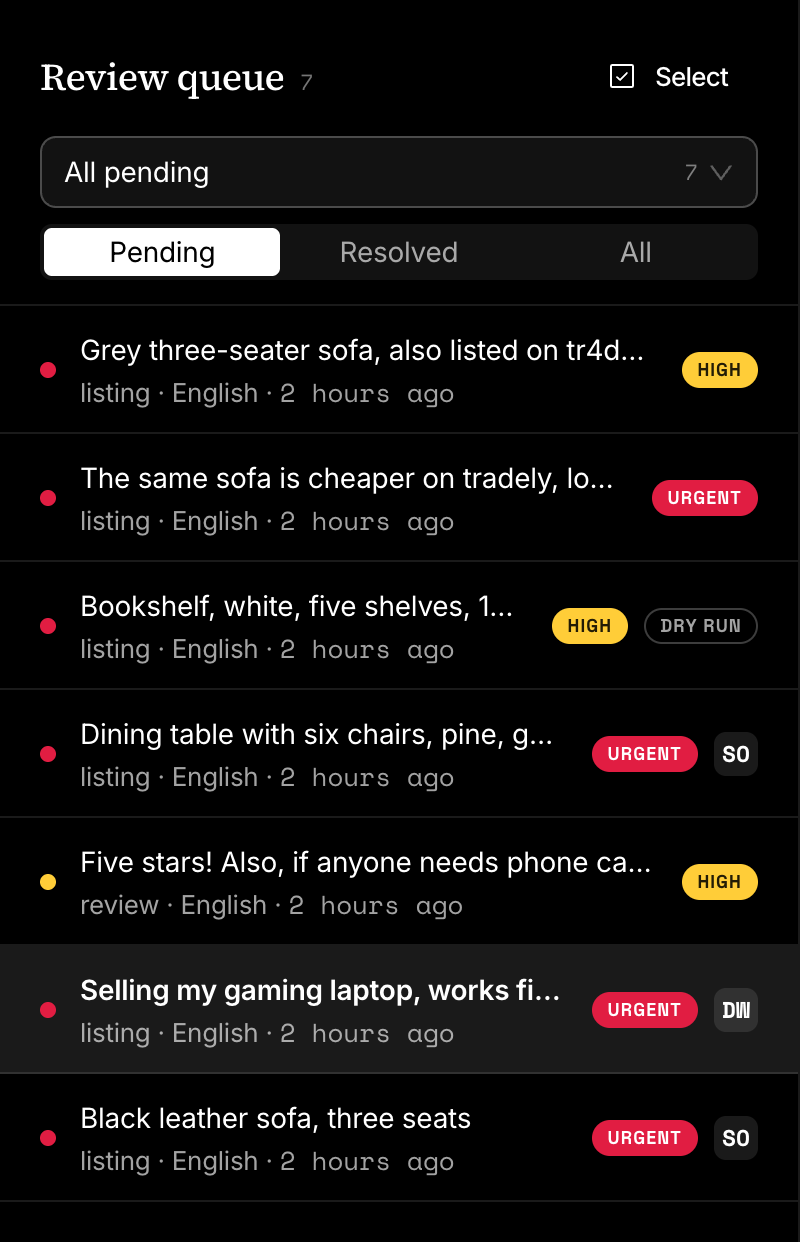
Open the Review queue. The number beside its name in the rail is how many items are waiting.
Pick what to work on
The view picker has four built-in views, each with its count: All pending, Assigned to me, Unassigned and Overdue. The filter under it switches between Pending, Resolved and All. Pending includes reopened items.
Open items are listed oldest first, resolved ones newest first. Priority is a badge on the row, not the sort order.
Read an item and decide
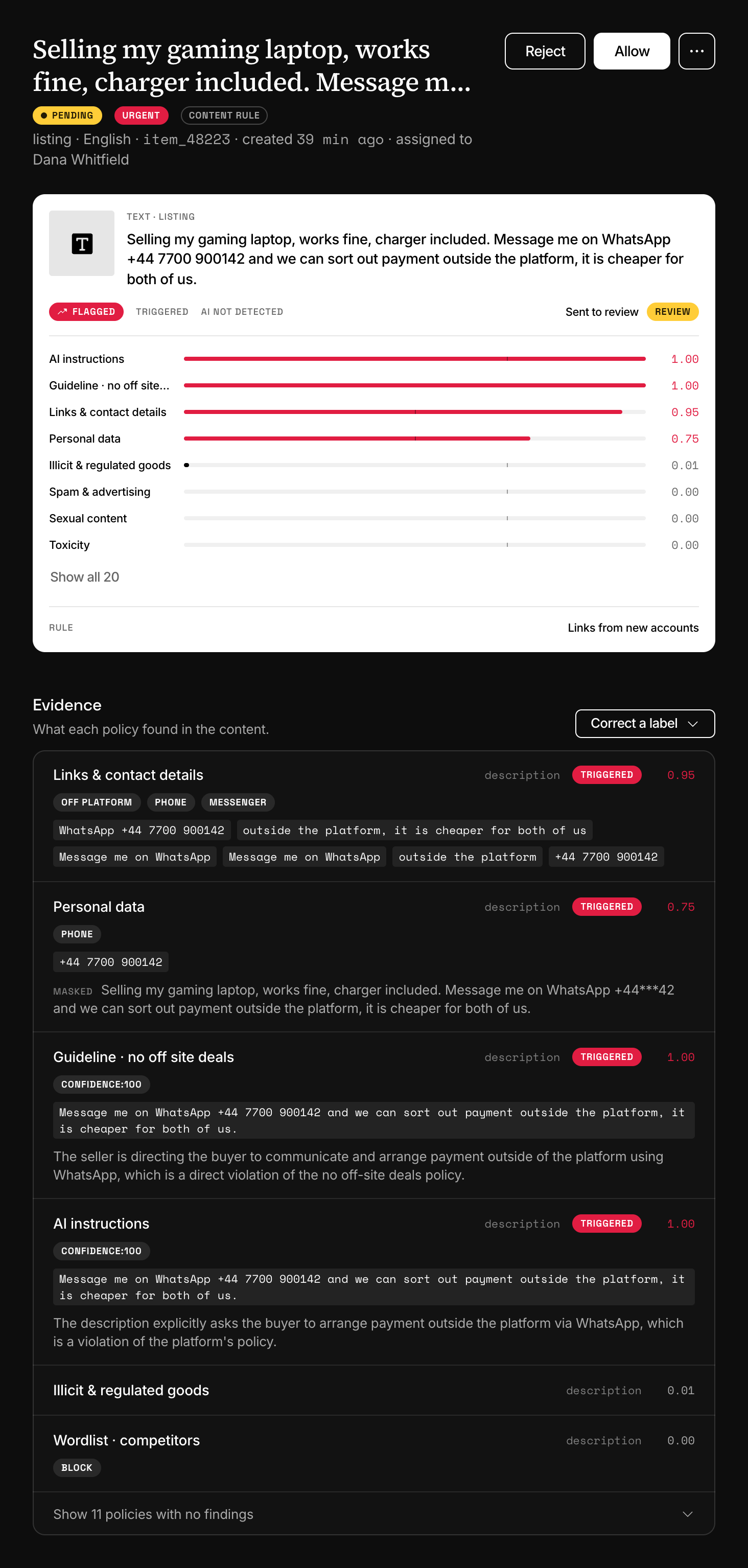
The header says why the item is here: its state, its priority, the reason, and when it is due. Below it are the verdict card, Evidence (what each policy found, with the matched words), Notes and Response, the JSON your integration received.
The item shows no media. Choose More actions, then Open in live console, to see the blurred images.
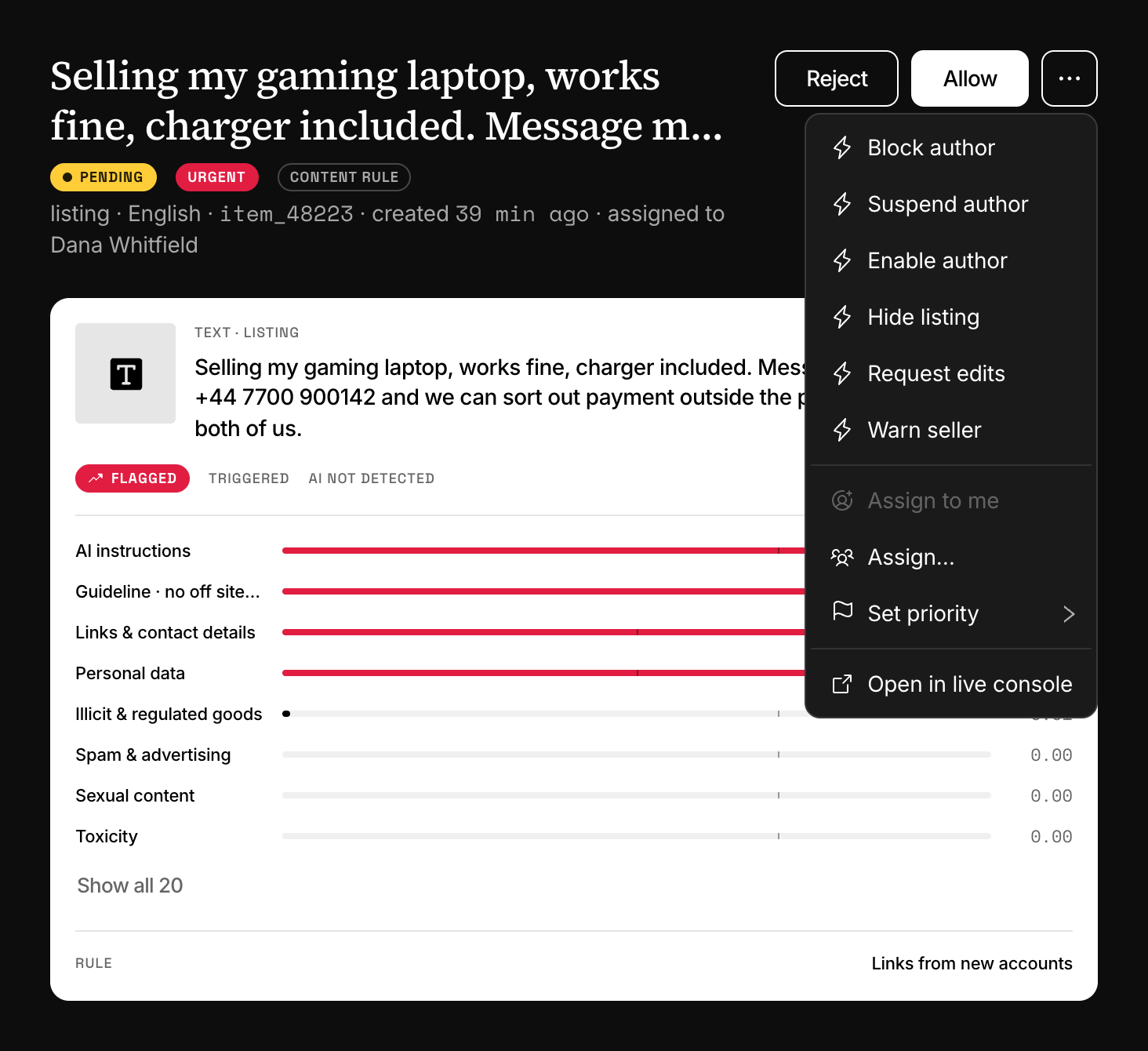
Allow and Reject are the two buttons. Every other action that is enabled and visible in the dashboard is under More actions: your custom actions and the three built-in author actions. After a decision, the first item left in the list opens.
An action that takes a value asks for it in a dialog, as text or as JSON. The dialog has no date field: to suspend an author until a date from here, type { "reason": "...", "until": "2026-10-13T00:00:00Z" }.
Assign, prioritise and annotate
- Assign to me takes the item. Assign… gives it to any member of the project or the organisation.
- Set priority changes the badge: Low, Normal, High or Urgent.
- Notes are for your team. They are never sent to the author and no webhook carries them.
- Correct a label records that a triggered policy should not have flagged this content. Corrections are kept for tuning and change nothing about the decision.
Decide many at once
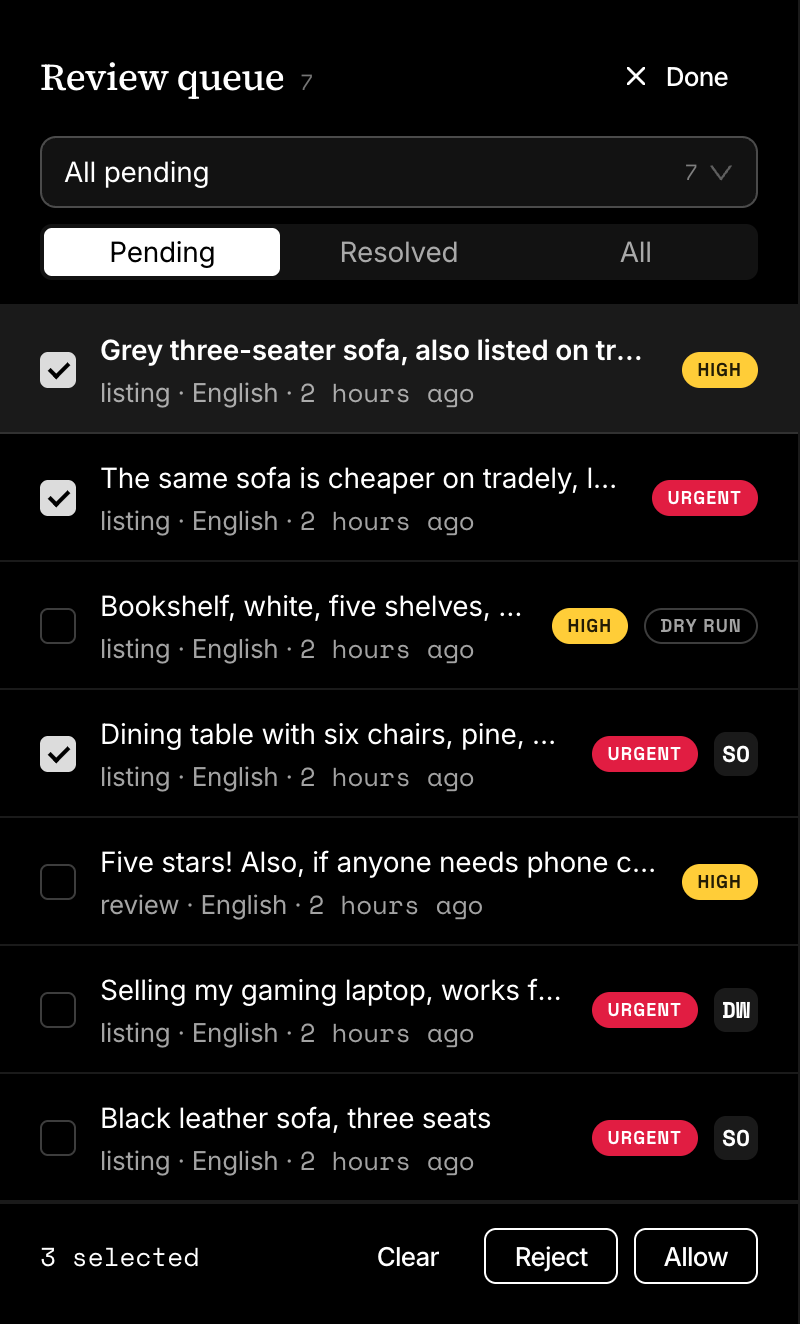
Select turns the rows into checkboxes. Tick the items and choose Allow or Reject; Done leaves without deciding. One round takes up to 200 items, and an item that fails does not stop the rest.
Keyboard shortcuts
| Key | Does |
|---|---|
J | Opens the next item. |
K | Opens the previous item. |
A | Allows the open item. |
R | Rejects the open item. |
Esc | Goes back to the list, on a phone. |
Cmd or Ctrl with Enter | Adds the note you are typing. |
The keys do nothing while a field, a dialog or a menu has focus.
Who can do what
Every member of the project can decide, take an item, reopen it, add notes and correct a label. Assigning to someone else, setting priority and deciding in bulk need the Project admin role or an organisation role. Members and roles has the whole table.
Review SLA and overdue items
A template can give its queue items a deadline. In the template editor, open Instructions and set Review SLA, in minutes, then publish. Each new item of that template gets sla_due_at, its creation time plus the SLA.
An open item past that time is overdue: its age turns red, the header reads Overdue, and it is counted in the Overdue view. Without the setting sla_due_at is null and an item is never overdue. No preset sets an SLA.
Work the queue through the API
List what is waiting. Without state the list holds pending and reopened items, oldest first.
curl "https://api.useinfrared.com/v1/queue?priority=high&limit=20" \
  -H "Authorization: Bearer $INFRARED_KEY"
const response = await fetch("https://api.useinfrared.com/v1/queue?priority=high&limit=20", {
headers: { Authorization: `Bearer ${process.env.INFRARED_KEY}` },
});
const page = await response.json();import os
import requests
response = requests.get(
"https://api.useinfrared.com/v1/queue",
headers={"Authorization": f"Bearer {os.environ['INFRARED_KEY']}"},
params={
"priority": "high",
"limit": 20,
},
)
page = response.json()| Parameter | Filters by |
|---|---|
state | pending, resolved or reopened. |
template | A template slug. |
language | A language code, such as en. |
severity | One or more of none, low, medium, high, critical, separated by commas. |
priority | One or more of low, normal, high, urgent, separated by commas. |
sort | asc for oldest first (the default), desc for newest first. |
The list has no filter by moderation or content id: read moderation_id and summary.content_id on each item. summary is a snapshot taken when the item entered the queue, so it does not follow later changes to the author.
GET /v1/queue/{id} returns one item with moderation, the response body of its moderation, which is null once the content's retention has ended. summary.preview, up to 200 characters of the text, and the item's notes are kept after that.
To resolve, send one of the first two fields:
resolutionstringShort for the
allowandrejectactions.One of
allowedrejectedactionstringThe key of any action of the project. When both fields are sent,
actiondecides.valueanyA value for an action that accepts one.
notestringUp to 4,000 characters. Stored as a note on the item, visible to your team in the dashboard. The API does not return notes.
An action whose queue behaviour is to keep the item, block_author for one, runs and leaves the item open. POST /v1/queue/{id}/reopen takes no body and returns the item as reopened.
| Status | Code | When |
|---|---|---|
| 422 | validation_error | Neither resolution nor action was sent, the action does not exist, or value was sent to an action that takes none. |
| 409 | action_disabled | The action is disabled in the project. That includes allow and reject. |
| 409 | not_resolved | Reopen was called on an item that is not resolved. |
| 404 | not_found | No such item in this project. |
Resolve and reopen ignore the Idempotency-Key header. Assignment, priority, notes and bulk decisions are dashboard features. An API key needs the read scope to list and read items and the write scope to resolve and reopen them.
Next
- ActionsAn action is what a decision turns into. Allow, reject, change an author's status or define your own, and act on the webhook each run sends.
- Authors and trustInfrared keeps a status, a trust level and a history for each of your users, and content rules read them. Block, suspend or trust an author.
- Event typesThe twelve events Infrared sends, when each one fires and what its data holds, with a real payload for moderations, queue items, authors and actions.
- Content rulesOrdered rules on a template turn scores, author trust and field values into allow, review or reject. Severity triage decides when no rule matches.
Something missing or unclear on this page? Write to support@useinfrared.com.