Content rules
Ordered rules on a template turn scores, author trust and field values into allow, review or reject. Severity triage decides when no rule matches.
Scores say what was found. Content rules say what you do about it: reject everything from a blocked author, send links from new accounts to review, let established authors through. Every template has its own ordered list.
Rules run from top to bottom, and the first one whose conditions all hold decides the recommendation. When none holds, severity triage decides from the scores alone.
You write rules in the template editor. The API returns them with the template, and every moderation says which rule decided.
The rules of a template
A template made from the Listing preset starts with six rules. The editor prints them like this, in the order they run:
| Rule | If | Then |
|---|---|---|
| 01 Block banned authors | author is not enabled | Reject |
| 02 Zero tolerance for hate | Hate speech is flagged | Reject |
| 03 Illicit goods | Illicit & regulated goods is flagged | Reject |
| 04 No sexual content | Sexual content is flagged | Reject |
| 05 Allow established authors | trust level is at least regular | Allow |
| 06 Links from new accounts | trust level is at most new and Links & contact details is flagged | Review |
- 01
Block banned authorsReject
if author is not enabled
Does not hold:author: enabled - 02
Zero tolerance for hateReject
if Hate speech is flagged
Does not hold:hate_speech0 - 03
Illicit goodsReject
if Illicit & regulated goods is flagged
Does not hold:illicit0 - 04
No sexual contentReject
if Sexual content is flagged
Does not hold:sexual0 - 05
Allow established authorsAllow
if trust level is at least regular
Does not hold:trust level: new - 06
Links from new accountsReviewDecides
if trust level is at most new and Links & contact details is flagged
Holds:trust level: newlinks_contact0.90flagged
Reviewrecommendation: "review"
rule:r6Links from new accounts
flagged: truefrom triggers, not from the rule
Sample data
The API returns the same rules with the template. Their ids, r1 to r6, are what a moderation reports. Three of the six are shown here.
curl https://api.useinfrared.com/v1/templates/listing \
  -H "Authorization: Bearer $INFRARED_KEY"
const response = await fetch("https://api.useinfrared.com/v1/templates/listing", {
headers: { Authorization: `Bearer ${process.env.INFRARED_KEY}` },
});
const template = await response.json();import os
import requests
response = requests.get(
"https://api.useinfrared.com/v1/templates/listing",
headers={"Authorization": f"Bearer {os.environ['INFRARED_KEY']}"},
)
template = response.json(){
"object": "template",
"slug": "listing",
"version": 1,
"rules": [
{
"id": "r1",
"name": "Block banned authors",
"action": "reject",
"enabled": true,
"conditions": [{ "op": "is_not", "type": "author_status", "value": "enabled" }]
},
{
"id": "r5",
"name": "Allow established authors",
"action": "allow",
"enabled": true,
"conditions": [{ "op": "at_least", "type": "author_trust", "value": "regular" }]
},
{
"id": "r6",
"name": "Links from new accounts",
"action": "review",
"enabled": true,
"conditions": [
{ "op": "at_most", "type": "author_trust", "value": "new" },
{ "type": "policy_flagged", "value": true, "policy": "links_contact" }
]
}
],
"severity": { "reject": 0.8, "review": 0.4 }
}What a moderation reports
A listing text with a link, sent with no author:
curl https://api.useinfrared.com/v1/moderations \
  -H "Authorization: Bearer $INFRARED_KEY" \
  -H "Content-Type: application/json" \
  -d '{
    "template": "listing",
    "type": "text",
    "input": "Vintage oak dining table, seats six. More photos at https://example.org/oak-table"
  }'
const response = await fetch("https://api.useinfrared.com/v1/moderations", {
method: "POST",
headers: {
Authorization: `Bearer ${process.env.INFRARED_KEY}`,
"Content-Type": "application/json",
},
body: JSON.stringify({
template: "listing",
type: "text",
input: "Vintage oak dining table, seats six. More photos at https://example.org/oak-table",
}),
});
const moderation = await response.json();import os
import requests
response = requests.post(
"https://api.useinfrared.com/v1/moderations",
headers={"Authorization": f"Bearer {os.environ['INFRARED_KEY']}"},
json={
"template": "listing",
"type": "text",
"input": "Vintage oak dining table, seats six. More photos at https://example.org/oak-table",
},
)
moderation = response.json(){
"object": "moderation",
"id": "mod_07UTbSR4w600QSYxGtjTjF",
"flagged": true,
"recommendation": "review",
"severity": "high",
"triggered": ["links_contact", "guideline/no-off-site-deals", "instructions"],
"rule": {
"id": "r6",
"name": "Links from new accounts",
"action": "review"
},
"reasons": [
"trigger:links_contact:flag",
"trigger:guideline/no-off-site-deals:flag",
"trigger:instructions:flag",
"rule:r6"
],
"author": null
}A request that names no author counts as an enabled author with the trust level new. Rules r1 to r5 did not hold. r6 did: the trust level is at most new and links_contact is flagged. Its action became the recommendation, and rule and the last entry of reasons say so.
Severity is high here, so triage would have rejected. The rule decided first.
The same text sent with "author_id": "user_5530", an author whose trust level is established, stops one rule earlier:
{
  "flagged": true,
  "recommendation": "allow",
  "rule": {
    "id": "r5",
    "name": "Allow established authors",
    "action": "allow"
  },
  "reasons": [
    "trigger:links_contact:flag",
    "trigger:guideline/no-off-site-deals:flag",
    "trigger:instructions:flag",
    "rule:r5"
  ]
}
flagged is still true. A rule sets the recommendation and nothing else: flagged comes from triggers, and a rule never changes it.
A rule
idstringAssigned when the rule is first saved (
r1,r2and so on) and kept across versions. It is whatrule.idandreasonscarry.namestringRequiredUp to 120 characters. Returned as
rule.name.enabledbooleanDefaulttrueA disabled rule is skipped.
conditionsarrayRequiredFrom 1 to 20 conditions. All of them must hold.
actionstringRequiredThe recommendation when the rule decides.
One of
allowreviewreject
A template holds up to 100 rules. There is no "or" inside a rule: write two rules with the same action.
Conditions
| Type | Tests | Operators | Value |
|---|---|---|---|
policy_flagged | Whether a policy is flagged | none | true or false |
policy_score | A policy's score | gte, gt, lte, lt | A number from 0 to 1 |
author_status | The author's status | is, is_not | enabled, suspended or blocked |
author_trust | The author's trust level | at_least, at_most, is | new, basic, regular, established or trusted, in that order |
field_value | The value submitted in a field | eq, neq, contains, not_contains, gte, lte, in, not_in, empty, not_empty, matches | A string, a number, a boolean or a list |
language | The detected language | in, not_in | A list of ISO 639-1 codes |
[
  { "type": "policy_flagged", "policy": "links_contact", "value": true },
  { "type": "policy_score", "policy": "made_with_ai", "op": "gte", "value": 0.9 },
  { "type": "author_status", "op": "is_not", "value": "enabled" },
  { "type": "author_trust", "op": "at_most", "value": "new" },
  { "type": "field_value", "field": "price", "op": "gte", "value": 10000 },
  { "type": "language", "op": "in", "value": ["pt", "es"] }
]
What each one reads:
- Flagged means the policy matched a pattern, or its score is at or over the policy's own threshold. It does not depend on the policy's triggers or on its mode. A rule can therefore act on a policy in Observe mode, which is how a template sends photos that look generated to review while
made_with_aionly observes. - A policy in a condition must be one the template lists. To write a rule on the AI instructions, turn AI instructions on in the Policies tab first.
- An author the request did not name counts as
enabledwith the trust levelnew. Authors and context covers how to name one. - A field value is compared as text by
eq,neq,inandnot_in, and as a number bygteandlte.containsignores case.containsandmatchesread text fields only, and only their first 500 characters. - A regular expression for
matchesis not checked when you save. An invalid one never matches. - A single object sent without
fieldhas no named fields, so afield_valuecondition sees an empty value. - Language is empty for a text too short to tell.
inis then false andnot_inis true.
How rules are evaluated
- Rules are read from top to bottom. A disabled rule is skipped.
- A rule holds when every one of its conditions holds.
- The first rule that holds decides. The rules under it are not read.
- When no rule holds, severity triage decides.
Two things happen after that. A client_action on the request can override the result or make it stricter. And when a policy in Trigger mode failed to run, an allow that no rule decided becomes a review. Decisions follows the whole path.
Rules apply to the submission as a whole. In a whole form, the per-field moderations are decided by triggers and triage, without rules.
Severity triage
Severity is the highest score × weight among the template's policies in Trigger mode. A pattern policy or a wordlist that matched counts as at least 0.85 before its weight. A policy in Observe mode adds nothing.
A template can set a policy's weight. The defaults:
| Weight | Policies |
|---|---|
| 1.00 | toxicity, hate_speech, violence, self_harm, sexual, illicit, instructions, every guideline and every wordlist |
| 0.95 | links_contact |
| 0.90 | personal_data |
| 0.80 | profanity, spam, lookalike_characters |
| 0.70 | duplicate |
| 0.60 | made_with_ai |
| 0.50 | off_topic, gibberish, screenshot, image_quality, watermark |
Triage compares severity with the template's two thresholds, severity.review and severity.reject:
| Severity | Recommendation | severity in the response |
|---|---|---|
| 0 | allow | none |
| Under 0.40 | allow | low |
| From 0.40 | review | medium |
| From 0.80 | reject | high, or critical from 0.95 |
0.40 and 0.80 are the defaults. One more thing can move the result: a trigger with the effect review that fired turns an allow into a review.
The weights explain the outcomes you will see. A gibberish score of 1.00 is a severity of 0.50, so meaningless text goes to review and is never rejected by triage. One URL is a severity of at least 0.81, so it is rejected unless a rule decides first.
An insult, on the same template, with no rule that covers it:
curl https://api.useinfrared.com/v1/moderations \
  -H "Authorization: Bearer $INFRARED_KEY" \
  -H "Content-Type: application/json" \
  -d '{
    "template": "listing",
    "type": "text",
    "input": "Oak desk for sale. Time wasters are complete idiots and should stay away."
  }'
const response = await fetch("https://api.useinfrared.com/v1/moderations", {
method: "POST",
headers: {
Authorization: `Bearer ${process.env.INFRARED_KEY}`,
"Content-Type": "application/json",
},
body: JSON.stringify({
template: "listing",
type: "text",
input: "Oak desk for sale. Time wasters are complete idiots and should stay away.",
}),
});
const moderation = await response.json();import os
import requests
response = requests.post(
"https://api.useinfrared.com/v1/moderations",
headers={"Authorization": f"Bearer {os.environ['INFRARED_KEY']}"},
json={
"template": "listing",
"type": "text",
"input": "Oak desk for sale. Time wasters are complete idiots and should stay away.",
},
)
moderation = response.json(){
"object": "moderation",
"id": "mod_1Nrd5iHg2oiIlvRK7Byk0a",
"flagged": true,
"recommendation": "reject",
"severity": "high",
"policies": {
"toxicity": 0.81
},
"triggered": ["toxicity"],
"rule": null,
"reasons": ["trigger:toxicity:flag", "triage:reject"]
}rule is null and the last reason is triage:reject: 0.81 at a weight of 1.00 is over the reject line.
Write rules in the editor
Open the Rules tab
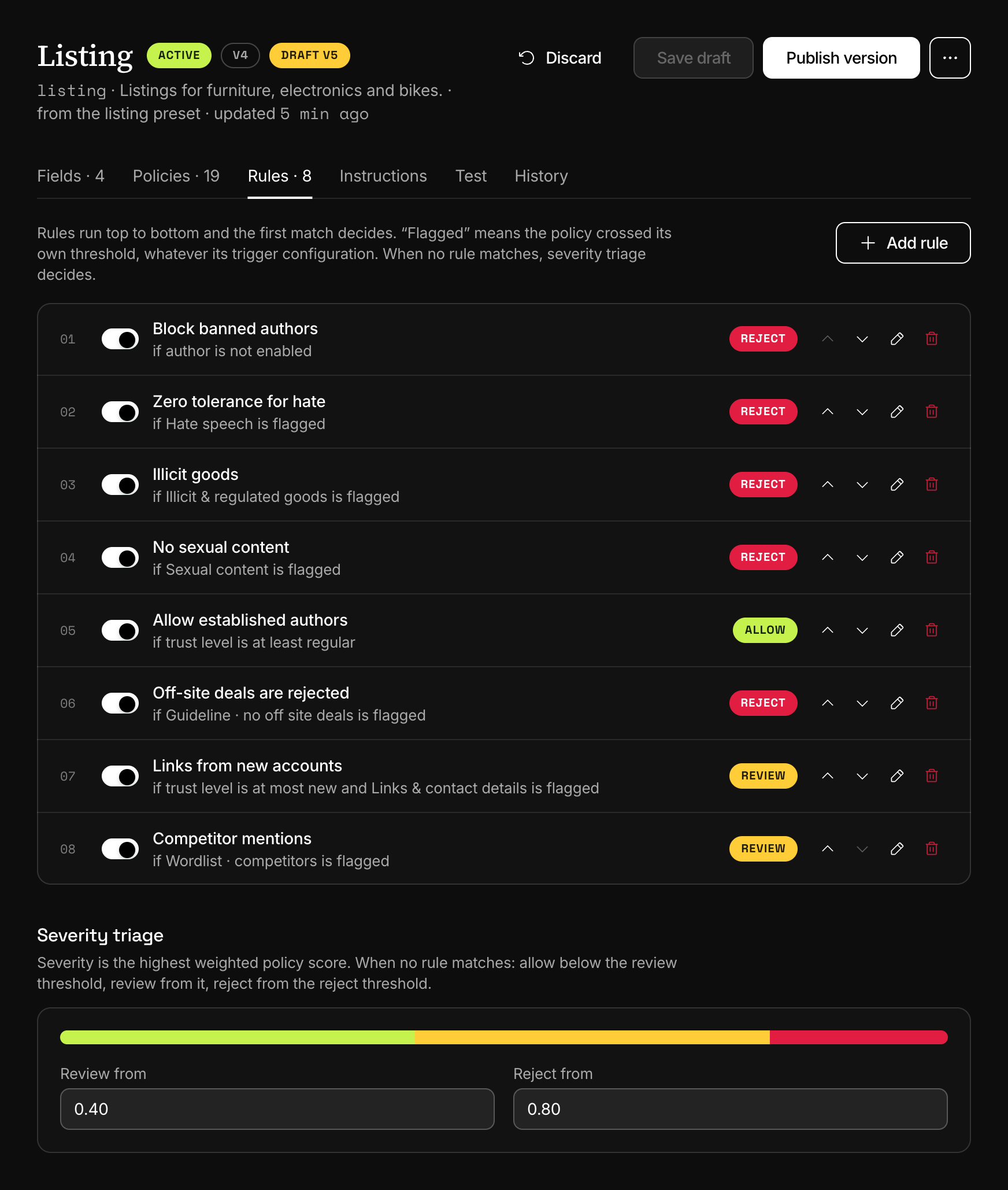
Open Templates, choose the template and open Rules. The list is numbered in the order the rules run, and each row prints its rule as a sentence: "if trust level is at most new and Links & contact details is flagged".
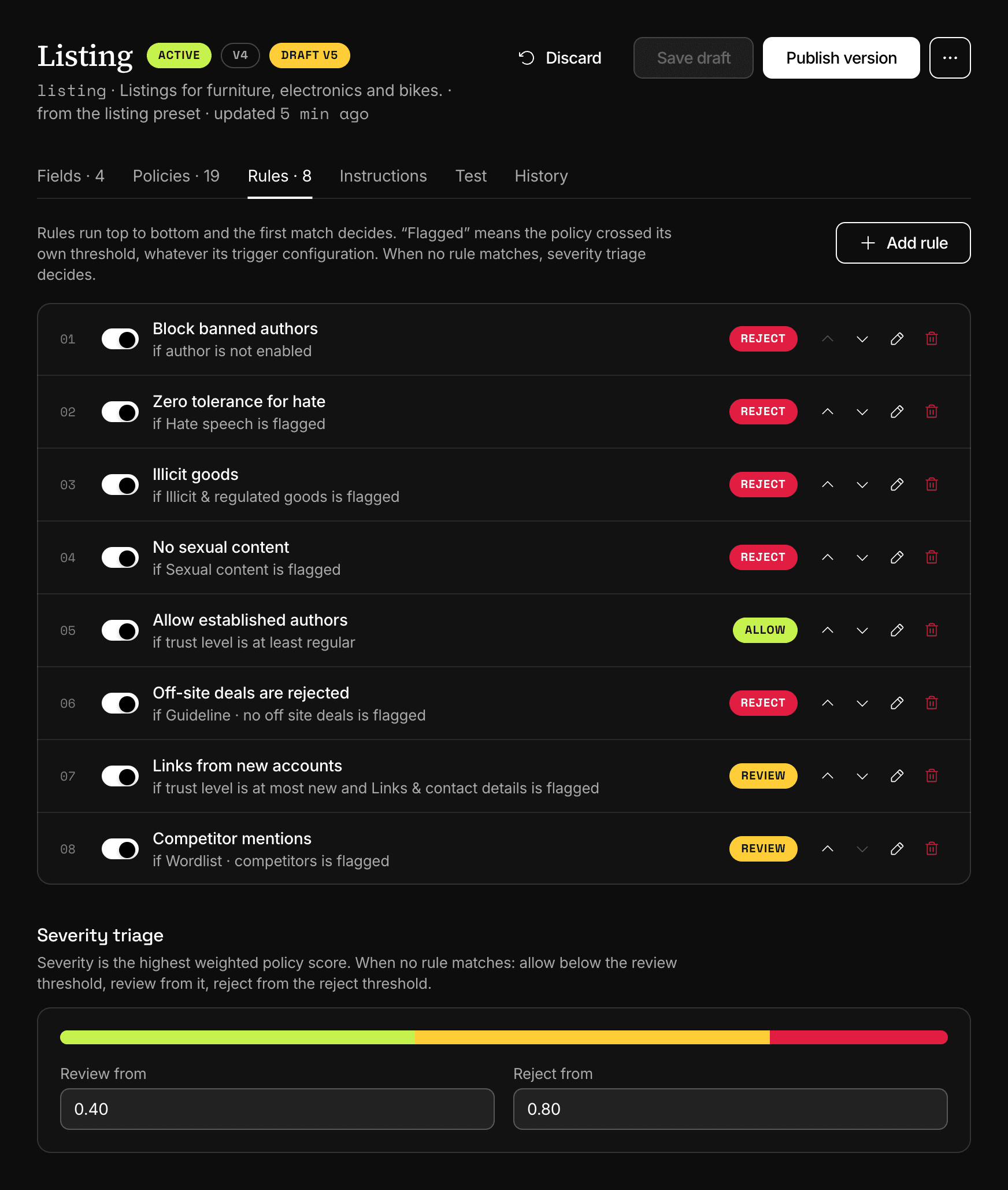
Dashboard, TemplatesThe rules of a template in running order, with severity triage under them. Add a rule
Choose Add rule and give it a Name. Under If all of these hold, pick what the condition tests: Policy is flagged, Policy score, Author status, Author trust level, Field value or Language. Add condition adds another one, joined by "and". Under Then, pick Allow, Review or Reject.
The Reason box is a note for your team. It is printed in the rule list and is not returned by the API.
Put it in order
A new rule goes to the end of the list. Move it with the Move up and Move down arrows of its row. The switch at the start of a row disables a rule without removing it.
Set the triage thresholds
Under the list, Severity triage has Review from and Reject from. Review cannot be higher than reject.
Save and publish
Save draft keeps the change in the draft. Before Publish version makes it live, replay last week's decisions against the draft with a simulation.
Next
- SimulationReplay the last seven days of a template's decisions against its draft and count what would change before you publish. Nothing is charged.
- How a decision is madeTriggers set the verdict, severity ranks the content, your content rules decide first and triage decides the rest. reasons records the path taken.
- Authors and trustInfrared keeps a status, a trust level and a history for each of your users, and content rules read them. Block, suspend or trust an author.
- TriggersA trigger says what a policy's score sets off, a flag or a review, for the whole template or for one field. One of your own replaces the default.
Something missing or unclear on this page? Write to support@useinfrared.com.