Presets
Eight starting points for a template, one per broad kind of content. Each fills in fields, policies, triggers and rules that you then make your own.
A preset is a finished starting point for one kind of content. Choose one when you create a template and its fields, policies, triggers and content rules are filled in, most with AI instructions too. You adjust what does not fit and publish.
From then on the template is yours. Nothing ties it to the preset, and a later change to a preset does not reach templates already made from it.
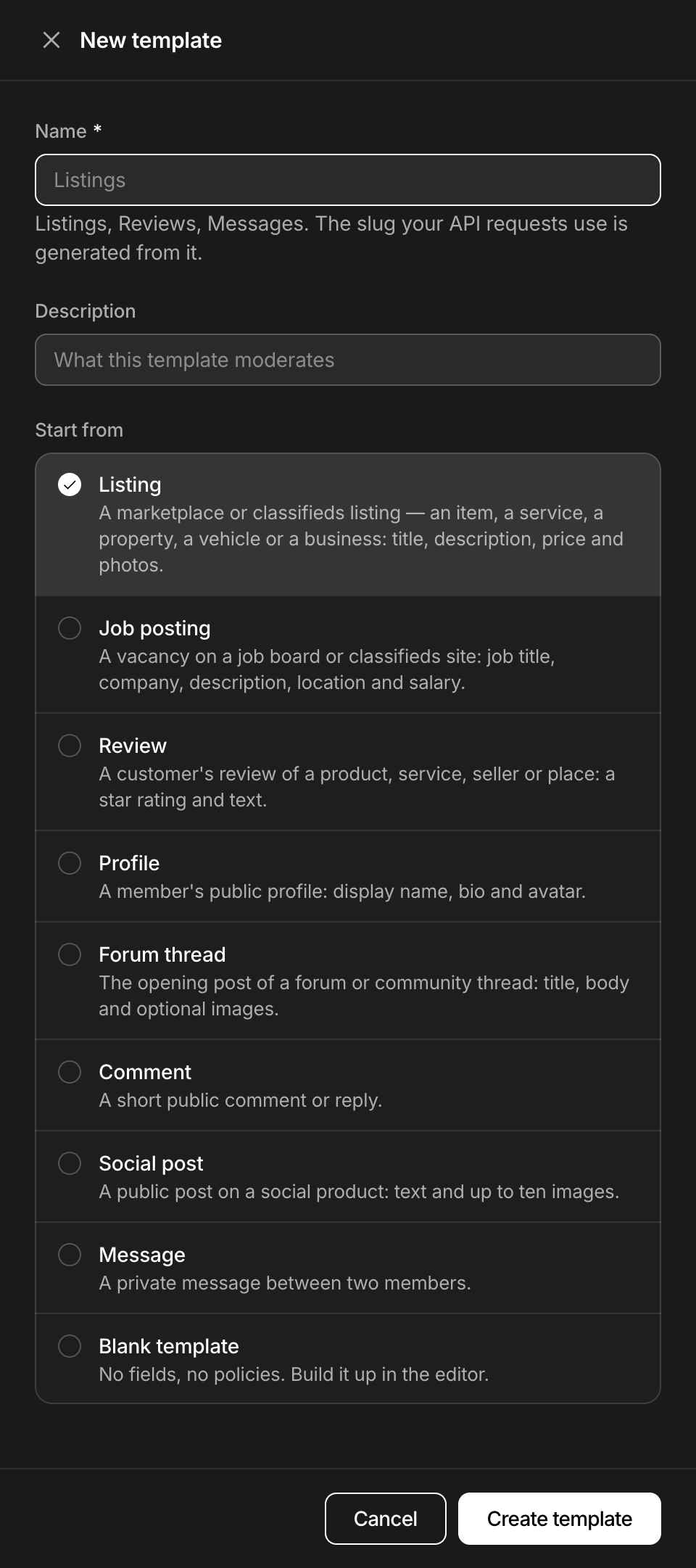
Open Templates, choose New, name the template and pick the preset under Start from. The slug comes from the name you type, not from the preset.
The eight presets
| Preset | For | Fields | AI instructions |
|---|---|---|---|
| Listing | Something offered for sale or rent: an item, a service, a property, a vehicle. | title, description, price, photos | Yes |
| Job posting | A vacancy on a job board or a classifieds site. | title, company, description, location, salary | Yes |
| Review | A customer's review of a product, a service, a seller or a place, with a star rating. | rating, body | Yes |
| Profile | A member's public profile. | display_name, bio, avatar | No |
| Forum thread | The opening post of a forum or community thread. | title, body, images | Yes |
| Comment | A short public comment or reply. | body | No |
| Social post | A public post on a social feed. | text, images | No |
| Message | A private message between two members. | body | Yes |
Blank template is the ninth choice: no fields and no policies.
A narrower kind of content is a preset with your own words. A used-car listing is the Listing preset with a different What this content is, other field descriptions and other AI instructions. Every preset fills in What this content is, and a description for nearly every field.
Fields of each preset
| Preset | Field | Type | Rule | Validation |
|---|---|---|---|---|
| Listing | title | Text | Required | 5 to 120 characters |
| Listing | description | Text | Required | Up to 5,000 characters |
| Listing | price | Number | Optional | At least 0 |
| Listing | photos | Image | Optional | Up to 10 files, max size 10 MB |
| Job posting | title | Text | Required | 3 to 120 characters |
| Job posting | company | Text | Optional | Up to 120 characters |
| Job posting | description | Text | Required | 30 to 10,000 characters |
| Job posting | location | Text | Optional | Up to 120 characters |
| Job posting | salary | Text | Optional | Up to 120 characters |
| Review | rating | Number | Required | 1 to 5 |
| Review | body | Text | Required | 5 to 3,000 characters |
| Profile | display_name | Text | Required | 2 to 60 characters |
| Profile | bio | Text | Optional | Up to 1,000 characters |
| Profile | avatar | Image | Optional | 1 file at most, max size 5 MB |
| Forum thread | title | Text | Required | 5 to 200 characters |
| Forum thread | body | Text | Required | 1 to 20,000 characters |
| Forum thread | images | Image | Optional | Up to 10 files, max size 10 MB |
| Comment | body | Text | Required | 1 to 2,000 characters |
| Social post | text | Text | Optional | Up to 5,000 characters |
| Social post | images | Image | Optional | Up to 10 files, max size 10 MB |
| Message | body | Text | Required | 1 to 5,000 characters |
A max size is reported and does not reject, as Fields and validation explains.
What each policy does
In every preset, toxicity, hate_speech, profanity, violence, self_harm, sexual and illicit flag, and lookalike_characters sends to review. The other policies differ from preset to preset:
| Policy | Listing | Job posting | Review | Profile | Forum thread | Comment | Social post | Message |
|---|---|---|---|---|---|---|---|---|
personal_data | flag | observe | review | flag | flag | flag | flag | observe |
spam | flag | flag | review | flag | review | review | review | review |
links_contact | flag | flag | review | review | observe | review | observe | review |
gibberish | review | review | review | observe | review | observe | observe | observe |
duplicate | review | review | off | off | review | off | off | observe |
off_topic | off | off | review | off | observe | observe | observe | off |
made_with_ai | review | off | observe | off | observe | observe | observe | off |
screenshot, image_quality, watermark | review | off | off | off | off | off | off | off |
Flag and review are the effects of a trigger. An observed policy is scored and returned: it fires no trigger and adds nothing to severity. Presets that carry AI instructions flag on them from 0.70.
Some policies fire on one field only:
- Listing:
links_contactintitle,profanityindescription, andmade_with_aionphotos, from 0.90. - Job posting:
links_contactintitle. - Profile:
profanityandlookalike_charactersindisplay_name,links_contactinbio. - Forum thread:
profanityintitle.
A policy with a field trigger does not fire elsewhere, so a link in a Listing description does not flag. It still counts for severity, and the listing can be sent to review or rejected all the same. Triggers explains why and how to cover every field.
Four presets also set options:
- Listing and Job posting count steering off the platform, such as "write me on WhatsApp", as a contact.
duplicatelooks back 7 days in Listing, at texts of 40 characters or more, and in Forum thread, at texts of 80 or more. In Job posting it looks back 14 days, at texts of 60 or more.- In Message,
duplicatelooks back one day, at texts of 60 characters or more by the same author.
Content rules of each preset
Content rules are read in order and the first one that matches decides. Where none matches, severity triage does, with the default thresholds: review from 0.40, reject from 0.80.
| Preset | Rules, in order |
|---|---|
| Listing | 1. Block banned authors: reject when the author is not enabled. 2. Zero tolerance for hate: reject when hate_speech is flagged. 3. Illicit goods: reject when illicit is flagged. 4. No sexual content: reject when sexual is flagged. 5. Allow established authors: allow from trust level regular. 6. Links from new accounts: review when the trust level is new and links_contact is flagged. |
| Job posting | 1. Block banned authors. 2. Discrimination is rejected: reject when hate_speech is flagged. 3. Illegal work is rejected: reject when illicit is flagged. 4. Contacts from new accounts: review when the trust level is new and links_contact is flagged. |
| Review | 1. Zero tolerance for hate. |
| Profile | None. |
| Forum thread | 1. Block banned authors. 2. Zero tolerance for hate. |
| Comment | 1. Zero tolerance for hate. |
| Social post | 1. Block banned authors. 2. Zero tolerance for hate. |
| Message | 1. Threats are rejected: reject when violence scores 0.80 or more. 2. Links from new accounts. |
Read the Listing rules with trust levels in mind. A link from an author at trust level new is sent to review and one from regular up is allowed. The level in between, basic, matches neither rule, and triage rejects the link.
AI instructions of each preset
The full text is on the Instructions tab of a template made from the preset.
| Preset | What the instructions check |
|---|---|
| Listing | That the title, description, price and photos describe the same offer, that the photos show it and are not stock images, and that the price is plausible. Listings that only advertise another website or ask buyers to pay outside the platform are flagged. |
| Job posting | That the posting describes a real job. Flagged: fees or purchases asked of candidates, bank or ID details asked before hiring, applications moved to a messenger, pay far above the role, recruiting for multi-level marketing, drug couriers or money mules, and requirements that discriminate. |
| Review | That the review describes a real experience. Flagged: fake or paid reviews, attacks on a person, promotion of a competitor, and reviews unrelated to the purchase or visit. |
| Forum thread | That the thread starts a real discussion or asks a real question. Flagged: threads that only advertise, that farm links or engagement, or that expose someone's private information. |
| Message | Scams and fraud: requests for money, gift cards, crypto or prepayment, fake payment or delivery confirmations, requests for login codes, passwords or card details, and impersonation of platform staff. Also unsolicited sexual content and any attempt to groom or exploit a minor. |
Fitted to your plan
Five presets carry it: Listing, Review, Forum thread, Comment and Social post. After an upgrade it is not added back by itself. Switch it on in the Policies tab of the template.
Next
- TemplatesA template is the configuration for one kind of content. It holds the fields, the policies and the rules, and requests name it by its slug.
- Fields and validationA template's fields say what a submission must contain. Validation runs first, costs nothing and answers with one error per problem, named by field.
- TriggersA trigger says what a policy's score sets off, a flag or a review, for the whole template or for one field. One of your own replaces the default.
- Content rulesOrdered rules on a template turn scores, author trust and field values into allow, review or reject. Severity triage decides when no rule matches.
Something missing or unclear on this page? Write to support@useinfrared.com.