Fields and validation
A template's fields say what a submission must contain. Validation runs first, costs nothing and answers with one error per problem, named by field.
Fields are the parts of a submission: a title, a description, a price, photos. Each has a type and rules, and every submission is checked against them before any policy runs. That check calls no model and uses no check of your plan.
A submission that breaks a rule comes back with one error per problem, each naming its field, so your form can show every message beside the input it belongs to.
curl https://api.useinfrared.com/v1/moderations \
  -H "Authorization: Bearer $INFRARED_KEY" \
  -H "Content-Type: application/json" \
  -d '{
    "template": "listing",
    "content_id": "item_8841",
    "fields": {
      "title": "Bike",
      "description": "Aluminium frame, serviced in spring.",
      "price": -5,
      "colour": "red"
    }
  }'
const response = await fetch("https://api.useinfrared.com/v1/moderations", {
method: "POST",
headers: {
Authorization: `Bearer ${process.env.INFRARED_KEY}`,
"Content-Type": "application/json",
},
body: JSON.stringify({
template: "listing",
content_id: "item_8841",
fields: {
title: "Bike",
description: "Aluminium frame, serviced in spring.",
price: -5,
colour: "red",
},
}),
});
const moderation = await response.json();import os
import requests
response = requests.post(
"https://api.useinfrared.com/v1/moderations",
headers={"Authorization": f"Bearer {os.environ['INFRARED_KEY']}"},
json={
"template": "listing",
"content_id": "item_8841",
"fields": {
"title": "Bike",
"description": "Aluminium frame, serviced in spring.",
"price": -5,
"colour": "red",
},
},
)
moderation = response.json(){
"object": "moderation",
"id": "mod_4tuxoYhQK5SSPJvilyW2mY",
"template": { "slug": "listing", "version": 1 },
"type": "form",
"status": "invalid",
"flagged": true,
"recommendation": "reject",
"severity": "none",
"policies": {},
"reasons": ["validation_failed"],
"validation_errors": [
{ "field": "colour", "code": "unknown_field", "message": "colour is not a field of this template" },
{ "field": "title", "code": "min_length", "message": "Title must be at least 5 characters" },
{ "field": "price", "code": "min", "message": "Price must be at least 0" }
],
"usage": { "checks": 0, "cached": false },
"test": true,
"content_id": "item_8841",
"fields": {
"title": {
"object": "moderation",
"id": "mod_22BnpvM0UrFLx0jGT1a0On",
"field": "title",
"status": "invalid",
"validation_errors": [
{ "field": "title", "code": "min_length", "message": "Title must be at least 5 characters" }
],
"parent_id": "mod_4tuxoYhQK5SSPJvilyW2mY"
},
"description": {
"object": "moderation",
"id": "mod_7MEzT5TlPhupQ8yADIT7Mo",
"field": "description",
"status": "invalid",
"parent_id": "mod_4tuxoYhQK5SSPJvilyW2mY"
}
}
}The answer is HTTP 200: the request was understood and the content was refused. Every problem is listed at once, on the form and again on the field it belongs to. price has no entry under fields because a number is validated and not screened. Statuses and errors lists every code.
What a field is made of
A field as GET /v1/templates/{slug} returns it, and as the Fields tab of the editor shows it:
keystringWhat your requests send: a key of
fields, or the value offield. Lowercase letters, digits and underscores, starting with a letter, 64 characters at most. Unique in the template.namestringThe label, 100 characters at most. Validation messages use it: "Title must be at least 5 characters".
typestringWhat the value is. The type decides which rules apply and whether the value is screened.
One of
textimagenumberbooleanenumurljsonrequiredbooleanDefaultfalseWhether a submission must carry a value. Required or Optional in the editor.
descriptionstringOptionalWhat the field holds, for the models. 500 characters at most.
validationobjectThe rules for the value. Which ones exist depends on the type.
triggersarrayTriggers that apply to this field only.
policiesarrayOptionalWhen present, only these policies run on the field.
A template holds up to 40 fields. A field's key is part of your API: change it and submissions that still send the old key become invalid.
Field types
type | In the editor | What happens to the value |
|---|---|---|
text | Text | Screened by the text policies. In a form it gets its own result under fields. |
image | Image | One or more image URLs, each screened. In a form it gets its own result under fields. |
number | Number | Validated: a number, or a string that reads as one. |
boolean | Boolean | Validated: true or false. |
enum | Enum | Validated: one of the values you list. |
url | URL | Validated: a string that starts with http:// or https://. |
json | JSON | Validated: an object or an array. |
No policy runs on a number, a boolean, an enum, a URL or a JSON value, link policies included. Those values are there for your content rules to test and for the AI instructions to read.
Validation rules
| Type | Rule | In the editor | A value passes when | Error code |
|---|---|---|---|---|
text | min_length | Min characters | It has at least this many characters. | min_length |
text | max_length | Max characters | It has at most this many characters. | max_length |
text | numeric | Numbers only | It holds digits, with an optional sign, spaces, dots and commas. | numeric |
text | pattern | Pattern | It matches the regular expression. | pattern |
number | min | Minimum | It is at least this number. | min |
number | max | Maximum | It is at most this number. | max |
enum | enum_values | Allowed values | It is one of the listed values. | enum |
image | min_items | Min files | It holds at least this many files. | min_items |
image | max_items | Max files | It holds at most this many files. | max_items |
An image field has three more rules, for size and dimensions. They are reported and never reject: see Image size and dimensions.
What the table does not say:
- A value of the wrong JSON type answers
type: a number where text is expected, a word where a number is. - Characters are counted as Unicode code points, so an accented letter is one character.
- Every text is also held to 20,000 characters, whatever Max characters says.
patternis searched for anywhere in the value. Start it with^and end it with$to match the whole value.- An image field with no Max files takes up to 20 files, and Max files goes up to 50. A required image field needs at least one file.
- Each file of an image field must be an
httporhttpsURL. One that is not answersurl.
Image size and dimensions
Max size (max_bytes, entered in megabytes), Min width and Min height (min_width and min_height, in pixels) never reject a submission. They are read once the image is downloaded, during screening. An image that misses one of them is still screened and still counted, and a note is added to validation_errors of that field's result: the image's url, the code max_bytes or dimensions, and a message.
The note is returned for a whole form only. A single image object and the test console do not return it.
Whatever the field allows, an image over 10 MB is not downloaded. That is a failed fetch, not a validation error, and the submission stays valid. Moderate images says how images are fetched and what a failed fetch returns.
Required, empty and unknown values
- A value is empty when its key is missing, or when it is
null, an empty string or an empty list.falseand0are values. - An empty required field answers
required. An empty optional field is skipped, and none of its rules apply. - A key the template does not have answers
unknown_fieldand makes the whole submission invalid. Nothing is dropped silently.
One check comes earlier, on the shape of the request itself. A form with no fields, with more than 40, or with a key that holds anything but lowercase letters, digits and underscores answers 422 validation_error, and no moderation is created.
One object and its field
A request that sends a single object can say which field it is, with "field": "title". That field's rules then apply to input. Without field, a text is held to the 20,000 character limit only, and an image request takes exactly one URL.
field has to name a field of the right kind. A text can name any field that is not an image field, and an image can only name an image field. A mismatch answers type_mismatch, and a key the template does not have answers unknown_field. Moderate text shows such a request.
Tell the models what a field holds
What it holds is the field's description: a sentence for the models, not for your users. They read it whenever they judge the field, and it replaces any assumption about what a text or a picture is. "Photos of the item itself. A brand label on the item is normal." keeps a logo from being read as an advertisement.
A description reaches the models only when the request says which field the content is: in a form, or in a single object with field.
Run only some policies on a field
Only run these policies limits a text or image field to the policies you pick, from those the template enables. Left empty, every enabled policy that fits the field's type runs on it.
The limit covers the scoring of the field itself. The AI instructions and your guidelines, which read all fields together, still read it.
Edit fields in the dashboard
Open a template in Templates. The Fields tab lists the fields with their type, rule, validation and triggers.
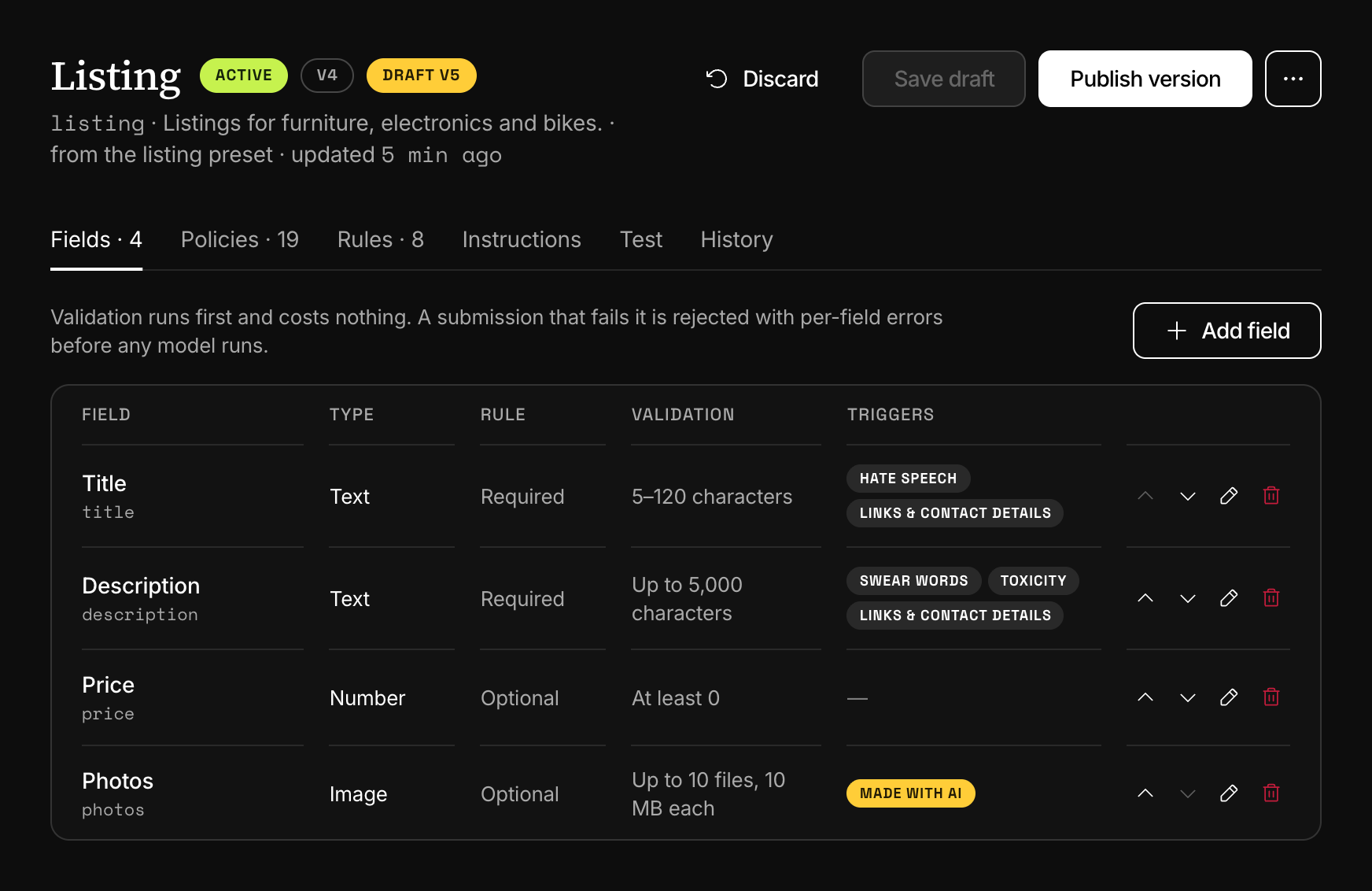
Add field opens the form: Name, Key (filled in from the name as you type), Type, the Rule switch, What it holds, then the validation inputs of the chosen type. For a text or image field, Triggers and Only run these policies follow. The arrows on a row change the order, which is also the order of the form on the Test tab.
Removing a field removes the rule conditions that compare it. Changes apply once you choose Save draft and then Publish version, as Versions, testing and diff describes.
Next
- TriggersA trigger says what a policy's score sets off, a flag or a review, for the whole template or for one field. One of your own replaces the default.
- Moderate a whole formSend every field of a listing, a profile or a post in one request. Each content field gets its own result and the parent carries the decision.
- Statuses and errorsThe five statuses a moderation can have and every error the moderation endpoints return, with the HTTP status, the code and what to do next.
- Versions, testing and diffEdits go to a draft, a test runs it and keeps nothing, and publishing makes it the version every request runs. Earlier versions stay comparable.
Something missing or unclear on this page? Write to support@useinfrared.com.