Simulation
Replay the last seven days of a template's decisions against its draft and count what would change before you publish. Nothing is charged.
A change to a rule or a threshold is quick to make and hard to predict: one condition can move hundreds of items between allow, review and reject.
Simulation answers before you publish. It takes the decisions a template made in the last seven days, decides each of them again with the draft, and counts how many would come out differently. It reuses the scores that were stored, so no model runs and no checks are used.
It is part of the dashboard, on the Test tab of the template editor. The API has no endpoint for it.
Run a simulation
Change the draft
Open Templates, choose the template and edit what decides: content rules, triage thresholds, triggers, or the mode and threshold of a policy.
Replay the last 7 days
Open the Test tab. Under Simulation, choose Replay last 7 days. Edits you have not saved are saved to the draft first.
The button stays disabled until the template has a draft or an unsaved change: there is nothing to compare with the live version yet.
Read the three figures
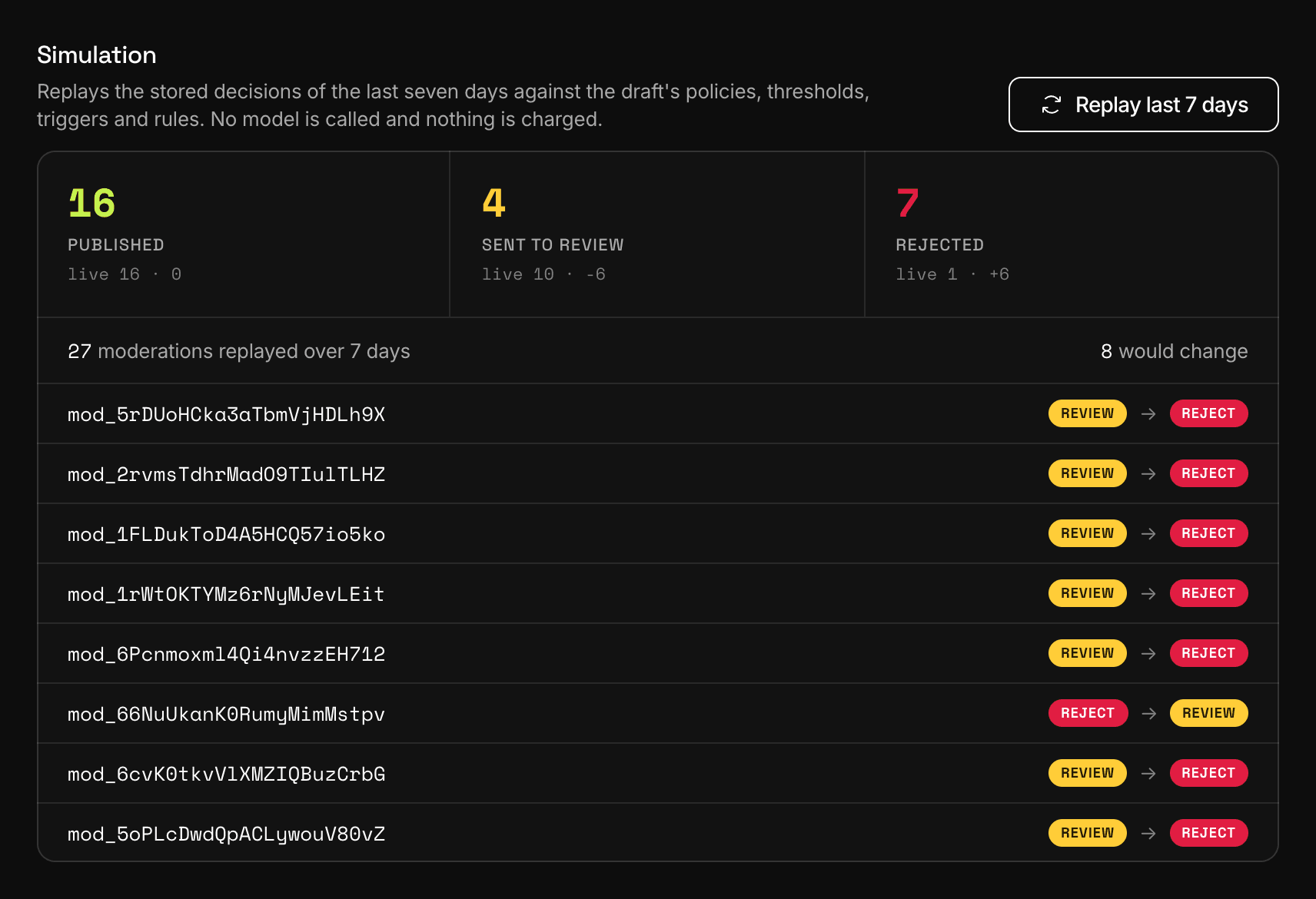
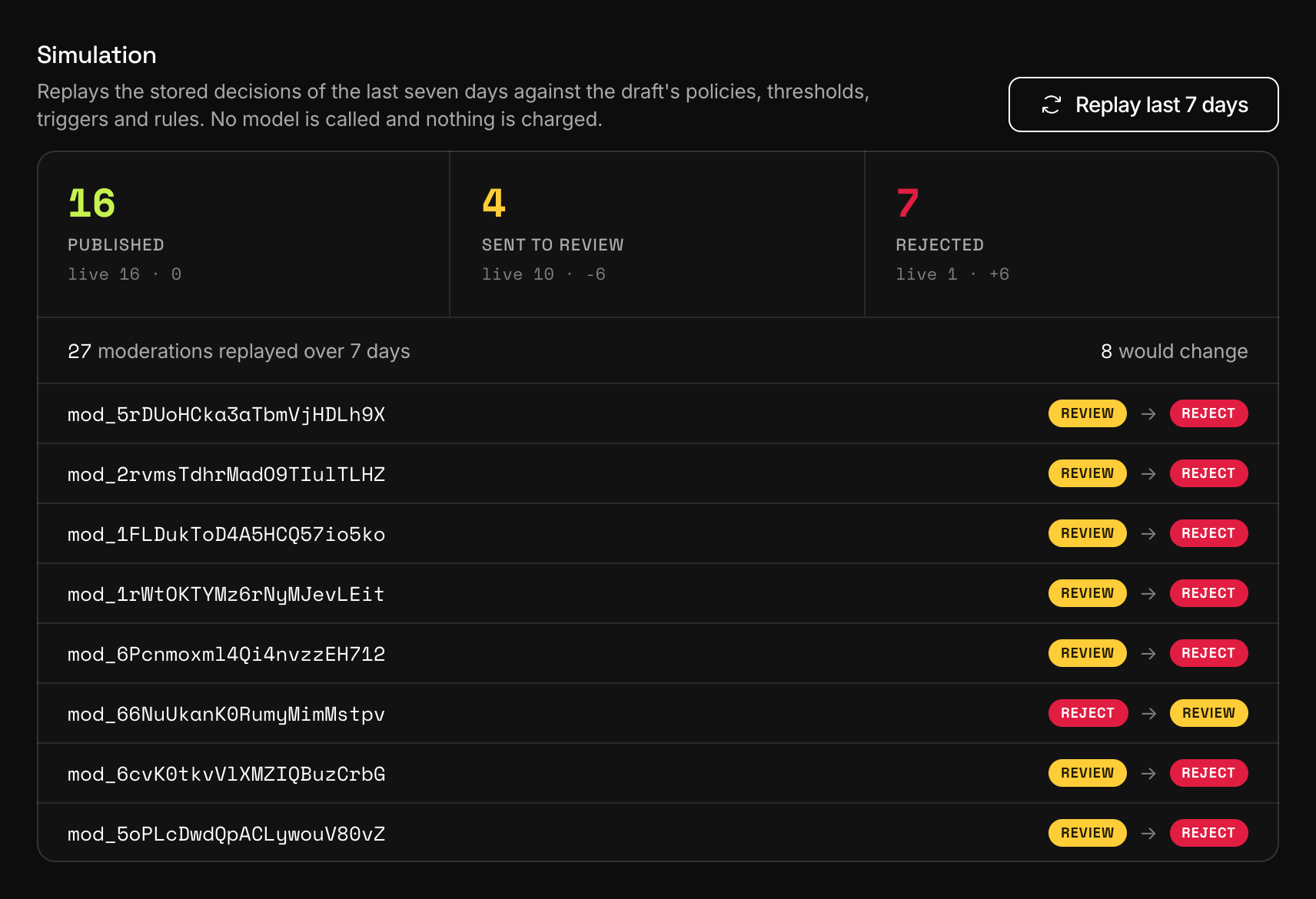
Dashboard, TemplatesA replay on the Test tab: what the draft would answer, next to what the template answered. Published, Sent to review and Rejected are what the draft would have answered: allow, review and reject. Under each figure a line such as
live 900 · -50says how often the template gave that answer in the seven days, and the difference.Below them, the panel says how many moderations were replayed and how many would change, then lists up to twelve of those. Each one links to the moderation in the Live console and shows its recommendation before and after.
Publish or keep editing
Nothing has changed for live requests. Choose Publish version when the numbers are the ones you want. Versions covers publishing and going back.
What is replayed
The moderations of this template from the last seven days, newest first, up to 20,000:
- single objects and whole forms, not the per-field moderations inside a form;
- made with a live key, so test-key traffic and runs of the test console are left out;
- finished, with the status
completedorpartial; - from every version of the template, dry runs included.
Each one keeps what it had when it ran: its scores, the author's status and trust level at that moment, its field values and its language. The draft supplies the rest: which policies are on, each policy's mode and threshold, the triggers, the content rules and the triage thresholds.
What a simulation cannot show
Scores are reused, never computed again. That sets the limits:
- A policy you add in the draft has no stored score, so it changes nothing in the replay. A policy you remove drops out of it.
- A change to policy options, to AI instructions, to a guideline's text, to a wordlist's terms or to the project context is not reflected.
- A changed
weightis ignored: each moderation is replayed with the weight it ran with. - The score of the template's AI instructions is left out of the replay, unless the template lists AI instructions on its Policies tab. A moderation that the instructions rejected replays as allowed, so a draft you did not touch can show changes.
- A moderation whose content was not stored keeps its scores and its number, boolean and enum fields. A rule on one of its text fields is replayed against an empty value.
- The number beside "would change" stops at 100. The three figures stay exact, and they are net: moves in opposite directions cancel out.
How far back it reaches
Seven days, or less when the project keeps content for a shorter time: the stored decision of a moderation goes when its retention ends. A template that was never published has nothing to replay.
Simulation, dry run and the test console
Three tools answer three different questions.
- Simulation looks back: what would this draft have decided last week.
- A dry run looks at live traffic: the published version decides, and your product does not enforce the result yet.
- The test console, above the simulation on the same tab, runs one sample through the draft or the live version and leaves no trace. Test a template covers it, with the API call that does the same.
Who can run it
| Limit | Free | Starter | Growth | Business |
|---|---|---|---|---|
| Simulation | Not included | Included | Included | Included |
Starting a simulation takes the Owner, Admin, Project admin or Developer role. The built-in basic check has no draft and no rules, so its Test tab shows the console only.
Next
- Content rulesOrdered rules on a template turn scores, author trust and field values into allow, review or reject. Severity triage decides when no rule matches.
- Versions, testing and diffEdits go to a draft, a test runs it and keeps nothing, and publishing makes it the version every request runs. Earlier versions stay comparable.
- Dry run and re-moderationRun your rules on real traffic without enforcing them, and run stored content again after a template changes. What each one records and what it costs.
Something missing or unclear on this page? Write to support@useinfrared.com.