Versions, testing and diff
Edits go to a draft, a test runs it and keeps nothing, and publishing makes it the version every request runs. Earlier versions stay comparable.
Editing a template does not change what your requests run. Edits collect in a draft. A test runs the draft against a sample and stores, queues and charges nothing. Publishing makes the draft the version every request runs from then on.
Earlier versions are kept. Every moderation names the version that judged it, and any two versions can be compared.
- DraftDraft
v1Editable. Nothing runs it but a test.- Requests
409 template_not_published - Tests
v1
- Requests
- Publish version
- PublishedLive
v1Can no longer be edited.- Requests
v1 - Tests
v1
- Requests
- Edit, then Save draftDiscardThe draft is dropped. v1 keeps running.
- Published, with a draftThe draft starts as a copy of v1. Requests do not see it.
v1Livev2Draft v2- Requests
v1 - Tests
v2orv1, see the note
- Requests
- Publish version
- PublishedLive
v2v1 is kept in History. Moderations that ran on it keep its number.- Requests
v2 - Superseded
v1
- Requests
- Test tab
- the draft, unless you switch to Live version
POST /v1/templates/{slug}/test- the published version, unless the body has
"draft": true
Draft, published, superseded
| Version | What it is | What runs it |
|---|---|---|
| draft | The one version you can edit. A template has at most one. | A test, and nothing else. |
| published | The current version, marked Live in the History tab. It can no longer be edited. | Every request that names the template. |
| superseded | An earlier published version. | Nothing. Moderations that ran on it keep its number. |
A new template starts as draft number 1, and nothing runs until it is published. Editing a published template opens a new draft, copied from the published version, and the published version keeps running untouched.
Versions are numbered 1, 2, 3 per template. A draft already carries the number it will be published under, shown as Draft v2 beside the title. version in GET /v1/templates/{slug} and template.version in every moderation are that number.
Save a draft and publish it
Edit
Change anything in the tabs of the editor. An Unsaved badge appears beside the title. Until you save, the edits exist in your browser only.
Save the draft
Choose Save draft. The whole configuration is checked first. When something does not hold together, nothing is saved, and a panel titled "The configuration is not valid yet" lists each problem with its place:
rules.2.conditions.0.policy: toxicity is not an enabled policy.Test it
Open the Test tab and run a few samples against the draft. The next section covers it.
Publish
Choose Publish version. The confirmation takes optional Release notes, which the History tab shows beside the version. The new version judges the next request, and the one before it becomes superseded.
Three things about drafts are worth knowing:
- A template needs at least one field before it can be published.
- Discard drops the draft. Every change since the last published version is lost, and the published version keeps running.
- There is no rollback. To return to an earlier configuration, open that version in History, make the draft match it and publish again.
A new version judges new requests only. To see what it makes of content you already have, re-moderate it: a re-moderation runs the version that is published now.
Test a template
A test runs a sample through a template and leaves nothing behind. Use it to see what a change does before it reaches a single real submission.
In the dashboard
Open a template in Templates and choose the Test tab.
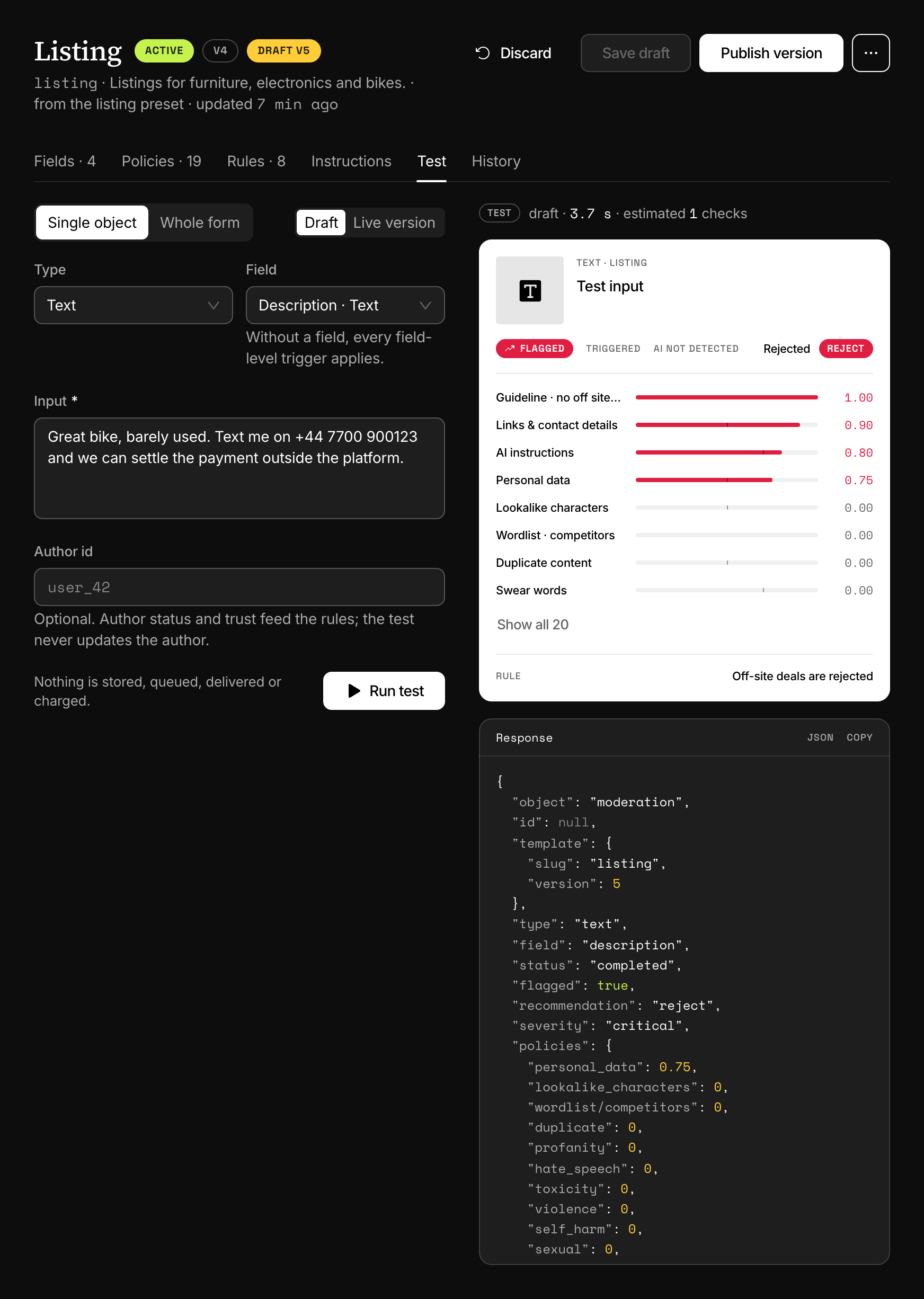
- Single object tests one text or one image. Whole form shows one input per field of the template.
- Draft or Live version picks what runs. Draft is selected whenever the template has one, and unsaved edits are saved to the draft before the test.
- Field says which field a single object is. Left on "Template level", every field trigger applies, as for a request without
field. - Author id is optional. The author's status and trust level feed your content rules, and the test does not update the author.
Run test shows the verdict card and, under Response, the JSON your integration would receive. Running a test takes the Owner, Admin, Project admin or Developer role.
Under the console, the same tab holds Simulation, which replays the decisions of the last seven days against the draft.
Over the API
The body is a moderation request, a single object or a form, with one more key.
curl https://api.useinfrared.com/v1/templates/review/test \
  -H "Authorization: Bearer $INFRARED_KEY" \
  -H "Content-Type: application/json" \
  -d '{
    "type": "text",
    "field": "body",
    "input": "Worst seller ever. You are a complete idiot."
  }'
const response = await fetch("https://api.useinfrared.com/v1/templates/review/test", {
method: "POST",
headers: {
Authorization: `Bearer ${process.env.INFRARED_KEY}`,
"Content-Type": "application/json",
},
body: JSON.stringify({
type: "text",
field: "body",
input: "Worst seller ever. You are a complete idiot.",
}),
});
const moderation = await response.json();import os
import requests
response = requests.post(
"https://api.useinfrared.com/v1/templates/review/test",
headers={"Authorization": f"Bearer {os.environ['INFRARED_KEY']}"},
json={
"type": "text",
"field": "body",
"input": "Worst seller ever. You are a complete idiot.",
},
)
moderation = response.json(){
"object": "moderation",
"id": null,
"template": { "slug": "review", "version": 1 },
"type": "text",
"field": "body",
"status": "completed",
"flagged": true,
"recommendation": "reject",
"severity": "critical",
"policies": {
"toxicity": 0.98,
"instructions": 1 // the other policies of the template are trimmed
},
"triggered": ["toxicity", "instructions"],
"rule": null,
"reasons": ["trigger:toxicity@body:flag", "trigger:instructions:flag", "triage:reject"],
"usage": { "checks": 0, "estimated": 1, "cached": false },
"test": true
}draftbooleanDefaultfalsefalseruns the published version, and answers 409template_not_publishedwhen there is none.trueruns the draft, or the published version when the template has no draft.
The slug in the path decides which template runs, and a template key in the body is ignored. The key needs the moderate scope, live and test keys both work, and each call counts toward the key's rate limit. Idempotency-Key is not read here.
What a test runs and what it skips
A test runs the whole pipeline: validation, every policy the template enables, the downloading of images, the AI instructions and guidelines, triggers, content rules and triage. The duplicate policy looks at your real stored moderations, so a text that already went through live can score as a duplicate.
It skips everything that would leave a trace:
- No moderation is recorded. Nothing shows in the live console or in
GET /v1/moderations. - No check is used and the allowance is not consulted, so a test runs with no checks left.
- The input and the images are not stored.
- No author is created or updated. An existing author's status and trust level are read.
- No review queue item, no webhook and no usage record are created.
- The result cache is neither read nor written.
A test always answers in the same response, images included, and mode is ignored.
How the answer differs from a moderation
idisnull, on the object and on every field of a form.testistrue.usage.estimatedis the number of checks the same request would use with a live key, before any discount for a cached result.template.versionis the version that ran: the draft's number when the draft was tested.
Two things in the answer of a whole-form test do not match a real moderation today:
detailsis the same on the form and on every field: the entries of all fields merged into one. A real moderation keeps each field's details on that field.- When the form fails validation, the fields come back with
status: "screening"and without their own errors. A real moderation marks theminvalidand repeats each field's errors on it.
Compare versions
The History tab lists every version, newest first: its number, its status, when it was published and its release notes.
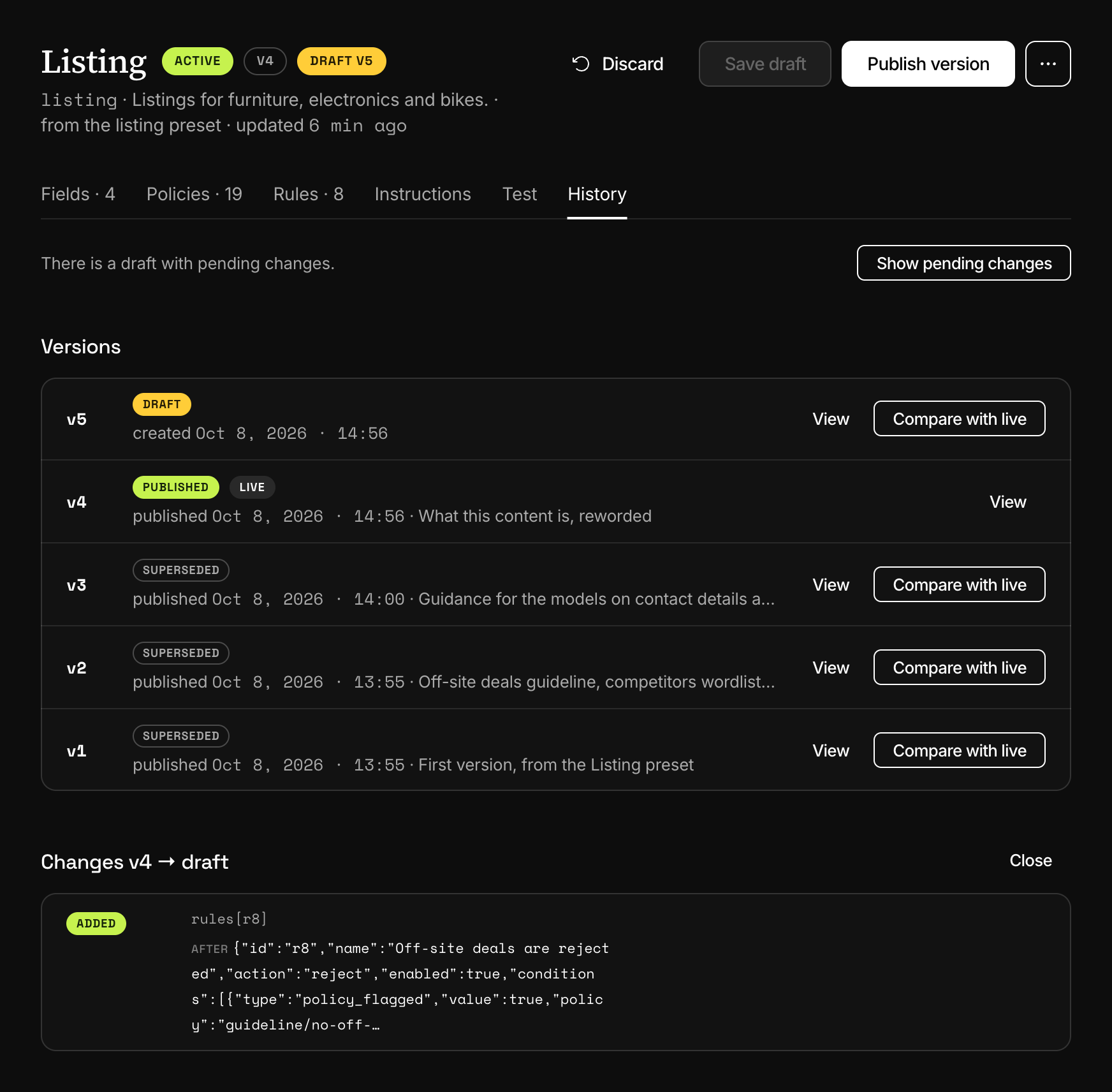
- View opens a version as JSON, with its id and its checksum. Two versions with the same checksum hold the same configuration.
- Compare with live lists what differs between that version and the published one.
- Show pending changes appears when there is a draft, and compares the published version with it.
Each change has a kind, a path, and the value before and after. Five edits to the review template of the example above are listed like this:
| Kind | Path | Before | After |
|---|---|---|---|
| changed | fields[body].validation.max_length | 3000 | 5000 |
| reordered | fields | ["rating","body"] | ["body","rating"] |
| added | policies[duplicate] | {"key":"duplicate","mode":"observe"} | |
| removed | triggers[spam] | {"effect":"review","policy":"spam"} | |
| changed | severity.review | 0.4 | 0.5 |
Lists are matched by identity and not by position: fields and policies by their key, rules by their id, triggers by their policy. Moving a field or a rule is one reordered entry, not a string of changes.
History and comparison are in the dashboard only. The API returns the published version, never a draft, an earlier version or a diff.
Run settings
A template also carries settings that are neither fields nor policies. They are on the Instructions tab, in the Run settings panel, and come back under settings. Like every other edit, they go to the draft and apply once published.
| In the editor | In settings | What it does |
|---|---|---|
| Review SLA | review_sla_minutes | How many minutes a review queue item of this template may wait before it is overdue, from 1 to 10,080. Empty means no deadline. |
| Language hint | language_hint | The language to assume for a text that is too short to detect one. |
| Store inputs | store | Off keeps the input and the media of this template's moderations out of storage. See Data retention and privacy. |
| Cache results | cache | Off stops this template from reusing the scores of identical content. |
Store inputs and Cache results can only switch something off. On does not override the project: where storage or the cache is off in Settings, Project, it stays off, and On behaves like Project default.
The thresholds of severity triage are part of a version too. They are on the Rules tab, described with the content rules.
Next
- SimulationReplay the last seven days of a template's decisions against its draft and count what would change before you publish. Nothing is charged.
- Test modeA test key runs the whole pipeline and uses no checks. It is not a sandbox: its moderations still reach the review queue and your webhooks.
- TriggersA trigger says what a policy's score sets off, a flag or a review, for the whole template or for one field. One of your own replaces the default.
- Content rulesOrdered rules on a template turn scores, author trust and field values into allow, review or reject. Severity triage decides when no rule matches.
Something missing or unclear on this page? Write to support@useinfrared.com.