Test mode
A test key runs the whole pipeline and uses no checks. It is not a sandbox: its moderations still reach the review queue and your webhooks.
A test key lets you build and run your integration against the real pipeline without spending checks. Use it in development, in CI and on staging, and switch to a live key when real users' content starts to flow.
Test mode is a property of the key, not a separate environment. A test key works on the same project, the same templates and the same data as a live key. Create one in Settings, API keys by picking Test as the environment.
curl https://api.useinfrared.com/v1/moderations \
  -H "Authorization: Bearer $INFRARED_KEY" \
  -H "Content-Type: application/json" \
  -d '{
    "type": "text",
    "input": "Worst seller ever. You are a complete idiot."
  }'
const response = await fetch("https://api.useinfrared.com/v1/moderations", {
method: "POST",
headers: {
Authorization: `Bearer ${process.env.INFRARED_KEY}`,
"Content-Type": "application/json",
},
body: JSON.stringify({
type: "text",
input: "Worst seller ever. You are a complete idiot.",
}),
});
const moderation = await response.json();import os
import requests
response = requests.post(
"https://api.useinfrared.com/v1/moderations",
headers={"Authorization": f"Bearer {os.environ['INFRARED_KEY']}"},
json={
"type": "text",
"input": "Worst seller ever. You are a complete idiot.",
},
)
moderation = response.json(){
"object": "moderation",
"id": "mod_4Vy9b9w1MRrTGXH5RXlSnO",
"template": { "slug": "basic", "version": 1 },
"status": "completed",
"flagged": true,
"recommendation": "reject",
"usage": { "checks": 0, "cached": false },
"dry_run": false,
"test": true,
"created_at": "2026-10-08T08:46:24.485Z",
"completed_at": "2026-10-08T08:46:26.682Z"
}The verdict is real. Two fields say it came from a test key: usage.checks is 0, and test is true. A moderation made with a live key has no test field at all.
POST /v1/moderationsSame project, same templates, same data.ir_test_…ir_live_…usage.checks: 0usage.checks: 1GET /v1/usagereview"test": truetest fieldWhat a test key changes
- No checks. A test moderation costs nothing and is never refused with 402
quota_exceeded. - Usage is counted apart. Test traffic has its own view on the Usage page and is left out of
GET /v1/usage. - No author history. A test moderation does not move the author's counters or trust level. The author's current status and trust still feed the decision, and an
author_idthe project has not seen still creates the author. - Not a duplicate. The
duplicatepolicy does not count test moderations as earlier copies, and a simulation leaves them out.
What stays the same
- The review queue. A test moderation whose recommendation is
reviewgoes into the review queue like any other. - Webhooks.
moderation.completedand the queue events are sent to your webhook endpoints. - Storage. Test content is stored and removed on the same terms as live content. See Data retention and privacy.
- The plan. A named template on the Free plan is still refused, and the batch size still applies.
- The rate limit. A test key gets the plan's requests a minute, the same as a live key.
- Scopes. They work the same on both kinds of key.
Tell test traffic apart
- In a webhook, read
data.moderation.test. Aqueue_item.createdevent carries no flag of its own: look the moderation up by itsmoderation_id. - In the API,
GET /v1/moderationsreturns test and live moderations together, and each test one carriestest: true. - In the dashboard, the Live console labels test rows and has a Test switch that hides them. The Usage page switches between Live and Test.
The Overview shows live traffic only. A first request made with a test key appears in the Live console and not on the Overview, and the second step of the setup checklist there stays open until a live request arrives.
The test console
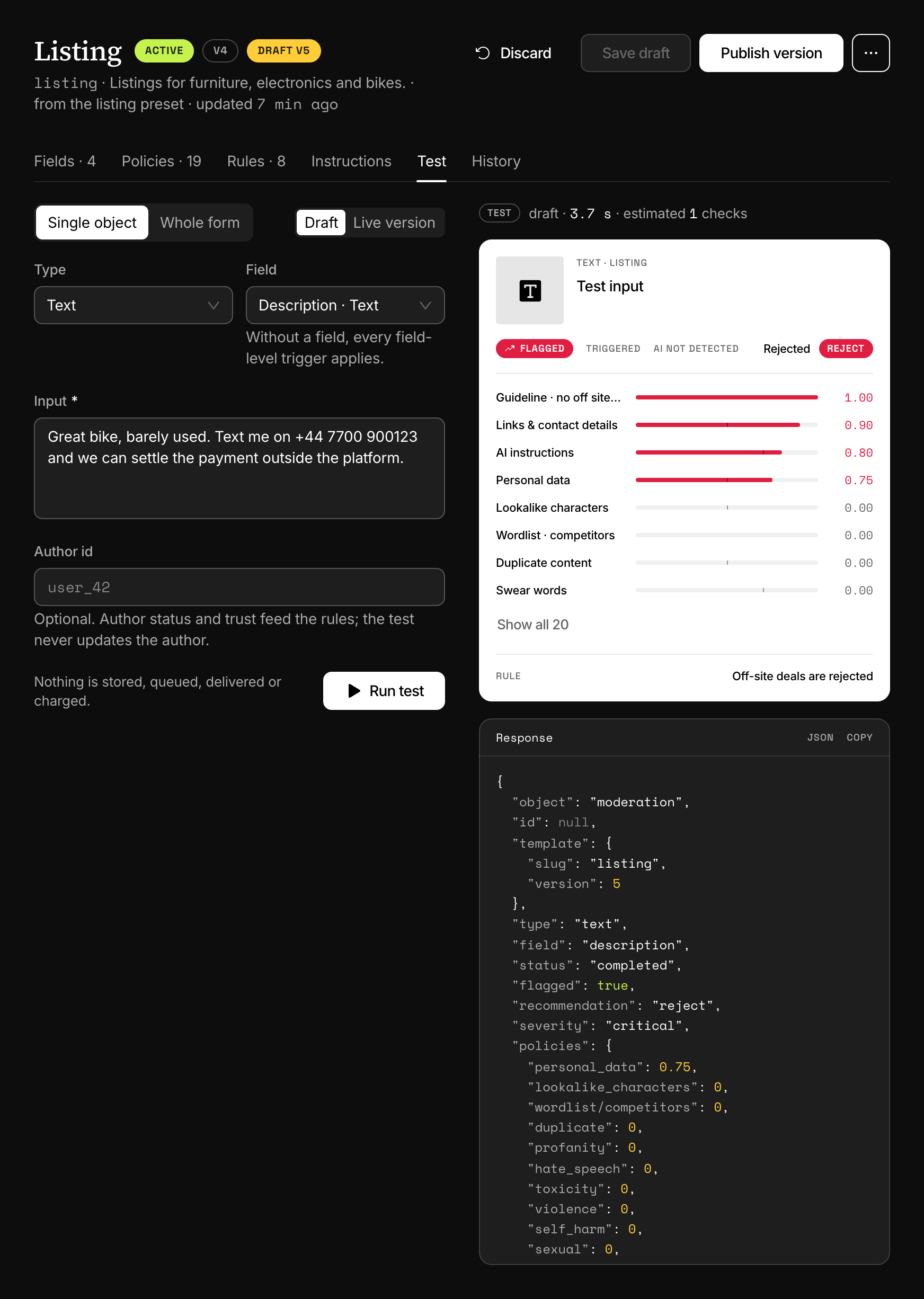
To try a template and leave nothing behind, use the test console: the Test tab of a template in the dashboard, or this endpoint. It runs every stage and then stores nothing. No moderation, no queue item, no webhook, no usage and no author are created.
curl https://api.useinfrared.com/v1/templates/basic/test \
  -H "Authorization: Bearer $INFRARED_KEY" \
  -H "Content-Type: application/json" \
  -d '{
    "type": "text",
    "input": "Worst seller ever. You are a complete idiot."
  }'
const response = await fetch("https://api.useinfrared.com/v1/templates/basic/test", {
method: "POST",
headers: {
Authorization: `Bearer ${process.env.INFRARED_KEY}`,
"Content-Type": "application/json",
},
body: JSON.stringify({
type: "text",
input: "Worst seller ever. You are a complete idiot.",
}),
});
const moderation = await response.json();import os
import requests
response = requests.post(
"https://api.useinfrared.com/v1/templates/basic/test",
headers={"Authorization": f"Bearer {os.environ['INFRARED_KEY']}"},
json={
"type": "text",
"input": "Worst seller ever. You are a complete idiot.",
},
)
moderation = response.json(){
"object": "moderation",
"id": null,
"template": { "slug": "basic", "version": 1 },
"status": "completed",
"flagged": true,
"recommendation": "reject",
"usage": { "checks": 0, "estimated": 1, "cached": false },
"dry_run": false,
"test": true
}idisnull, because nothing was saved.usage.estimatedis what the same request would cost with a live key.- Add
"draft": trueto the body to run a template's unpublished draft instead of its published version. - The answer always comes with the request, images included.
- The console works with a live key too, needs the
moderatescope and counts toward the key's rate limit. - A test of a whole form differs from a real form in two more ways, listed under How the answer differs from a moderation.
Test keys on the Free plan
The Free plan has one key in total, so it holds a test key or a live key, never both. Start with a test key. When you go live, revoke it and create a live one.
Next
- Going liveWhat to settle before production traffic depends on Infrared, from keys and retries to the review queue. Each item links to the page behind it.
- API keysA key signs every request and decides which project it lands in. Create one for each place that calls Infrared, with only the scopes it needs.
- Checks and usageA check is the unit every plan counts. See what one moderation costs, when the monthly allowance resets and how to read your usage over the API.
- WebhooksInfrared posts a signed event to your endpoint when a moderation finishes, a queue item is decided or an author changes. Add an endpoint and receive it.
Something missing or unclear on this page? Write to support@useinfrared.com.