Wordlists
Match your own terms, such as competitor names or banned phrases. A list's mode says whether a match is a violation, required or only reported.
A wordlist holds terms of your own: competitor names, brands you do not carry, slang your community bans, or a word a sponsored post must contain. Infrared matches them without a model, on a normalised form of the text, so tr4dely, TRADELY and t.r.a.d.e.l.y all hit the term tradely. The result is returned as the policy wordlist/<slug>.
Use a wordlist when the rule is about particular words. When it is about meaning, write a guideline.
Create a list and add terms
curl https://api.useinfrared.com/v1/wordlists \
  -H "Authorization: Bearer $INFRARED_KEY" \
  -H "Content-Type: application/json" \
  -d '{
    "name": "Competitors",
    "description": "Other marketplaces that listings should not send buyers to.",
    "mode": "block",
    "match_preset": "same_word"
  }'
const response = await fetch("https://api.useinfrared.com/v1/wordlists", {
method: "POST",
headers: {
Authorization: `Bearer ${process.env.INFRARED_KEY}`,
"Content-Type": "application/json",
},
body: JSON.stringify({
name: "Competitors",
description: "Other marketplaces that listings should not send buyers to.",
mode: "block",
match_preset: "same_word",
}),
});
const wordlist = await response.json();import os
import requests
response = requests.post(
"https://api.useinfrared.com/v1/wordlists",
headers={"Authorization": f"Bearer {os.environ['INFRARED_KEY']}"},
json={
"name": "Competitors",
"description": "Other marketplaces that listings should not send buyers to.",
"mode": "block",
"match_preset": "same_word",
},
)
wordlist = response.json(){
"object": "wordlist",
"id": "wl_5pLeuA3L3i0NVotCEeX1nk",
"project_id": "prj_0TBAgHGtdMketrbltGFHuk",
"slug": "competitors",
"policy": "wordlist/competitors",
"name": "Competitors",
"description": "Other marketplaces that listings should not send buyers to.",
"mode": "block",
"match_preset": "same_word",
"language": null,
"enabled": true
}mode and match_preset are explained below. slug is made from the name when you leave it out and cannot be changed later. language is a label for your team: it does not limit which texts the list is matched on. The answer also carries entries_count and the two timestamps.
Terms go in with a second call, up to 5,000 a request. A term is a string, or an object when it has a canonical form or a note.
curl https://api.useinfrared.com/v1/wordlists/wl_5pLeuA3L3i0NVotCEeX1nk/terms \
  -H "Authorization: Bearer $INFRARED_KEY" \
  -H "Content-Type: application/json" \
  -d '{
    "terms": [
      {
        "term": "tradly",
        "canonical": "tradely"
      },
      {
        "term": "swapmeet market",
        "notes": "Their second site"
      },
      "Tradly"
    ]
  }'
const response = await fetch("https://api.useinfrared.com/v1/wordlists/wl_5pLeuA3L3i0NVotCEeX1nk/terms", {
method: "POST",
headers: {
Authorization: `Bearer ${process.env.INFRARED_KEY}`,
"Content-Type": "application/json",
},
body: JSON.stringify({
terms: [
{
term: "tradly",
canonical: "tradely",
},
{
term: "swapmeet market",
notes: "Their second site",
},
"Tradly",
],
}),
});
const added = await response.json();import os
import requests
response = requests.post(
"https://api.useinfrared.com/v1/wordlists/wl_5pLeuA3L3i0NVotCEeX1nk/terms",
headers={"Authorization": f"Bearer {os.environ['INFRARED_KEY']}"},
json={
"terms": [
{
"term": "tradly",
"canonical": "tradely",
},
{
"term": "swapmeet market",
"notes": "Their second site",
},
"Tradly",
],
},
)
added = response.json(){
"object": "wordlist_terms_result",
"created": 2,
"updated": 0,
"skipped": 1,
"entries_count": 5
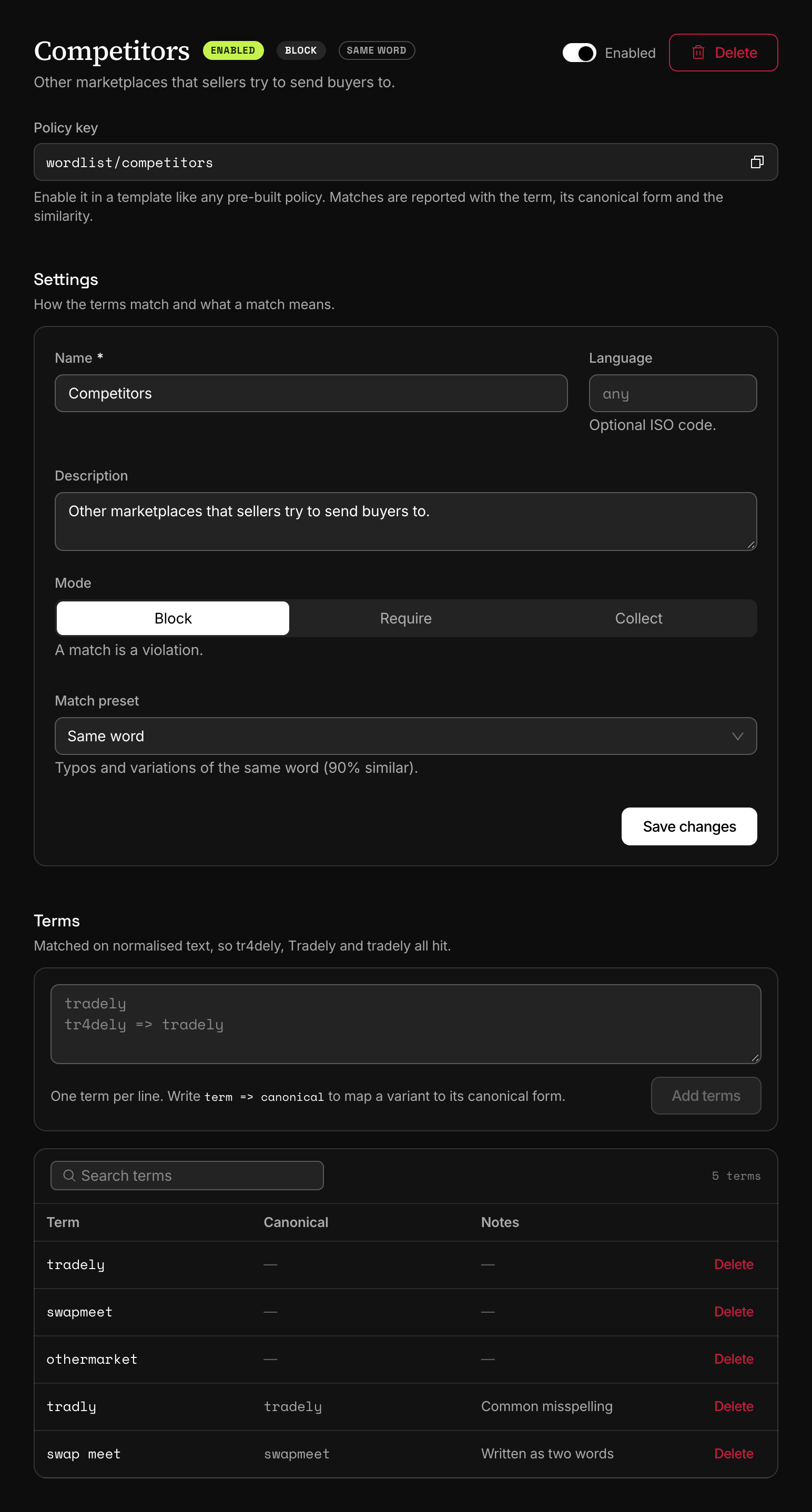
}The list already held tradely, swapmeet and othermarket. created counts new entries. updated counts terms that were already in the list under the same matching form: the spelling is replaced, and so are the canonical form and the note when the request gives them. skipped counts repeats inside the request, here Tradly after tradly.
In the dashboard, open Policies, Wordlists and choose New wordlist. The drawer creates the list and its first terms in one step: one term per line, and term => canonical for a variant.
How a term is matched
In the content
…cheaper on tr4dely, have a look…
tr4delyMatching form
Lower case, lookalike letters folded,
4read asa.tradelyCompared with each term
The term
tradely. Thesame_wordpreset needs 0.90.similarity1.00Enough:MatchWhat the list's mode does with the match
mode: "block"- A violation. The policy triggers.score0.85
block - The term is there: nothing to reportscore0
require - Reported onlyscore0
collect
requirewith no term in the text: score 1, the policy triggers.collectin Trigger mode: the match still triggers. Attach the list in Observe mode to only report.
wordlist/competitors0.85FlaggedRejecttriage:reject
details reportsvalue: "tradely"term: "tradely"canonical: "tradely"similarity: 1
Sample data
Before anything is compared, the text and every term are put into the same matching form:
- Lower case, with invisible characters removed and lookalike letters from another alphabet folded back, so
Тradelywritten with a Cyrillic Т reads astradely. - Digits and symbols that stand in for letters are read as letters:
0 1 3 4 5 7 8aso i e a s t b,@asa,$assand!asi. - A character repeated three times or more is cut to two.
- In the text, single characters set apart by spaces, dots, hyphens or asterisks are joined:
t r a d e l yreads astradely.
The text is then cut into words at everything that is not a letter or a digit.
- A single-word term is compared with each word. The same word has a similarity of 1. For any other word, similarity is 1 minus the edit distance divided by the length of the longer word, and the list's match preset says how much is enough.
- A phrase, a term with a space in it, is looked for as it stands in the text. Presets do not apply to phrases, and neither does any tolerance for typos.
Five consequences are worth knowing before you fill a list:
- A term with a hyphen, an apostrophe,
&,+or a dot never matches its own spelling.R&D,o'clockandwi-fiare such terms: the text is cut at those characters and the term is not. The termswifiandwi fido not catchwi-fiin content either. !,@or$touching a word changes the word.Tradely!reads astradelyiand@tradelyasatradely, and neither matchestradelyon theexactandsame_wordpresets.- A term saved with punctuation keeps it.
Tradely.is stored with its dot and stops matching on the same two presets. - A phrase is found inside longer words too:
art salematches "smart sales". - Accents are kept, so
Cafédoes not match the termcafe. Digits in a term become letters, so a term7matches a lonet.
Match presets
A preset is the similarity a word needs to match a single-word term.
| Preset | Similarity needed | What passes |
|---|---|---|
exact | 1.00 | The term's matching form and nothing else |
same_word | 0.90 | One wrong letter, in words of ten letters or more |
similar | 0.75 | One wrong letter in four: tradly matches tradely at 0.857 |
nearest | 0.60 | Two wrong letters in five. Expect false matches on short terms: cat matches car |
same_word is the default. It misses a typo in a shorter word, so tradly does not match tradely there. Add the misspelling as its own term, with the real name as its canonical form, which is what the request above does.
Modes
| Mode | What a match means | Score |
|---|---|---|
block | A violation | 0.85 for one matching term, 0.90 for two, 0.95 for three, 1.00 for four or more |
require | Nothing. The violation is that no term matched | 1.00 when no term matched, otherwise 0 |
collect | Something to report | Always 0 |
A wordlist is a pattern policy. When it triggers it does so whatever the threshold, and it then counts as at least 0.85 for severity. Three things follow.
- Block. One matching term triggers the policy and is over the default reject line. To send matches to review, lower the policy's weight in the template or decide with a content rule.
- Collect. A collect list attached in Trigger mode still flags, and triage rejects on a match, although the score is 0. Attach it in Observe mode to only report.
- Require. The policy triggers when no term is found. The list is checked against each text on its own: every text field, and the text read from each image. In a form, a title without the term scores 1 even when the description has it.
Attach it to a template
A list is matched only where a template lists its policy. In the template editor, open Policies, find the list under Your guidelines and wordlists, turn it on and pick Trigger or Observe. Then choose Save draft and Publish version. The published version holds:
{ "key": "wordlist/competitors", "mode": "trigger" }A wordlist takes mode, effect and weight. Its threshold has no effect, and the editor greys it out.
Read a match
curl https://api.useinfrared.com/v1/moderations \
  -H "Authorization: Bearer $INFRARED_KEY" \
  -H "Content-Type: application/json" \
  -d '{
    "template": "listing",
    "type": "text",
    "input": "Solid oak desk, barely used. The same desk is cheaper on tr4dely, have a look there first."
  }'
const response = await fetch("https://api.useinfrared.com/v1/moderations", {
method: "POST",
headers: {
Authorization: `Bearer ${process.env.INFRARED_KEY}`,
"Content-Type": "application/json",
},
body: JSON.stringify({
template: "listing",
type: "text",
input: "Solid oak desk, barely used. The same desk is cheaper on tr4dely, have a look there first.",
}),
});
const moderation = await response.json();import os
import requests
response = requests.post(
"https://api.useinfrared.com/v1/moderations",
headers={"Authorization": f"Bearer {os.environ['INFRARED_KEY']}"},
json={
"template": "listing",
"type": "text",
"input": "Solid oak desk, barely used. The same desk is cheaper on tr4dely, have a look there first.",
},
)
moderation = response.json(){
"object": "moderation",
"id": "mod_6DosWdhkHV8dvFSnwLpOhW",
"flagged": true,
"recommendation": "reject",
"severity": "high",
"policies": {
"wordlist/competitors": 0.85
},
"triggered": ["wordlist/competitors"],
"rule": null,
"reasons": ["trigger:wordlist/competitors:flag", "triage:reject"],
"details": {
"wordlist/competitors": {
"labels": ["block"],
"matches": [
{
"label": "block",
"value": "tradely",
"term": "tradely",
"canonical": "tradely",
"similarity": 1,
"start": 57,
"end": 64
}
],
"canonical_term": "tradely"
}
}
}valuestringThe word that matched, in its matching form:
tradelyfor a text that saystr4dely.termstringThe entry of the list, as you saved it.
canonicalstringThe entry's canonical form, or the term itself when it has none. A text that says
tradlyreports the termtradlyand the canonical formtradely.similaritynumberHow close the word is to the term, from the preset's minimum to 1.
start, endintegerWhere the match sits in the matching form of the text. That form can be shorter than what was submitted, so do not use the positions to cut the original string.
canonical_termstringThe canonical form of the first match.
labels holds the list's mode, plus missing when a require list found no term and ocr when the text was read from an image. In a whole form, the entry sits in details of the field that matched, under fields, and the parent carries the score.
Manage terms
- The list keeps one entry per matching form:
tradely,Tradelyandtr4delyare the same entry. Adding a term whose form is already there updates that entry. - List terms returns them oldest first, 100 a page.
- Remove terms takes entry ids, up to 5,000 a request.
- Results are cached for six hours per identical text. A new term, or a change of mode or preset, reaches text that was already screened only when its cached result expires.
PATCH /v1/wordlists/{id} changes the name, the description, mode, match_preset, language and enabled. A disabled list stays in its templates and scores 0.
Deleting a list removes its terms with it. Turn the list off in every template first: a template that still lists it keeps returning the key with a score of 0, the editor has no row left to turn it off, and that template's draft is refused until a list with the same slug exists again.
Limits
| Limit | Free | Starter | Growth | Business |
|---|---|---|---|---|
| Wordlists, per project | Not included | 5 | 20 | 100 |
The count is per project. Changing a list or its terms takes a key with the write scope, or the Owner, Admin, Project admin or Developer role in the dashboard. These endpoints do not read Idempotency-Key; adding the same terms twice is harmless.
Next
- GuidelinesWrite a rule of your platform in plain language. Infrared scores every submission against it and returns the score as a policy of its own.
- Policy options and instructionsDecide how each policy behaves on a template: mode, threshold, effect and weight, guidance for the models, and the options four policies take.
- Content rulesOrdered rules on a template turn scores, author trust and field values into allow, review or reject. Severity triage decides when no rule matches.
Something missing or unclear on this page? Write to support@useinfrared.com.